Documentation-based review with two original course captures. Updated: October 4, 2026.
Download the practice material and checking guide (ZIP).
For writers and editors, the useful question is how much work remains after the draft: is the date correct, did the qualification survive, and can you edit the downloaded file? Start with Claude Free and a small document. Consider Pro when usage limits repeatedly interrupt your work, or when you have a concrete need for the Claude Docs workspace.
Review method: the feature and plan assessment is based on official documentation; two separate course captures illustrate specific editing steps. We have not run the writing exercise in Claude or measured writing quality, accuracy, speed or time saved. The recommendations are editorial judgments. The exercise below is a proposed self-test.
What Free includes
Free supports chat and downloadable files through Claude’s file-creation capability. Official documentation lists Word (DOCX), PDF, XLSX and PPTX output, including on the website. It says the capability is on by default for individual plans. If it is unavailable, check Code execution and file creation under Settings, then Capabilities. This describes the documented capability, rather than verified access in your account.
That makes a practical difference: you do not need a subscription just to try producing a DOCX file. For occasional editing, first establish whether the result is useful and whether the available allowance covers your task.
Pro pricing: understand the commitment
The US reference price is $20 per month, or $200 billed upfront for an annual subscription. The annual option is a full-year purchase; the displayed monthly equivalent is rounded. Regional pricing, taxes and purchase channels may differ. We have not verified a checkout total for any specific country.
Pro offers more usage than Free. It does not include API usage, which is billed separately through Claude Console. Do not assess a chat subscription using the per-million-token prices shown for the API.
Precise editing starts with a clear boundary
A fluent draft is an intermediate result. When you have an approved source, make it the authority, ask Claude to identify contradictions, and resolve them before drafting. For revision work, specify exactly which sections can change and which must stay untouched.
Three tasks worth trying
- Draft from a source: prepare a short document containing six facts. Ask for a structured summary and questions where information is missing.
- Make a targeted revision: save the first version, then request changes to exactly two passages. Compare the supposedly untouched sections too.
- Shorten carefully: request fewer words while preserving dates, quantities and conditions. Watch for “subject to approval” turning into an unconditional promise.
A prompt for source-based editing
Work only from the attached document. Before drafting, list six facts and identify contradictions or missing details. If the source gives no rule for resolving a contradiction, stop and ask. After clarification, write a 180–220-word draft. Preserve every condition and qualification. Do not add results, promises or numbers. Keep your checklist separate from the draft.
This is a proposed prompt, not one validated in a product test. The fictional source below contains a deliberate conflict between November 18 and 19. The expected behavior is a question before drafting. After the question, clarify that November 19 is correct, then check that all other facts and conditions survive.
Fictional practice source: Open Page
Fictional material for an editing exercise only. This is not a real event, registration offer or service commitment. The conflicting dates in the source are intentional.
Introduction
Open Page offers a one-off writing workshop for adults. The aim is to organize an idea into a clear paragraph. This document describes the workshop for practice only.
Date
The workshop takes place on November 18, 2026 and lasts 90 minutes.
Schedule
The workshop date is November 19, 2026. The document gives no further information that resolves the conflict with the Date section.
Registration
Attendance is free. Advance registration and an available place are required. Capacity is limited to 12 participants.
What you receive
Each participant receives one practice sheet. Sending a recording afterwards requires separate approval and is not guaranteed.
Missing details
No venue, start time or registration address has been provided. Do not invent them.
What an actual editing conversation can show
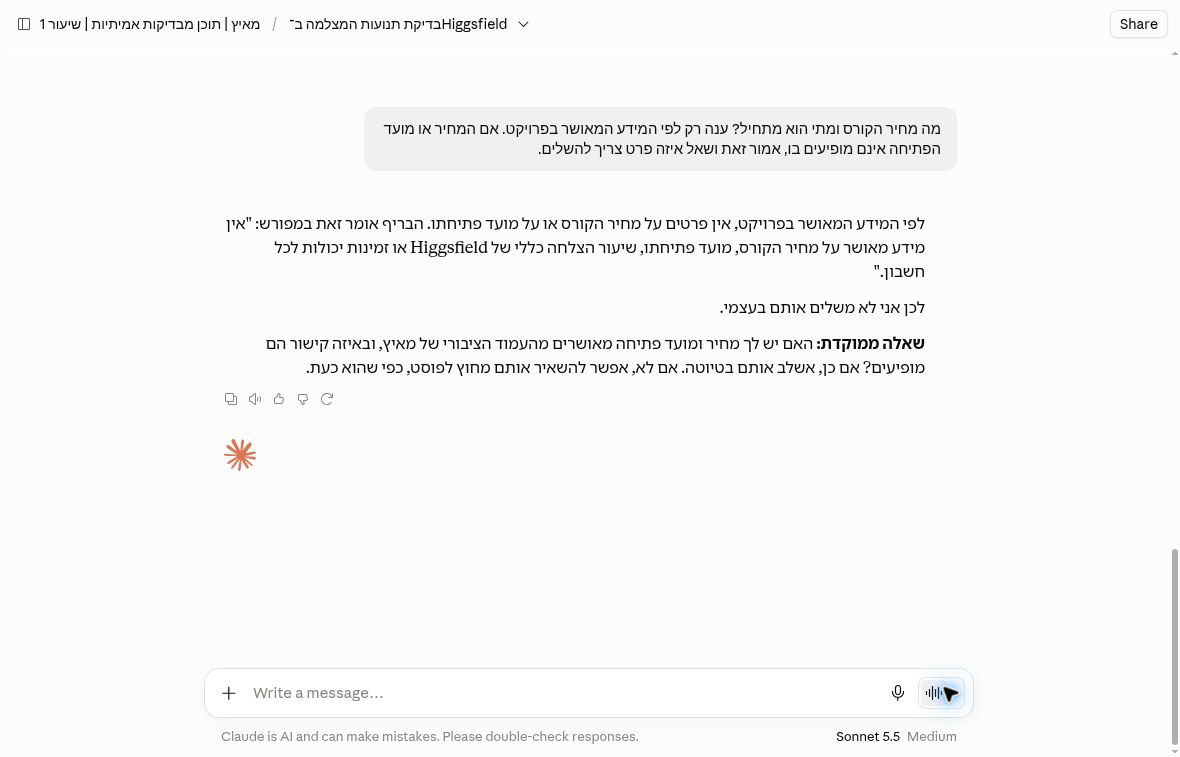
In a separate Maitz course example, run in a right-to-left language, we asked Claude for a course price and opening date using only an approved project brief. The visible reply says those details are missing and asks where approved information can be found. This is a useful example of preserving an information gap instead of filling it with plausible copy.
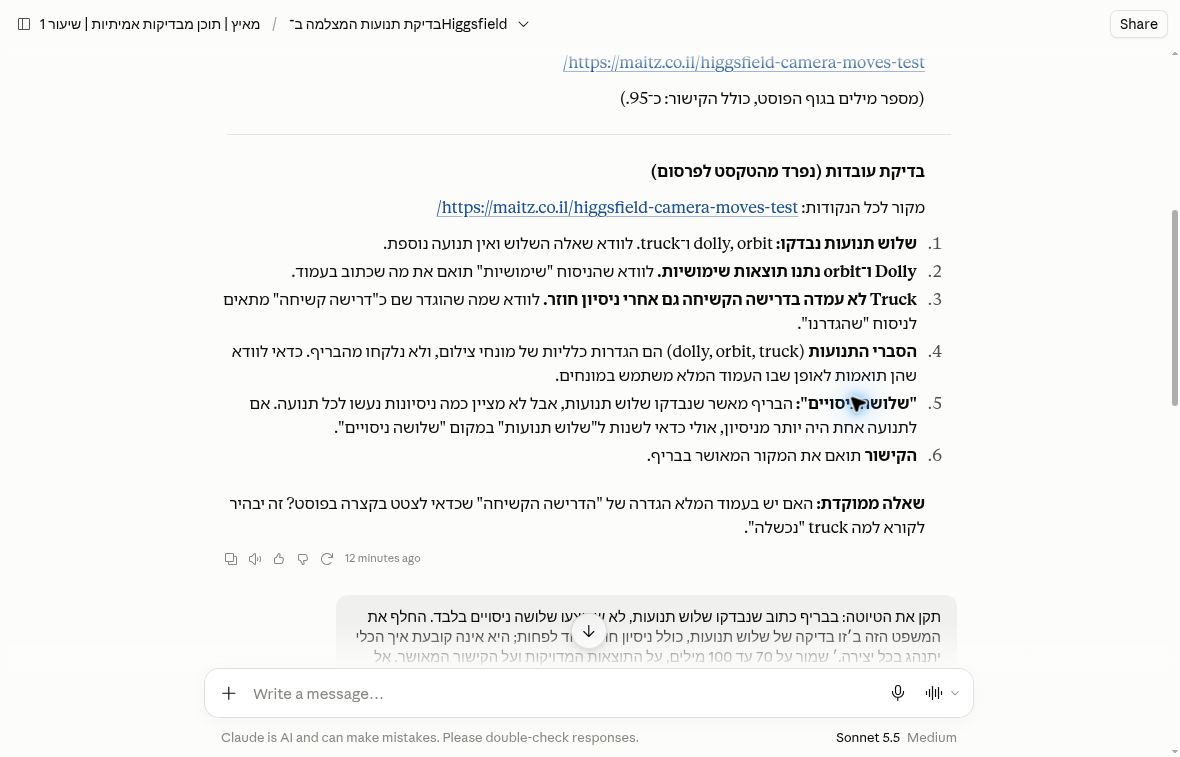
A second capture shows why the editor still matters. During a fact check, Claude distinguishes three camera movements from three test runs. Those are different claims: one movement may have needed more than one attempt. The visible follow-up asks for that wording to be corrected. The lesson is to check the unit behind a number, not only the number itself.
Give the second draft a narrower job
After clarifying the Open Page workshop date as November 19, save the first draft. Then ask: “Shorten only the opening paragraph to two sentences. Leave every other paragraph unchanged, including the registration condition, participant limit and recording qualification.” Compare the whole document afterwards, not only the opening.
Look especially for three changes that can hide inside fluent copy: “up to 12” becoming “12 guaranteed places,” advance registration disappearing, and a recording becoming something every participant will receive. Mark each as a content error even if the shortened paragraph reads well. The exercise is successful only when the requested passage improves and the protected facts survive.
We have not run this Open Page exercise or its DOCX export in Claude. The course screenshots above provide evidence for those individual editing moments only. A fair evaluation of your own workflow should keep the first attempt, the corrections you requested and the downloaded file together.
DOCX: check the downloaded file
- Facts: compare every date, quantity and qualification with the source, including after a small revision.
- Structure: check that headings are editable headings, lists remain ordered and no paragraphs are missing.
- Direction: inspect paragraph direction, names, dates, parentheses and numbering. A good-looking chat response does not prove the file is correct.
- Actual use: open the DOCX in your intended editor, change a sentence and save a copy. Check that hyperlinks remain clickable.
Measure more than response-generation time. Record fact-checking, rewriting and layout repair separately. That gives you a clearer view of whether the whole workflow helps.
Claude Docs is a different workflow
Claude Docs is a persistent rich-text document workspace with collaborative editing and comments. It is in beta on Pro, Max, Team and Enterprise. Exports include Word, PDF, Markdown and Google Docs. Official documentation says version history is not yet available, and Docs uses your plan’s allowance. Save local copies before major changes.
Usage matters more than a guessed message count
Conversation length, attachments, model choice and features affect consumption. There is no fixed message allowance that describes every editing task. A long document with repeated revisions can consume more than a short request. Check your account’s usage display and the limit message you actually receive.
Before uploading a document
For consumer plans, ordinary use of chats for model improvement depends on your settings and consent, with exceptions such as safety review. Feedback can also include the associated conversation. Check privacy settings before using client or employee material. Pro alone does not guarantee that content will be excluded from training.
Incognito chats are excluded from model improvement, but they are not local storage. There is also a workflow caveat: in the new Claude experience, Incognito opens the previous chat experience, where file creation and code execution are unavailable. Do not assume a DOCX-generation workflow will work there.
Use fictional or expressly shareable material for a first trial. Check that your country is on Anthropic’s list of supported locations; regional availability is not permission to upload someone else’s information.
Which plan fits?
Free is a sensible starting point for occasional writers who will check each result. Pro deserves consideration when repeated work is blocked by limits or when the Docs editing workspace solves a specific problem. If output needs extensive repair, a larger allowance may not improve the value. Base an upgrade on evidence from your own work.
Working with code instead? Our Claude Code installation and first-task guide covers the separate development tool. Model names, product names and subscription names describe different things. Claude Code installation guide
Comparing Claude with ChatGPT and Gemini before you pay? See our ChatGPT vs Claude vs Gemini buying guide.
Sources
- Anthropic: Claude pricing page (claude.com/pricing)
- Claude Help Center: “What is the Pro plan?”, “Create and edit files with Claude”, supported countries and regions, and Incognito chats
- Anthropic: Privacy Policy and Privacy Center “Is my data used for model training?”