
Different inquiries need a clear rule for where they go next. This guide builds a Router for a guide question, a technical issue and a suggested correction, with a fourth route for anything unmatched. We use Maitz teaching data and variables inside Make before connecting an external system.
The scenario and screenshots were checked in a Make account on October 4, 2026. Seven manual runs of the complete scenario reached their intended routes, including an empty category and an ID containing only spaces. Scheduling stayed off. The test used Tools and Router only; the Google Sheets extension below was not run.
What you will build
Data flows from Sample source to Normalize category, then into the Router. The source provides request_id and request_type. The second module cleans the category. Three ordinary branches use exact comparisons; Needs review is the fourth, fallback branch. A Tools module at each endpoint returns route_result so you can inspect the decision without sending a message.
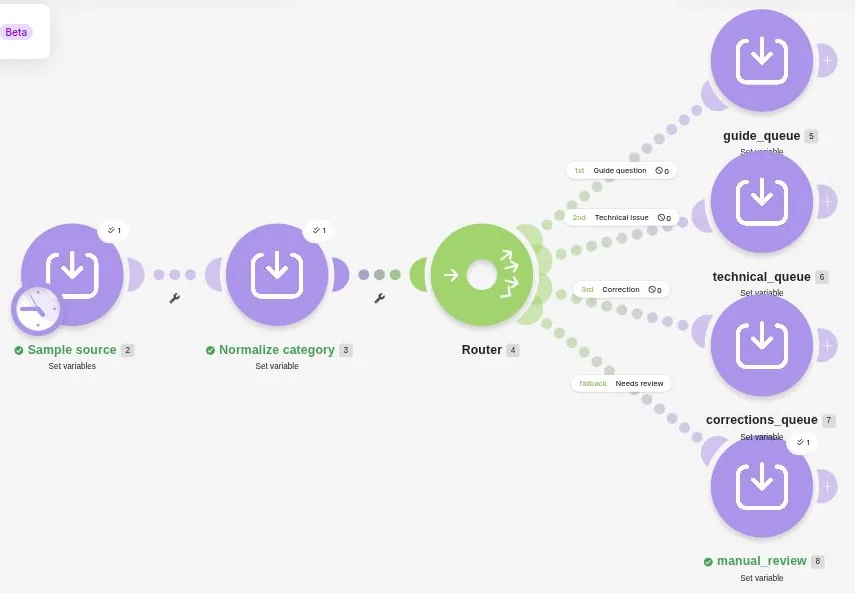
1. Prepare two teaching fields
Create a test scenario and add Tools > Set variables. Name the module Sample source. Add request_id with MAITZ-ROUTE-001 and request_type with Guide_Question followed by a space. These are teaching values, not a real person’s details. Leave the scheduling switch off. Run once is a real manual execution and may consume credits, so inspect your allowance before testing.
Save the module and scenario. When you inspect the source output bubble later, both fields should appear separately. If only one appears, reopen the variables list and add the missing item.
2. Normalize the category before branching
Add Tools > Set variable and name the module Normalize category. Enter category_key in Variable name. Build lower(trim(ifempty(request_type; ""))) in Variable value, using the mapped request_type token from Sample source. The source module is number 2 in these screenshots; yours may differ. ifempty supplies empty text for a missing category, trim removes surrounding whitespace, and lower converts letters to lowercase.
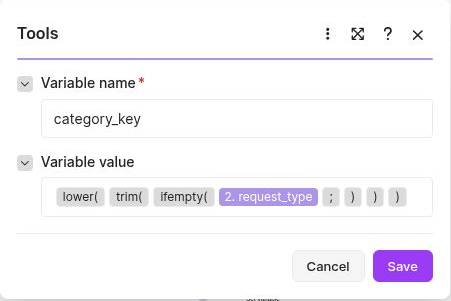
Guide_Question with trailing whitespace becomes guide_question. If the output literally says request_type, replace that fixed text with the mapped field. The tested dialog contained Variable name and Variable value, with no lifetime setting. Do not look for One cycle; it was removed on October 1, 2026.
3. Set three non-overlapping conditions
Add a Router after normalization and create three ordinary branches. Click the first branch connection to open Set up a filter. Enter Guide question as its Label and leave fallback set to No. Map category_key, choose Text operators: Equal to and enter guide_question. Use Add AND rule to add length(trim(request_id)), choose Numeric operators: Greater than and enter 0. Map request_id from the source too.
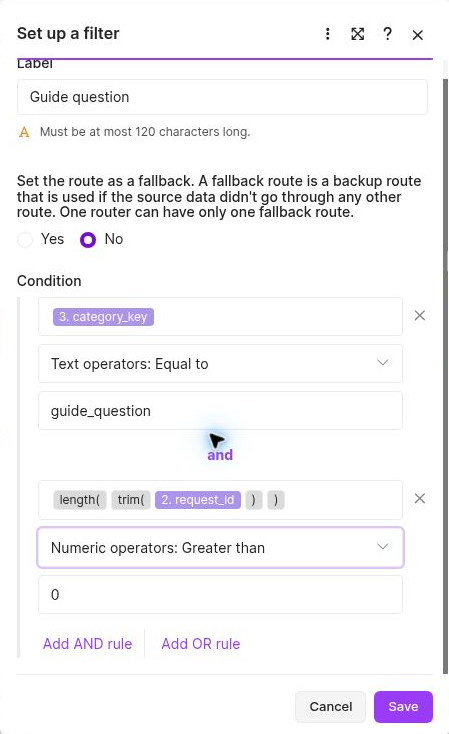
Use the same structure for Technical issue with technical_issue and Correction with correction. Save each filter. Exact comparisons keep these categories separate. Contains or OR can let one item reach more than one branch; route order does not mean stop at the first match.
4. Add a fallback for unmatched data
Create a fourth branch and open its filter. Set Label to Needs review and choose Yes under Set the route as a fallback. Leave it without an additional condition and click Save. It receives data that passed none of the ordinary routes, including an unknown category or an ID that is empty after trimming.
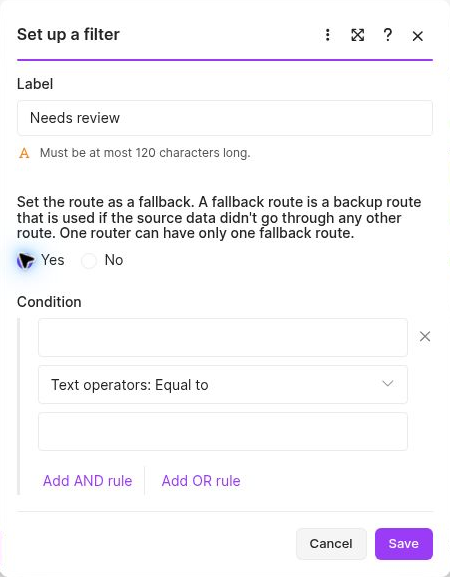
Fallback handles unmatched conditions, not module errors or external-service failures. If an unknown value never reaches it, check that Yes was saved and that no narrowing condition was added.
5. Give each branch a visible result
Add Tools > Set variable at each endpoint. Use route_result as Variable name in all four modules. Set their fixed values to guide_queue, technical_queue, corrections_queue and manual_review respectively. Give the modules those names as well, to make the canvas easier to follow. Save the scenario and click Run once.
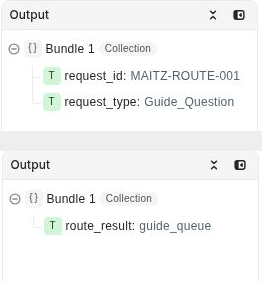
Open the output bubble above Sample source and then above the endpoint that ran. The first test returned guide_queue. Inspect Output itself rather than relying on the green status. If two endpoints ran, inspect the filters for a missing condition or OR in place of AND.
6. Test invalid values as well
For each attempt, change only the source fields, save and run once. These are the observed results of the seven complete-scenario tests:
- Guide_Question (trailing space); MAITZ-ROUTE-001 → guide_queue
- technical_issue; MAITZ-ROUTE-002 → technical_queue
- other; MAITZ-ROUTE-003 → manual_review
- correction; MAITZ-ROUTE-004 → corrections_queue
- empty category; MAITZ-ROUTE-005 → manual_review
- guide_question; ID containing three spaces → manual_review
- guide_question,correction; MAITZ-ROUTE-007 → manual_review
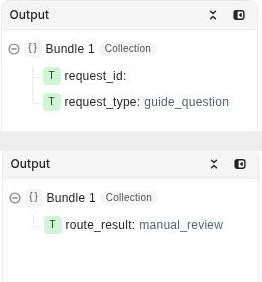
For the visually blank ID, three space mapping tokens were entered because the editor trimmed literal whitespace. All ordinary routes rejected it and the result was manual_review. A recognized category is therefore insufficient without a usable ID. These are specific routing tests, not load testing or a guarantee for every possible input type.
7. Treat a spreadsheet connection as a separate extension
Once the rules are clear, you can plan to replace Sample source with Google Sheets > Watch New Rows and the endpoints with Update a Row. This extension was not performed for the guide. It needs an authorized connection and test spreadsheet. Preserve the original request_id and request_type, and add outputs such as routed_to and routing_version. Map the trigger’s row number and recheck that the ID at that location still matches before writing.
A row number is a temporary location. Do not sort, move or delete rows during processing. With other editors, prevent overwriting a newer change. Also assign someone to manual_review: assigning a queue does not resolve an inquiry.
Practice files and references
The revised pack contains CSV and JSON for all seven cases and their observed results. These are original, locally prepared files, not an official blueprint or an automatic Make scenario import.
Download the updated Router practice files
The earlier Make pack remains available. Its Router examples use sales, billing and support and contain authored expectations only; they differ from the photographed exercise here.
For fit, allowance and maintenance, read our Make review for small businesses.
Official references: Router, Scenario variables, Cycles removal on October 1, 2026.
The useful result is a routing rule you can explain and test. Leave the teaching scenario unscheduled and deliberately change the source values to understand when each branch runs.

