
Claude Projects is useful when the next assignment needs the same background as the last one. A source brief and a few writing rules can stay with the project while individual chats handle different drafts. The difficult part is keeping that background accurate.
For current plans, prices and every Maitz article on Claude, see our Claude hub.
We built a project for Maitz and used it to turn a published camera-movement test into a short post. The first draft repeated a mistake in our own instructions. We corrected both the instruction and the draft, then asked a question the source material could not answer. This walkthrough shows those steps, including what went wrong.
Test scope: The screenshots are original captures from our Claude work recorded on October 4, 2026. The demonstration used source material and prompts in a language other than English, which is what the screenshots show; English passages identified as translations below explain that recorded test. They are not the result of a separate English-language run. Setup details were also checked against Anthropic’s documentation. We did not test team sharing, automatic publishing or cross-chat memory.
Choose one recurring job
Our job was specific: draft posts for readers learning to make AI videos, using results already published on Maitz. A successful draft needed to explain one practical lesson, link to the relevant article and preserve the limitations of the test.
The source for the first assignment was our original camera-movement test, published in another language. An English account of the camera test is also available. The result to preserve was straightforward: dolly and orbit produced usable results in that test; truck still failed the strict requirement after a retry. Three types of movement were tested. That does not mean there were only three attempts.
For your first project, choose a task with a similarly clear source and output. A weekly update from approved notes is manageable. “Handle all our marketing” leaves too much undefined. Have the source open while you review the result, and start with material you are allowed to share.
Create the project and check where you are working
In Claude, open Projects, select New Project, enter a recognizable name and description, then create it. We named ours for Maitz content based on real tests. In our capture, the final button is labeled Create project.
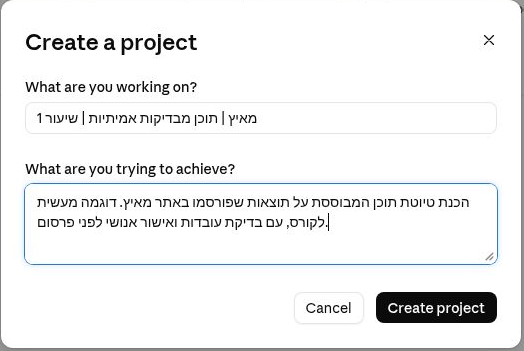
According to Anthropic’s documentation checked on October 4, 2026, Projects are available on Free, with up to five projects. If your account offers visibility options, check them before adding documents. Do not assume that a project with your company’s name is private.
A name helps you find the workspace. Put information Claude actually needs into the project’s instructions or source content rather than relying on the name or description alone.
Give the project a short source brief
We added a text brief covering the audience, tone, public source links, approved observations and missing information. On our project page, the right-hand panel was labeled Context; its plus control was the entry point for adding material. We used a text entry rather than claiming to have uploaded a Word document.
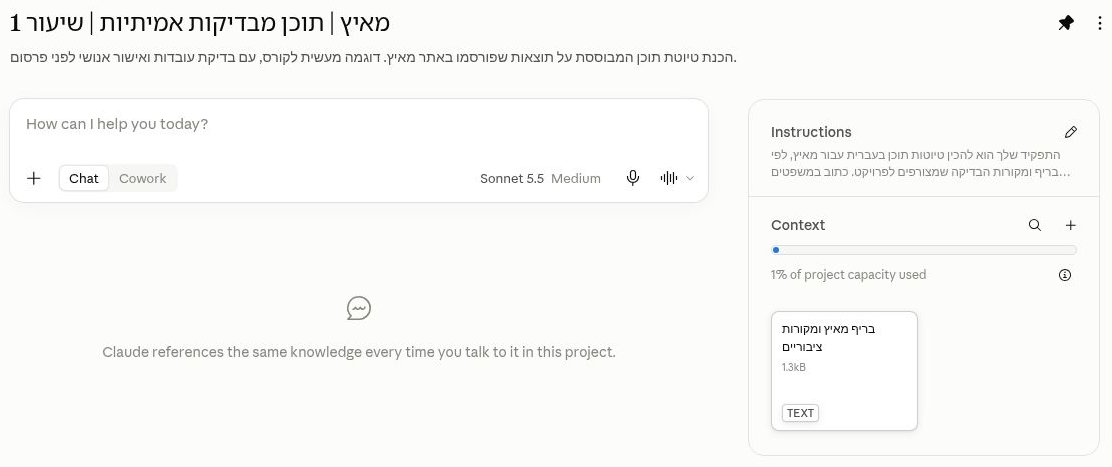
For this assignment, the essential source note was: three movements were tested; dolly and orbit were useful; truck did not meet the requirement even after a retry. The brief also said that no approved course price or opening date was available.
That final sentence gave us a useful boundary to test later. If a source does not contain a price, adding a persuasive sentence about value will not supply it. Write down what is unknown while preparing the brief, before those gaps become fluent-looking copy.
Keep an editable master of the brief outside Claude. When a result changes, update the master and replace the active project material. If you keep an older version for reference, clearly mark which one governs the current assignment. A filename ending in “final” is not evidence that its contents are current.
Separate standing rules from the day’s task
Our project instructions described how drafts should be written: short, direct sentences; approved facts only; a distinction between observed results and broader claims; a focused question when essential information was missing. They also asked for a draft for human review, with fact-check notes kept separate from the publishable text.
The task-specific word count and topic went into the chat prompt. That separation made the setup easier to maintain: changing the length of one post did not require rewriting the instructions for every future task.
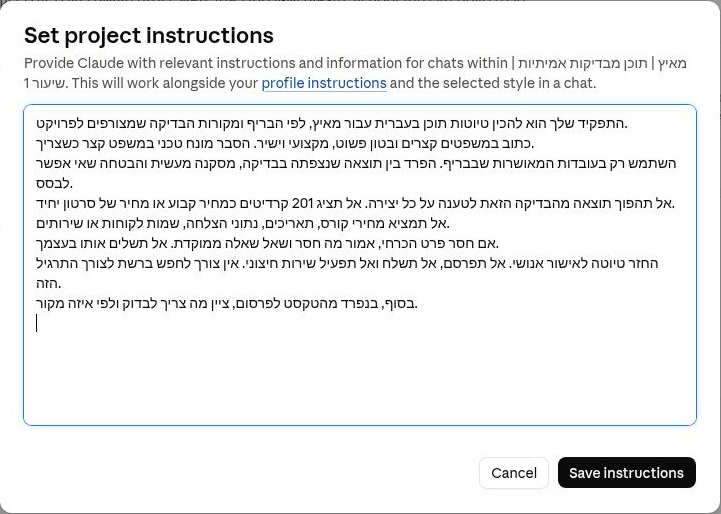
English adaptation for your own project, not an executed test prompt:
Prepare drafts using the current source brief. Write plainly for the audience it defines. Distinguish an observed result from an interpretation or a claim about future performance. Do not invent dates, prices, customer stories or success rates. If an essential fact is missing, identify it and ask a focused question. Return a draft for human review. Keep source-check notes separate. Do not publish or send anything.
Use the instructions control to save your rules, then reopen it and check the text. In our captured interface, the editor is called Set project instructions and the action is Save instructions. Labels and placement may vary across accounts.
Run a small task you can inspect
We opened a chat within the project and asked for a 70–100-word post about the camera test. The prompt named the audience, requested one practical lesson, required the approved link and asked Claude to keep the fact-check separate.
English translation of the recorded request:
Write a draft post of 70 to 100 words for Maitz about the Higgsfield camera-movement test. Audience: people starting to create AI videos who want to understand why they should test a movement before a longer production. Include what worked in the test, what did not meet the requirement, and one practical lesson. Briefly explain dolly, orbit and truck without inventing additional results. Do not present the test as proof that the tool always succeeds or always fails. Do not add a course price, discount or business-outcome promise. End with a short invitation to read the full test, using the approved link from the brief. After the post, separately, add a short fact-check. Do not actually publish.
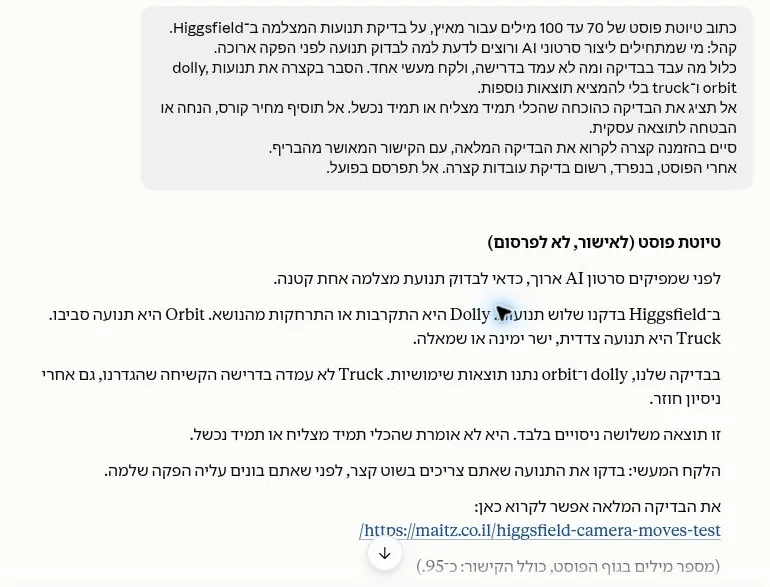
Read a draft against its source before judging the tone. In this case, the difference between “movements” and “experiments” mattered. It changed what a reader would infer about the amount of testing behind the article.
Correct the cause as well as the sentence
Our original instructions also referred to “three experiments.” Claude’s wording was therefore partly a reflection of an error we had supplied. Calling it a model hallucination alone would miss an important part of the problem.
We removed that wording from the standing instructions. We then gave a narrow revision request, specifying the replacement sentence and asking Claude to preserve the results and link. In English, the replacement says: “This is a test of three movements, including at least one retry; it does not establish how the tool will behave in every creation.”
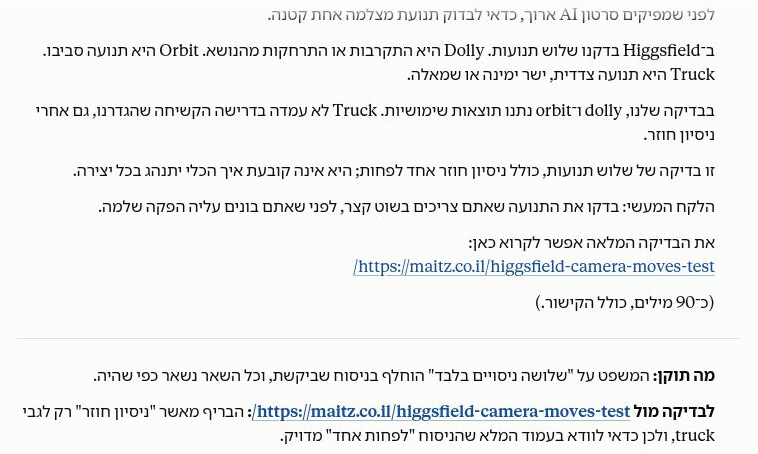
That last note is worth reading. A revision can sound more cautious while still needing a source check. We compared the new sentence with the public test rather than treating Claude’s explanation as independent verification.
If the same error appears in several drafts, inspect the reusable material before adding more prompt rules. Check the brief, the instructions and any older source copy. Fixing one chat response will not repair an inaccurate instruction that is still saved in the project.
Ask a question the brief cannot answer
After revising the draft, we asked (translated here): “What is the course price and when does it start? Answer only from the approved information in the project. If the price or opening date does not appear there, say so and ask what needs to be supplied.”
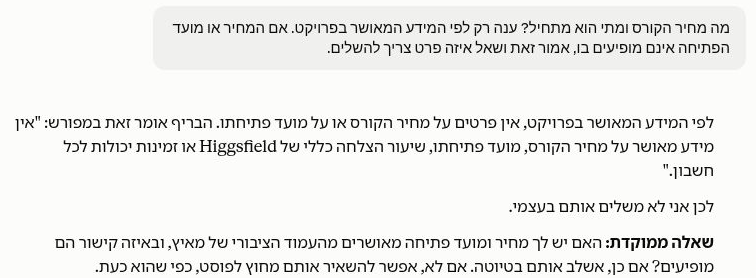
This check passed in the recorded conversation. It is evidence about that response, not a guarantee that the project can never invent a missing fact. Repeat a small boundary check when the source material or task changes.
Make the next assignment easy to start
Before opening a new chat, leave the project with a current brief and corrected instructions. Save important approved decisions in the source material you expect the next task to use. Do not rely on a previous conversation being a complete, exact handover.
A useful next prompt is: “Before drafting, summarize the relevant facts from the current brief and list anything still missing.” This is a suggested check, not a cross-chat memory test we ran. Review that recap before asking for more copy. If it contains an old result, stop and sort out which source is active.
Keep each review practical. Does the post preserve the actual result? Are caveats still present? Does the link point to the right article? Has a count of categories turned into a count of attempts? Those checks are more useful than asking whether the draft is generally “high quality.”
Common problems and what to check first
- The draft ignores your brief: Confirm that the chat is inside the intended project and that the source card is present. Open the card and inspect the actual contents.
- An error keeps returning: Search the instructions as well as the source text. Our “three experiments” mistake was present in both the input and output.
- Claude answers a missing-information question: Ask which exact source supports it. Remove unsupported claims before using the draft.
- The output is fluent but vague: Narrow the task to one audience, one result and one action for the reader.
- You see a limit or a different interface: Follow the account’s current message. Save your work; this exercise does not require purchasing a subscription.
Finish with one reviewed deliverable
You have completed the exercise when the brief is saved, the instructions are accurate, one draft has been checked against its source and a missing fact stays visibly missing. Publishing is a separate decision. Nothing in our recorded test was automatically sent or posted.
The downloadable practice pack contains the corrected brief, the exact original-language requests, clearly labeled English translations and a review checklist. Maitz prepared these text files from the recorded work; they are not files generated or exported by Claude. The package deliberately leaves out private chat links.
Download the tested Claude Projects practice files
For command-line development rather than a writing workspace, continue with our Claude Code installation and first-task guide.

