One bottle image produced two useful camera-movement examples and one persistent failure. A forward dolly and a shallow orbit looked convincing enough for this demonstration. A strict sideways truck did not match the instruction, even after a more explicit retry. This walkthrough shows how to run the comparison, inspect the result and count the attempts that never make the final cut.
For current plans, prices and every Maitz article on AI video tools, see our AI video tools hub.
The test was run on October 3, 2026, through the connected Higgsfield tool using Cinema Studio Video 3.0. It was a prompt-driven test, not a hands-on walkthrough of the website or its preset buttons. These individual runs illustrate a workflow; they do not establish a model-wide success rate.
Start with a scene that makes movement visible
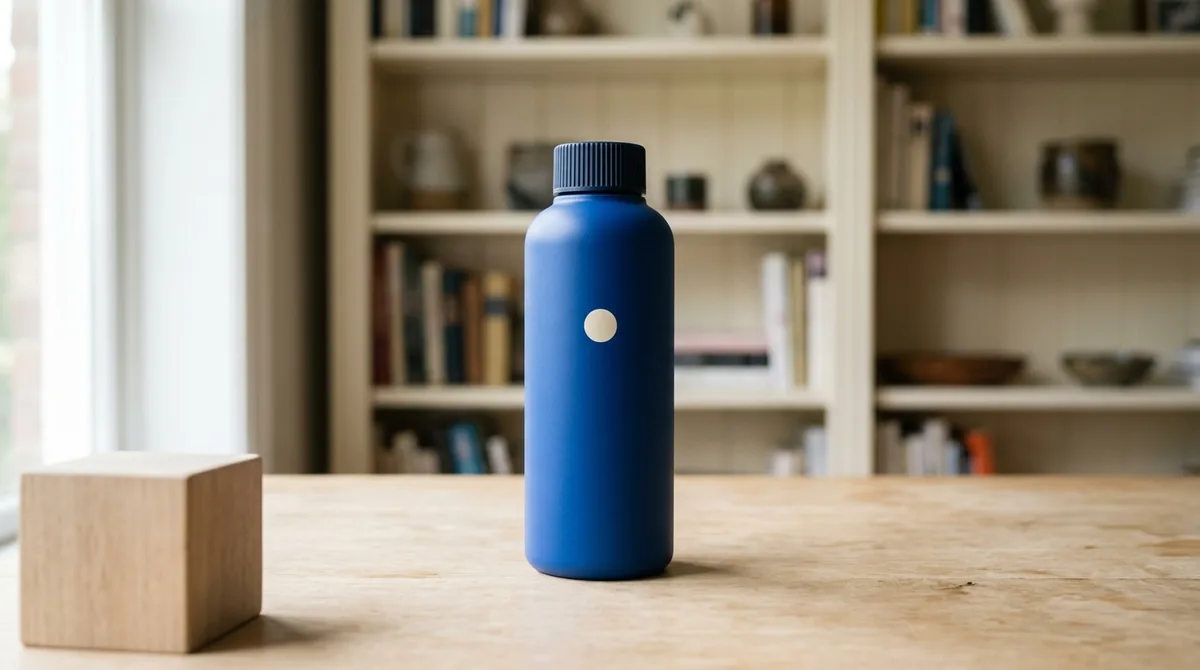
A useful test image has a subject, a nearby object and a distant background. Our fictional blue bottle sits on a table, with a wooden block in the foreground and a bookcase behind it. That separation gives you features to track at different depths. A completely blank background would make camera movement harder to evaluate.
Use R01.png from the practice pack to start from the same image without generating another reference. Alternatively, use an image you are entitled to process or create an original one with the prompt below. Once you choose your source, keep it unchanged for all three moves.
The original R01 source prompt
Create an original fictional product photograph, horizontal 16:9. One matte cobalt-blue cylindrical reusable bottle with rounded shoulders, a dark vertically ribbed screw cap, and one small cream circular mark centered on its front. No letters, handle or strap. The closed bottle stands upright near the center of a pale oak table. A small neutral wood block is nearer to the camera at frame left; a cream bookshelf is clearly farther behind. Soft daylight from frame left, clean editorial photography, eye-level medium shot, natural perspective. The separated foreground and background must be visible. No people, no text, no watermark.
We requested Nano Banana 2 with resolution=1k, aspect_ratio=16:9 and count=1. The request used nano_banana_2; the returned model name was nano_banana_flash. The actual image measured 1376×768, so the saved file dimensions matter as well as the requested aspect-ratio label.
Check the motion before paying for another attempt
Choose three landmarks: a corner of the wooden block, the cream mark on the bottle and a shelf in the bookcase. This is the original R01 image. The block is close to the camera and the bookcase is farther away, so their relative movement helps distinguish camera effects that initially look similar.
If the bottle stays centered during a requested sideways move without tracking, do not approve it solely because it looks attractive. Our more explicit retry still failed the strict movement test. When an exact path matters, stop or choose another shot; this test did not establish a reliable one-click fix.
Step 1 Keep the setup fixed
For each video, attach R01 as start_image and use cinematic_studio_3_0, a requested duration of 5 seconds, 720p, 16:9, genre=auto, count=1 and generate_audio=false. Check the quoted cost with the final input before submitting. Each camera clip cost 25 credits in this test.
No supported seed control was exposed. The shared image and settings make the comparison more useful, but they do not make it deterministic. The encoded videos measured 1280×720 at 24fps, with no audio stream. Each contained 121 frames, or approximately 5.0417 seconds, despite the five-second request.
Step 2 Change only the camera instruction
Paste the shared paragraph, then append one camera instruction. The wording below is the wording used in the test, rather than a rewritten prompt that has not been tried.
Use the supplied image as the first frame. A single uninterrupted five-second shot of the exact closed cobalt bottle on the same pale oak table. The bottle, its cap and cream circle remain rigid and stationary. Keep the foreground wood block, background bookshelf, soft daylight and exposure unchanged. No people, new objects, cuts, object rotation, text or visual effects. CAMERA:
C01 Move forward toward the bottle
A slow, straight physical dolly forward toward the bottle over the entire shot, ending modestly closer. Keep a constant focal length and aim at the bottle. Preserve natural foreground-background parallax. No digital zoom, orbit or pan.
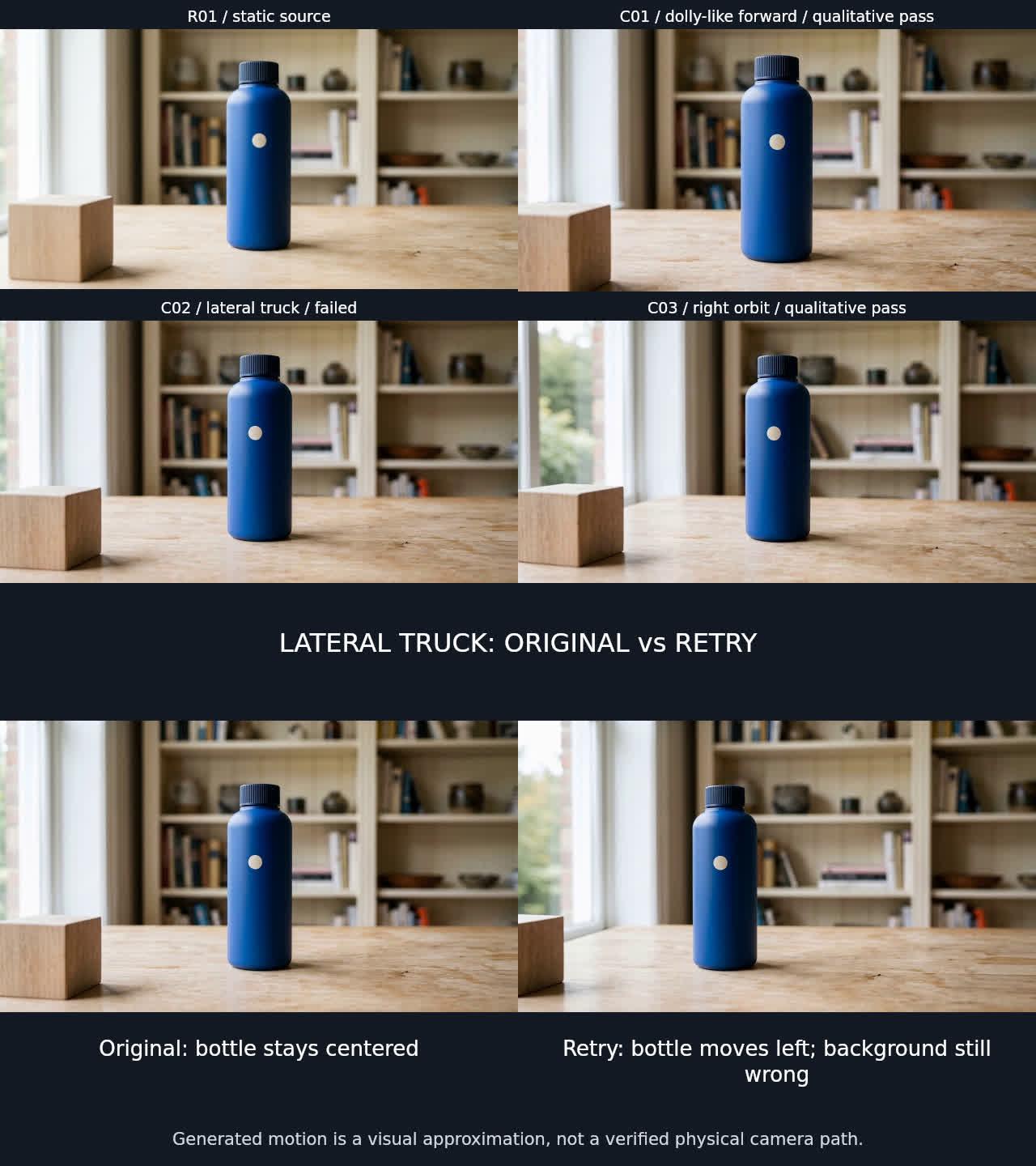
This produced a useful dolly-like move. An approximate measurement put the bottle's height increase at 29%. The nearby block moved outward and became partly cropped, while the bookcase expanded less. That depth-dependent change supports the visual impression of moving forward. It does not prove that a physically exact lens or camera path was simulated.
C02 Truck right without turning the camera
A slow physical lateral truck to camera right over the entire shot, with constant focal length, height and viewing direction. Do not pan to recenter the bottle. The stationary bottle and foreground block should drift left in the frame with visible parallax against the distant bookshelf. Keep the bottle inside the frame.
The original result failed the specified movement test. The bottle stayed almost centered when it should have drifted left. Movement in the foreground alone is not enough: the subject and the background need to behave consistently with the requested move.
C03 Make a shallow rightward orbit
Slowly move the camera in a shallow 15-degree arc to camera right around the stationary bottle, keeping the bottle near center. Keep constant height, focal length and camera-to-bottle distance. Reveal a little more of the bottle side while the background changes naturally. The bottle itself does not turn. No digital zoom or cuts.
This was a qualitative pass. The bottle stayed near the center while the bookcase moved relative to it, producing a useful change of viewpoint. The silhouette and cap remained recognizable, with minor contour and texture variation. The output does not verify an exact 15-degree arc, fixed focal length or constant physical distance.
Step 3 Make the failed instruction more explicit
For C02-retry, we retained the source and settings and replaced only the camera wording. Keep this as a separate attempt in your records, including its cost.
Pure sideways translation to camera RIGHT, with the camera orientation LOCKED, like a slider bolted to a rail. DO NOT track the subject. DO NOT turn, pan, yaw or orbit. Keep focal length unchanged. The bottle must visibly travel from the CENTER of the frame to the LEFT THIRD by the end, because the camera moves right. The near wooden block moves left faster than the bottle; the distant bookcase moves left slower. End with bottle fully inside the left third. A continuous gentle lateral slide only.
The bottle now moved from the center to the left third. However, the distant bookcase moved right. In the requested fixed-direction translation, stationary foreground and background features should both drift left at different rates. The retry therefore still failed the strict truck test. It also accelerated noticeably late in the shot. We stopped after that correction and kept both versions in the comparison.
How to judge your own clips
- Watch the motion, then compare equally sized frames from the start, middle and end.
- For a dolly, look for different movement at different depths. Uniform enlargement across the whole image may simply resemble a digital zoom.
- For a fixed-direction truck, check the subject and the background, not just one moving object.
- For an orbit, look for a changing viewpoint while checking that the product itself has not visibly rotated or deformed instead.
- Inspect the cap, front mark, table edges, unexpected cuts and added objects. Look at adjacent frames around any suspicious moment.
Our checks used visual inspection and approximate feature measurements. They did not reconstruct a physical 3D scene, and sampled frames cannot prove that every frame is artifact-free. A clip may still be useful for its visual effect; describe that effect honestly rather than claiming a camera move the test did not demonstrate.
What the comparison actually cost
The source image cost 1.5 credits. The three first video attempts cost 75 credits and the lateral retry cost another 25. Total: 101.5 credits, including the rejected attempts and source preparation. With two qualitatively usable camera results, that works out to 50.75 credits per usable result for this particular test. If you already have R01, the four video runs alone cost 100 credits at the tested rate.
Per-run quotes reconciled to the total observed credit change. We did not observe a refund for an unusable result. These are dated credit figures, not a cash conversion or a promise of future pricing. Active editing time was not separately measured, so this is not a claim that the workflow takes a particular number of minutes.
Practice with the same source
Download the full practice pack with source images and prompts (about 22 MB). For text files only, download the lite pack with prompts, settings and logs (about 17 KB, no images or videos).
The pack contains R01, the full prompts and settings, a cost log without account details, comparison images and a blank inspection log. Keep the original attempts when you try a correction. Decide what counts as success before you see the output, and leave room in your budget for work you may reject.
For an opener that brings the viewer closer, the dolly was the practical choice here. The orbit was useful for revealing a slightly different view. This test does not support a promise of precise sideways movement with a locked viewing direction.
New to image-to-video? Start with our Higgsfield beginner’s guide to creating a video from an image.
For the results, limitations and credit costs across all three tests, read our hands-on Higgsfield review.

