To turn an image into a video in Higgsfield, open Video, pick Seedance 2.0 (or 2.0 Fast on the Starter plan), upload a sharp image, start at 720p with a short clip, describe one action and one camera move, and check the credit cost on the Generate button before you click. Paid plans start at $19 a month before tax.
For current plans, prices and every Maitz article on AI video tools, see our AI video tools hub.
Checked against Higgsfield’s official pricing page, help center and changelog on October 8, 2026. This guide is based on documentation: the mug example below was written for illustration and wasn’t run for this article. For real runs and recorded credit costs, see our hands-on Higgsfield review. Plans, models and credit costs change often.
What you can make with Higgsfield
Higgsfield is a web platform that puts image, video and audio generation from several model providers in one place, alongside its own tools such as Cinema Studio, Marketing Studio, Ads Studio, Genjutsu and AI Influencer. Its pricing table lists video models including Seedance, Kling, Google Veo, Sora 2, Wan and Minimax Hailuo, and image models such as Nano Banana Pro and FLUX.2.
Beginners should pick one task before jumping between tools: animating an image, generating a shot from text, or changing an existing video. For the last one, Genjutsu offers Motion transfer (carry the motion and timing of a reference video into a new scene) and Object Swap (replace one element while keeping the rest of the shot). According to Higgsfield’s September 30, 2026 changelog, Genjutsu’s Restyle option works in Motion transfer mode with reference videos from 4 to 30 seconds. Those tools are separate from the beginner exercise in this guide.
Who should start with a short clip?
The exercise suits content creators and businesses exploring an opening for a Reel, an atmospheric clip for a product page, or a visual idea before a larger production. Start with material that contains no sensitive information and an outcome that is easy to judge: does the object stay consistent, does the motion look natural, and does the framing suit the intended destination?
If the video must show packaging, usage instructions or legal text accurately, plan a careful check of every detail. Even an impressive result may be unusable if the product’s color has changed or the lettering was invented. Add critical details during editing using original, approved material.
Higgsfield plans and credits at a glance (October 2026)
These are the individual plans shown on Higgsfield’s pricing page on October 8, 2026. Prices are in USD and, according to the page, exclude VAT and local taxes, which are calculated at checkout. The page was running a promotion at the time (annual billing advertised as 30% off), so check it again before you buy.
| Plan | Monthly billing | Billed annually | Credits per month | Seedance access |
|---|---|---|---|---|
| Free | $0 | Not applicable | No credits included | A small set of models only |
| Starter | $19 a month | $19 a month | 270 | Seedance 2.0 Fast and 2.0 Mini |
| Plus | $59 a month | $47 a month | 1,200 | All Seedance models |
| Ultra | $129 a month | $99 a month | 3,000 (6,000 and 9,000 options offered) | All Seedance models |
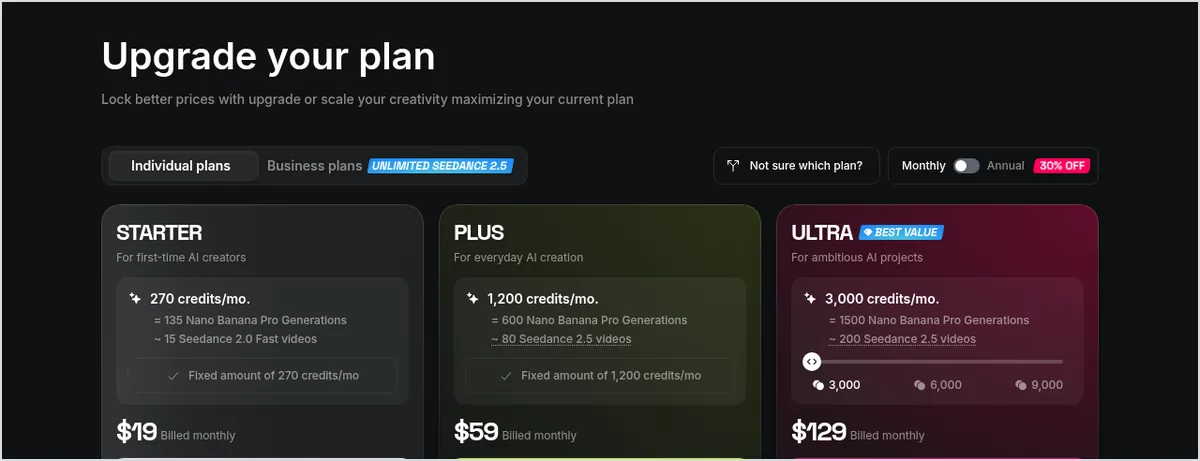
What do credits buy? Higgsfield’s comparison table listed approximate costs per clip: about 12 credits for 5 seconds of Seedance 2.0 Fast at 720p, about 22 for Seedance 2.0 at 720p, about 45 at 1080p and about 110 at 4K. Kling 3.0 at 720p was listed at about 7 credits per 5 seconds, and a Nano Banana Pro image at 2 credits. The Starter card itself equates 270 credits to “~15 Seedance 2.0 Fast videos”. Treat all of these as estimates: the exact cost is the number on the Generate button.
Two details are easy to miss. Unlimited models and the free generations included in some plans apply only on the higgsfield.ai website. And there is no free trial of the paid plans; the free tier is the way to look around first.
Step by step: your first image-to-video clip
The workflow below follows Higgsfield’s official Seedance help article (published August 2, 2026). We use Seedance because that’s the model the official guide walks through, not because we compared model quality.
- Prepare an image: For this example, photograph a plain ceramic mug with a hot drink on a table in daylight. Use a photo you own, with no people or trademarks. The guide recommends a sharp, well-lit reference image.
- Open the model: Go to Video and choose Seedance 2.0. On the Starter plan, which includes only Seedance 2.0 Fast and 2.0 Mini, choose Seedance 2.0 Fast. Pick the image-to-video option and upload your image.
- Set up a small trial: Start at 720p with a short duration. Choose the aspect ratio for the destination, such as 9:16 for vertical video, or Auto, which infers the ratio from your input.
- Write a structured prompt: Cover four things in order: what the subject is doing, setting and lighting, camera move, then mood. Use direct camera terms the guide says Seedance reads, such as dolly in, push in, pull back wide, arc shot or crane up.
- Check the cost: Read the credit count on the Generate button after choosing your settings. According to the guide, turning sound on doesn’t change the cost; model, resolution and duration do.
- Watch the entire clip: The guide notes that most quality problems appear around the 5 to 8 second mark. If something is off, change one thing: the prompt or the reference, not both.
- Scale up only when it works: Once the composition is right at 720p, rerun the identical prompt at 1080p or 4K (Seedance 2.0), and check the cost on the button again.
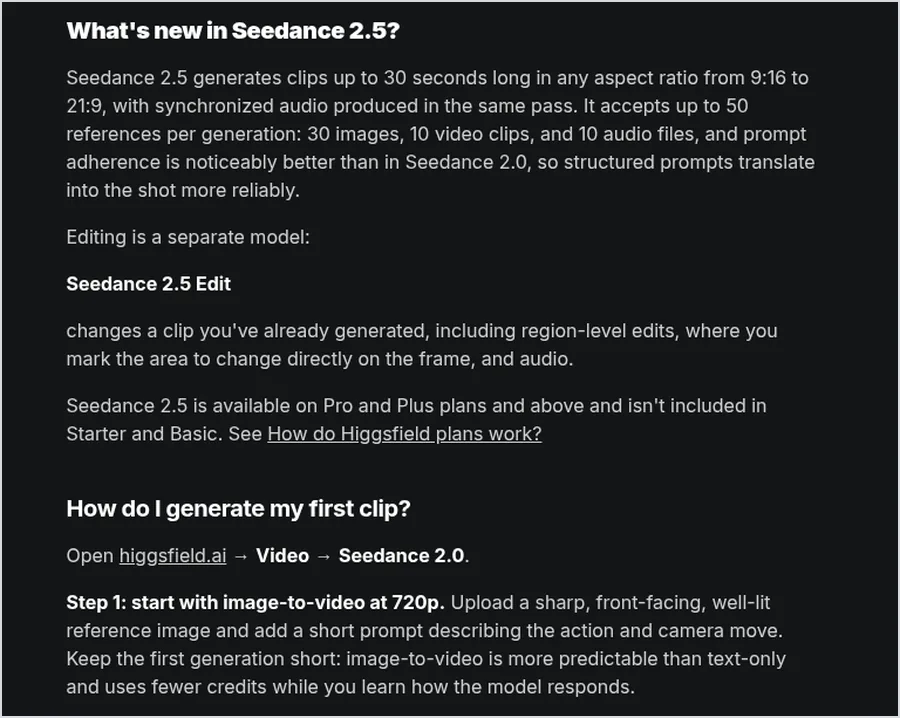
Which Seedance version fits a first clip? This summary comes from the same help article:
| Version | Higgsfield says it’s best for | Resolution | Clip length |
|---|---|---|---|
| Seedance 2.0 Fast | High-volume iteration | 480p to 720p | 4 to 15 seconds |
| Seedance 2.0 | Maximum quality, full multimodal input | 480p to 4K | 4 to 15 seconds |
| Seedance 2.5 | Longest clips, synchronized audio | Up to 1080p | 4 to 30 seconds |
Seedance 2.5 isn’t included in Starter. Higgsfield’s changelog also lists a Seedance 2.5 Draft Mode (a 480p preview first, then a 1080p render of the one you choose) that is available in all regions except the US, where the provider doesn’t offer the model.
An original example prompt
A prompt is the text instruction that tells the tool what to create. This one follows the four-part order above. It’s a suggestion to test, not a guarantee of a particular result, and the image should already show a mug with a hot drink so the request matches the source.
A plain blue ceramic mug filled with hot tea rests on a light wooden table beside a window. A thin wisp of steam rises slowly. Soft morning light, gentle shadows. The camera makes a slow, subtle push in. Keep the mug’s shape, blue color, and handle position consistent. One continuous shot, calm everyday atmosphere, no text, no logos, no people.
What does this ask for? One mug, gentle steam and a slow camera push-in. There is no need to add changing angles, a person entering the frame and shifting light to the same attempt. If the camera moves too much, try a fixed camera while keeping the rest of the prompt unchanged.
How to keep track of credits before they run out
According to Higgsfield’s credits guide, subscription credits don’t roll over: on monthly plans they reset with each paid renewal, and on annual plans every 30 days. Credit Pack and Auto-Refill credits expire 90 days after purchase. Re-rolls and upscaling cost credits too. You can see every deduction under Manage Account, then Usage, and if a generation fails, the refund is usually automatic within a few minutes, although some models may not refund failed generations.
Illustrative budget: at the listed rate of about 12 credits per 5-second Seedance 2.0 Fast clip at 720p, three attempts come to about 36 credits before any upscaling. Decide in advance how many attempts you’re willing to make and what counts as a satisfactory result. In our own tested product video, one of four clips was rejected, which is why we budget for retries; see our 15-second product video workflow.
Website, ChatGPT and other routes: what changes
This guide works directly on the Higgsfield website. Higgsfield also offers an extension for ChatGPT, released September 30, 2026, for generating images, video, branded content and websites in the chat, with slash commands such as /effects, /product, /motion, /marketing-studio and /genjutsu. It also offers MCP and CLI connections for assistants, a Canvas workspace and the Supercomputer agent. Billing differs between these routes:
| Route | Good for | Unlimited models and free generations |
|---|---|---|
| higgsfield.ai website | A first exercise, the full model picker and studios | Apply, according to your plan |
| ChatGPT extension | Requesting images, video or presets from a chat | Don’t apply: generations outside the website always deduct credits |
| MCP or CLI | Connecting an assistant or automation | Don’t apply: always deducts credits |
| Canvas and Supercomputer | Multi-step workflows and an agent | Don’t apply: always deducts credits |
For a first exercise, stay on the website. If you later move to a connected tool, check the cost for that route before generating.
Rights, training and privacy before you upload
Higgsfield’s help center, citing Section 4.4 of its terms of use, says the company doesn’t claim ownership of your inputs or outputs and doesn’t restrict commercial use of outputs. You’re still responsible for the rights to what you upload, you may not upload an image of another person without their permission, and outputs aren’t guaranteed to be unique. Permission from the service doesn’t settle questions about someone else’s photo, music, brand or likeness. The same article says paid plans include watermark-free downloads.
Model training: under the standard terms, Higgsfield may use your content to train and improve its models; Enterprise agreements are the exception. Deleting the content or your account stops future use, but content already in trained models can’t be removed. The privacy policy says removed content may stay on active servers for 30 days and in backups after that.
The privacy policy covers uploaded media and its metadata, plus prompts. It includes a Notice to European Users that names GDPR representatives in the EU/EEA and the UK, and a section on US state privacy rights. For a first trial, use a photo of a simple object with no personal details or client information.
What to check before using the result
- Does the product keep the same shape and color throughout the video?
- Are there details you didn’t ask for, such as lettering, fingers or extra objects?
- Do the movement, shadows and steam fit the same scene?
- Does the composition leave room for a title you’ll add during editing? Our captions workflow shows how to add text after generation.
- If audio was generated, have you listened to all of it, and does it suit the intended use?
Keep the approved file and the prompt used to create it so you can compare versions without relying on memory. If your next step is a series with the same character, our guide to keeping one AI character across five scenes covers references and checks.
Where to start
Choose one photo, define one movement and set a limit on attempts in advance. Start on the free tier or the smallest plan that includes the model you need, run the 720p test, and only then decide whether a bigger plan is worth it. If the result doesn’t preserve important details, improve the source image or the prompt before increasing your spending. To see how camera instructions behave in practice, read our camera moves test.
Frequently asked questions
Is Higgsfield free?
You can generate on the free tier without a paid plan, but it’s limited to a small set of models and includes no credits. There’s no free trial of the paid plans. On October 8, 2026, paid individual plans started at $19 a month (Starter), before VAT and local taxes.
How many credits does a 5-second video cost in Higgsfield?
It depends on the model, resolution and length. Higgsfield’s comparison table listed about 12 credits for 5 seconds of Seedance 2.0 Fast at 720p and about 22 for Seedance 2.0 at 720p. The exact cost is always shown on the Generate button before you confirm.
Do unused Higgsfield credits roll over?
No. Subscription credits reset each billing cycle: with each paid renewal on monthly plans, and every 30 days on annual plans. Credit Pack and Auto-Refill credits expire 90 days after purchase.
Can I use Higgsfield videos commercially?
According to Higgsfield’s help center, Section 4.4 of its terms doesn’t claim ownership of outputs or restrict their commercial use. You’re responsible for the rights to what you upload, and outputs aren’t guaranteed to be unique.
Does Higgsfield use my uploads to train its models?
Under the standard terms, yes, unless you’re on an Enterprise agreement. Deleting the content or your account stops future use, but content already used in trained models can’t be removed from them.
Can I cancel a Higgsfield subscription?
Yes. Subscriptions renew automatically, and you can cancel in your account settings; the plan stays active until the end of the current period. Higgsfield’s refund terms cover the first 7 days after an initial purchase if no credits were used, with a service fee of up to 6%, and renewals aren’t refundable.
Sources
- Higgsfield, Pricing page: individual plans, feature comparison table and FAQ (checked October 8, 2026)
- Higgsfield Help Center, “How do credits work?” (updated September 22, 2026)
- Higgsfield Help Center, “How do Higgsfield plans work?”
- Higgsfield Help Center, “How do I use Seedance?” (August 2, 2026)
- Higgsfield Help Center, “Who owns my generations, and can I use them commercially?” (August 2, 2026)
- Higgsfield Changelog: Seedance 2.5 Draft Mode (September 22, 2026); Genjutsu Restyle and Higgsfield extension for ChatGPT (September 30, 2026)
- Higgsfield Privacy Policy: Sections 1.1 and 5.9, Notice to European Users, US state privacy rights

