Is Higgsfield worth it? For short video shots you can review, reject and edit, yes: in our 201-credit test, forward and orbit camera moves, an edited character sequence and a 15-second product video worked. Precise lateral camera moves and exact product finish did not. Paid plans started at $19 a month on October 8, 2026.
For current plans, prices and every Maitz article on AI video tools, see our AI video tools hub.
Higgsfield gave us useful material for short videos when we were willing to inspect the output, reject attempts and edit. A forward move and a shallow orbit worked convincingly as visual examples. A precise lateral camera move failed even after a retry. A character picking up, carrying and placing a bottle became a usable sequence after we changed the reference strategy and cut the walking shot early. A 15 second vertical product video was the clearest finished deliverable.
Our recommendation is to consider Higgsfield for short shots that you can select and refine. These tests do not support a promise of exact choreography, completely faithful product rendering or long uninterrupted character continuity. The value we found depended on production judgment as much as generation.
Tests run on October 3, 2026. Plans, prices and product changes rechecked against Higgsfield’s official pricing page, help center and changelog on October 8, 2026.
What we actually tested
We ran the tests on October 3, 2026. Twenty generation jobs were accepted and completed: nine images and eleven videos. They consumed 201 credits, including outputs we rejected. A fictional bottle and a fictional adult character let us test camera motion, continuity of a person and prop, and a short edited product video.
We used Nano Banana 2 for reference images, Cinema Studio Video 3.0 for camera tests, and Seedance 2.0 in Fast mode for the character and product clips. We requested five second videos at 720p with audio disabled. The encoded files were 24 fps, at 1280 by 720 pixels for landscape or 720 by 1280 for portrait.
The access route matters. We generated through the Higgsfield connection to an assistant, supplying prompts, reference images and explicit settings. We assembled the selected clips with Higgsedit. We did not operate the Higgsfield website manually or test the button sequences in Marketing Studio or Ads Studio. This review assesses the output and production workflow we used; it does not score a website interface we did not test.
We retained rejected attempts, compared sampled frames and measured the encoded video files. Higgsfield’s changelog reports a provider-side issue on October 3, 2026, the day of our test, that caused failed and slow generations mostly on Seedance 2.0, 2.0 Mini, 2.0 Fast and 2.5 Draft Mode, and says credits for failed generations were refunded automatically. All 20 of our accepted jobs completed, and we didn’t measure queue times. This was a small illustrative test set, with no supported random seed locked in advance. It does not establish a platform success rate, guarantee repeatability or prove that every frame is artifact free. The three linked tutorials provide the prompts, settings and detailed evidence behind the findings.
Camera moves looked useful until the task required precise geometry
Every camera attempt started from the same bottle image. A nearby wooden block and a distant bookshelf provided separate depth references, allowing us to look beyond whether the picture simply moved or became larger.
The forward dolly produced a usable example. The bottle grew by roughly 29 percent in an approximate image measurement, while foreground and background features changed at different rates. A shallow right orbit was also useful: the bottle stayed close to the center as the background changed relative to it. Both results were convincing enough for their visual purpose. Neither proves an exact physical camera path, angle or fixed focal length.
The lateral move exposed the limits of prompt control. We requested a rightward translation with a fixed viewing direction, so the stationary bottle should move left in the frame. In the first output it remained almost centered. A more explicit retry moved it into the left third, but the distant bookshelf moved right. The retry therefore still failed the criterion. Correcting one visible detail did not make the complete motion correct.
For production, the distinction matters. A pleasant shot can be useful even when it does not match its camera instruction. If the motion is essential to the scene or must match other footage, assess that requirement directly. We stopped after one correction and retained both unsuccessful lateral attempts rather than presenting the better looking one as a clean pass.
See the camera test with the original and retried lateral move
Character continuity improved when each shot inherited a frame
The intended sequence was straightforward: pick up the bottle with the right hand, walk to the right, then place it on another table. We first tried independent starting images for each action. Four attempts at the later poses were rejected for the direction of the body, the bottle position or the hand holding it. Images that looked plausible individually were unsuitable for the sequence, so we did not animate them.
We changed to sequential continuation. The second shot began with a frame near the end of the pickup. The third began with a frame selected 4.25 seconds into the walk, when the bottle was still above the tabletop. That choice mattered because the character started placing the bottle too early later in the walking clip. We cut the walk at that point. The finished sequence runs for 14.25 seconds, with straight cuts and no speed changes.
The action remained readable, and the bottle was carried and placed with the right hand. There were still compromises: it was lifted to chest height rather than the requested waist, the framing shifted despite a fixed camera instruction, and minor changes in the character's appearance remained. This is a useful edited demonstration, not proof of perfect identity and prop continuity across arbitrary scenes.
For a multi shot project, inspect the handoff frame before generating the next clip. A strong continuation frame can reduce mismatch, but it can also carry an existing error forward. Selecting an earlier frame was part of what made this example work.
See the character and prop continuity workflow and exact cuts
The product video worked after replacing its opening shot
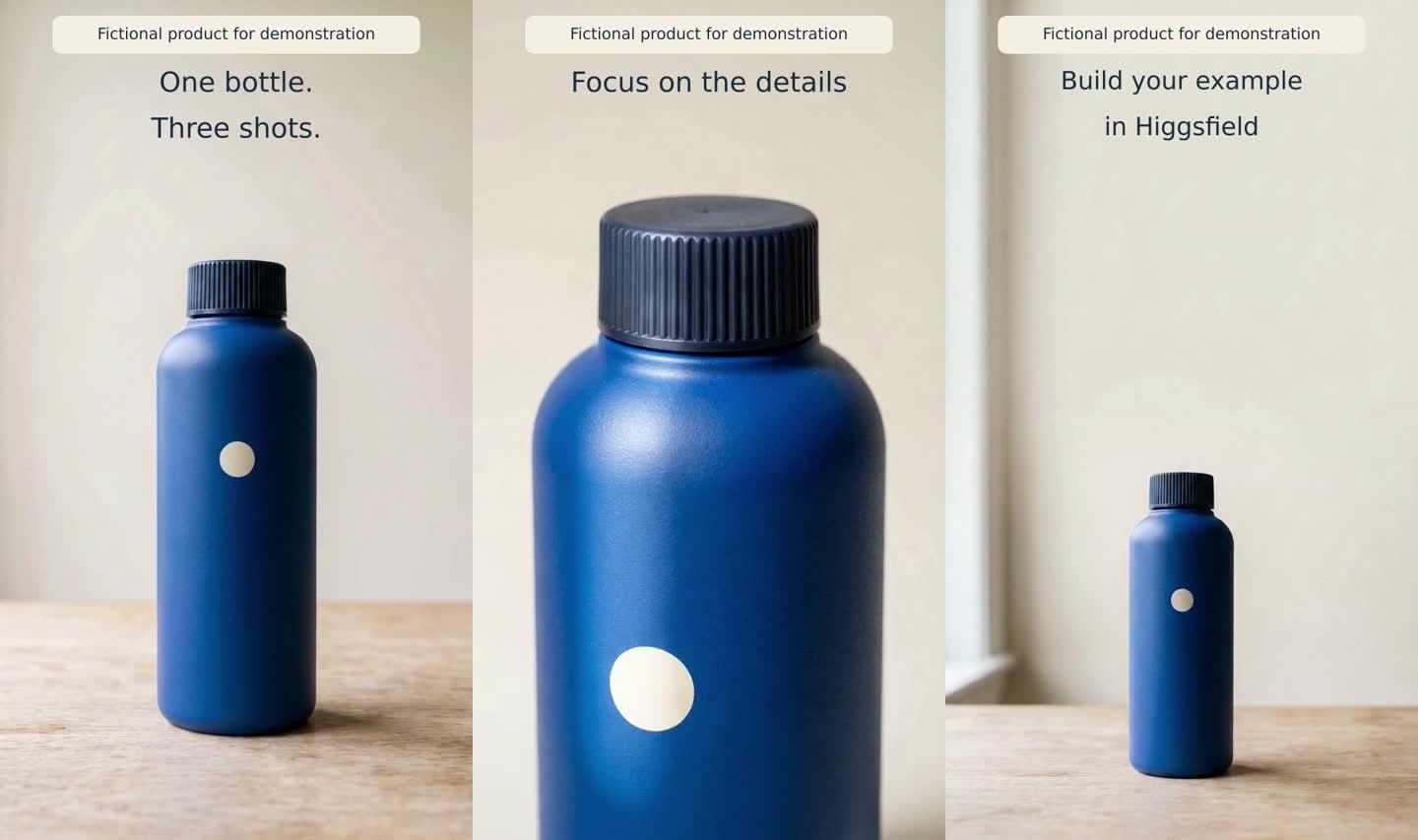
We planned three shots: a full bottle opener, a detail shot and a closing composition with space for text. The first opener cropped the bottle base near the end and was rejected. A retry kept the complete bottle in frame, although its movement still exceeded the requested growth of less than five percent.
The detail shot produced a useful moving highlight, but it made the material look glossier than the matte reference. That was an acceptable caveat for a fictional demonstration bottle. For a real product, the change in material appearance would need to be checked against the product before commercial use.
Each raw clip contained 121 frames, or approximately 5.0417 seconds. We trimmed each of the three selected shots to 120 frames to make an exact 15 second edit. The final video is vertical, at 720 by 1280 pixels, and has no audio stream. Titles in two languages were added as separate editable text rather than generated lettering inside the images.
Text checks revealed that right-to-left text and Latin words needed separate lines in our layout. An early disclosure label at the bottom also obscured part of the bottle base, so we moved it to the top margin. Those were production fixes with a visible effect on the result. We did not test voiceover, lip sync, a live advertising campaign or sales performance.
See the complete 15 second product video workflow
The credit cost of a usable result
A per generation quote only captures part of the expense. In this test, an image cost 1.5 credits, a Cinema Studio clip cost 25, and a Seedance Fast clip cost 12.5. These are recorded costs for the tested settings and access route on the stated date. They are not a general price list or a guarantee of what a future run will cost.
| Test | Actual credits | Selected results | Credits per result |
|---|---|---|---|
| Camera including shared source | 101.5 | 2 of 4 clips | 50.75 |
| Character incremental | 45 | 3 segments with adjustments | 15 |
| Product incremental | 54.5 | 3 of 4 clips | 18.17 |
| Total | 201 | Three demonstrations | No pooled average |
The shared source image, which cost 1.5 credits, is allocated to the camera row only. The three rows therefore sum to 201 without counting it twice. Starting either the character or product exercise from scratch would require adding that source cost if you need to generate it too. The character total includes five character reference attempts and three video clips. The product total includes three reference images and four clips.
The original plan before retries came to 160.5 credits. Two repeated reference images, one camera correction and one replacement product opener added 40.5 credits, an increase of approximately 25.2 percent. We observed no refund for outputs rejected on creative grounds.
The meaning of usable is different in each row. For cameras, we counted two clips that met the movement criterion qualitatively. For continuity, we counted three segments retained with caveats and a shortened walk. For the product edit, we counted the three selected shots. Pooling those judgments into one Higgsfield success percentage would be misleading. These averages do not predict the price of your next usable clip.
We have not converted credits to currency or priced editing time that was not measured separately. Current plans are summarized in the next section. Before paying or running another generation, check the current quote, allowance, models and terms shown in your account. Completing a technical workflow does not establish commercial usage rights.
Plans and prices (October 2026)
These are the individual plans on Higgsfield’s pricing page on October 8, 2026. Prices are in USD and exclude VAT and local taxes, which are calculated at checkout. The page was running a promotion (annual billing advertised as 30% off), so check it again before buying.
| Plan | Monthly billing | Billed annually | Credits per month | Video model access |
|---|---|---|---|---|
| Free | $0 | Not applicable | No credits included | A small set of models only |
| Starter | $19 a month | $19 a month | 270 | Seedance 2.0 Fast and 2.0 Mini; selected models and features |
| Plus | $59 a month | $47 a month | 1,200 | All models and features |
| Ultra | $129 a month | $99 a month | 3,000 (6,000 and 9,000 options offered) | All models and features |
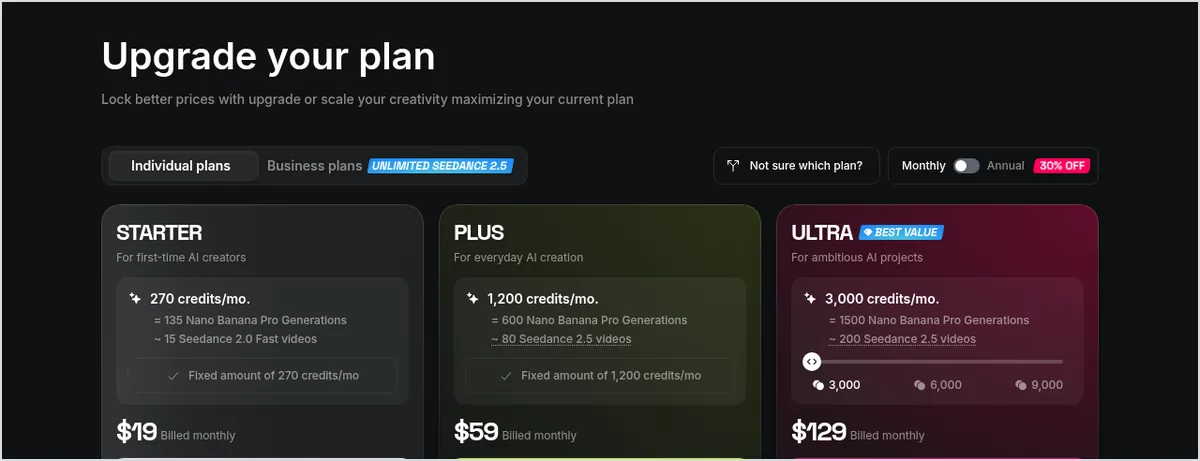
What does that mean for a test like ours? Our whole set used 201 credits, less than Starter’s 270 monthly credits. But Starter’s Seedance access is limited to 2.0 Fast and 2.0 Mini, and its card lists only “selected models and features” without saying whether Cinema Studio, which we used for the camera tests, is included. If you only need the character and product workflows, which ran on Seedance 2.0 Fast, Starter covers the models we used for them. For the full set, check the comparison table or plan on Plus. Subscription credits don’t roll over, and there’s no free trial of the paid plans.
Two more rules affect the real cost. Unlimited models and free generations apply only on the higgsfield.ai website; generations through MCP (the route we tested), the CLI, Canvas and Supercomputer always deduct credits. And subscriptions renew automatically; Higgsfield’s refund terms cover the first 7 days after an initial purchase if no credits were used, with a service fee of up to 6%.
What has changed since our test
- Seedance 2.5: according to Higgsfield’s help center, it generates clips of 4 to 30 seconds with synchronized audio, at up to 1080p. It isn’t included in Starter. We tested Seedance 2.0 Fast, so our results don’t cover it.
- Cinema Studio 4.0: Higgsfield’s homepage now promotes Cinema Studio 4.0. Our camera results come from Cinema Studio Video 3.0 and may not carry over.
- Nano Banana 2.1: added to Higgsfield on October 6, 2026, according to the changelog. We generated our reference images with Nano Banana 2.
- Ad Multiplier: a visual interface for recreating a video ad with your own product, cast or location arrived in Ads Studio on October 6, 2026. We didn’t test it.
The strengths and friction we actually saw
What worked
- A clear reference image produced short shots that could be assembled into a real deliverable, with a recognizable product and useful framing.
- Passing a frame between clips made an action sequence possible after independently generated continuation poses proved unsuitable.
- Separating video generation from editable typography let us produce two language versions from the same clips without generating more video.
- Keeping the failed attempts in the record made the cost of the selected result visible, rather than highlighting only the price of a single attempt.
What needed intervention
- Explicit instructions about hands, movement direction, carrying height and framing were not always followed. More detailed prompting did not guarantee a correction.
- Technical completion did not mean creative acceptance. All twenty jobs finished, but some of their outputs were unsuitable for the intended edit.
- Changes in surface finish, facial appearance and outlines required inspection, especially where a real product or person would need faithful representation.
- The tested route required selection, frame extraction, trimming and text checks. We did not measure working time well enough to promise production in a few minutes.
One clip submission also returned without a trackable confirmation. We checked job history before resubmitting to avoid creating a duplicate. The final count includes only one accepted clip for that step. In an assistant driven workflow, an unclear status is a reason to reconcile the job before trying again.
Who should consider it
For creators and editors who need short visual material, these tests demonstrate useful capability within defined tasks. The fit is stronger when you can choose among results, cut around a problematic moment and accept some variation in the brief. The workflow also provides a practical starting point for exploring a visual idea before a larger production.
We would be more cautious when the deliverable depends on exact movement, faithful color and surface finish for a real product, or identity remaining unchanged through a long sequence. If your main need is natural narration or speaking characters, our tests are not enough to recommend a purchase for that purpose.
We did not test 4K, long videos, every available model or preset, team collaboration, representative queue times or the manual website experience. Options and plans may change. A feature falling outside this review does not mean the service lacks it.
If your project needs something our tests didn’t support, here’s where we’d look next on Maitz:
| What you need | What our Higgsfield test showed | Read next |
|---|---|---|
| Short shots from one image | Forward and orbit moves were usable; a precise lateral move failed twice | Camera moves test |
| The same character across shots | Worked after handing a frame from clip to clip, with small changes in appearance | Keeping one AI character across five scenes |
| Readable titles and captions | Best added in editing, not generated inside the image | Automatic captions workflow |
| Voice and music | Not tested | Suno Speech: voice and background music |
A sensible first test
Choose one requirement that is easy to judge, such as keeping an entire bottle inside the frame throughout a short shot. Start with an image you have the right to use, check the generation quote and define the rejection criteria before spending credits. Leave room in the budget for an attempt that will not make the edit, without assuming our 25.2 percent overrun will cover every project.
After generation, inspect the beginning, middle, end and key action moments. If a correction is worthwhile, change one major variable so you can judge its effect. Check the handoff frame for character continuity, the edges and material for product shots, and the background as well as the subject for camera motion. Add precise typography in editing and inspect it again at the intended display size. If you’re new to the tool, start with our beginner’s guide to creating a video from an image.
Our verdict
We would use Higgsfield in a workflow that treats shot generation, review and editing as planned parts of production. This test set produced two useful camera examples, a short character sequence after adjustments, and an exact 15 second vertical product video. It also produced failures that consumed credits and required a change of approach. That is the basis for our recommendation: begin with a defined exercise, judge the actual output and account for every attempt.
The three tutorials linked above are a more concrete starting point than a feature list: they show the inputs, decisions and results. Before committing to a plan, confirm that the current settings and cost suit the job you want to do.
Frequently asked questions
Is Higgsfield worth it?
For short shots you can review, reject and edit, our tests say yes. For exact camera choreography, faithful product finish or long, unchanged character continuity, our results don’t support a purchase on that basis alone.
How much does Higgsfield cost?
On October 8, 2026, individual plans cost $19 a month for Starter (270 credits), $59 a month for Plus (1,200 credits) and $129 a month for Ultra (3,000 credits) on monthly billing, before VAT and local taxes. Annual billing lowered Plus to $47 and Ultra to $99 a month.
Is there a free Higgsfield trial?
There’s no free trial of the paid plans. You can generate on the free tier with a limited set of models, but it includes no credits.
How many credits did your Higgsfield test use?
Twenty completed jobs, nine images and eleven videos, used 201 credits, including rejected outputs. Retries added 40.5 credits, about 25.2 percent over the original plan.
Can Higgsfield keep a character consistent across shots?
In our test, a three-shot sequence worked after we started each shot from a frame of the previous clip, but small changes in the character’s appearance remained. Independently generated starting poses were rejected.
Can I use Higgsfield outputs commercially?
According to Higgsfield’s help center, Section 4.4 of its terms doesn’t claim ownership of outputs or restrict commercial use. You’re responsible for the rights to what you upload, and outputs aren’t guaranteed to be unique.
Sources
- Higgsfield, Pricing page: individual plans, feature comparison table and FAQ (checked October 8, 2026)
- Higgsfield Help Center, “How do credits work?” (updated September 22, 2026) and “How do Higgsfield plans work?”
- Higgsfield Help Center, “How do I use Seedance?” (August 2, 2026)
- Higgsfield Help Center, “Who owns my generations, and can I use them commercially?” (August 2, 2026)
- Higgsfield Changelog: Seedance generation failures resolved (October 3, 2026); Nano Banana 2.1 and Ad Multiplier (October 6, 2026)
- Higgsfield homepage (checked October 8, 2026)
- Maitz test log, October 3, 2026