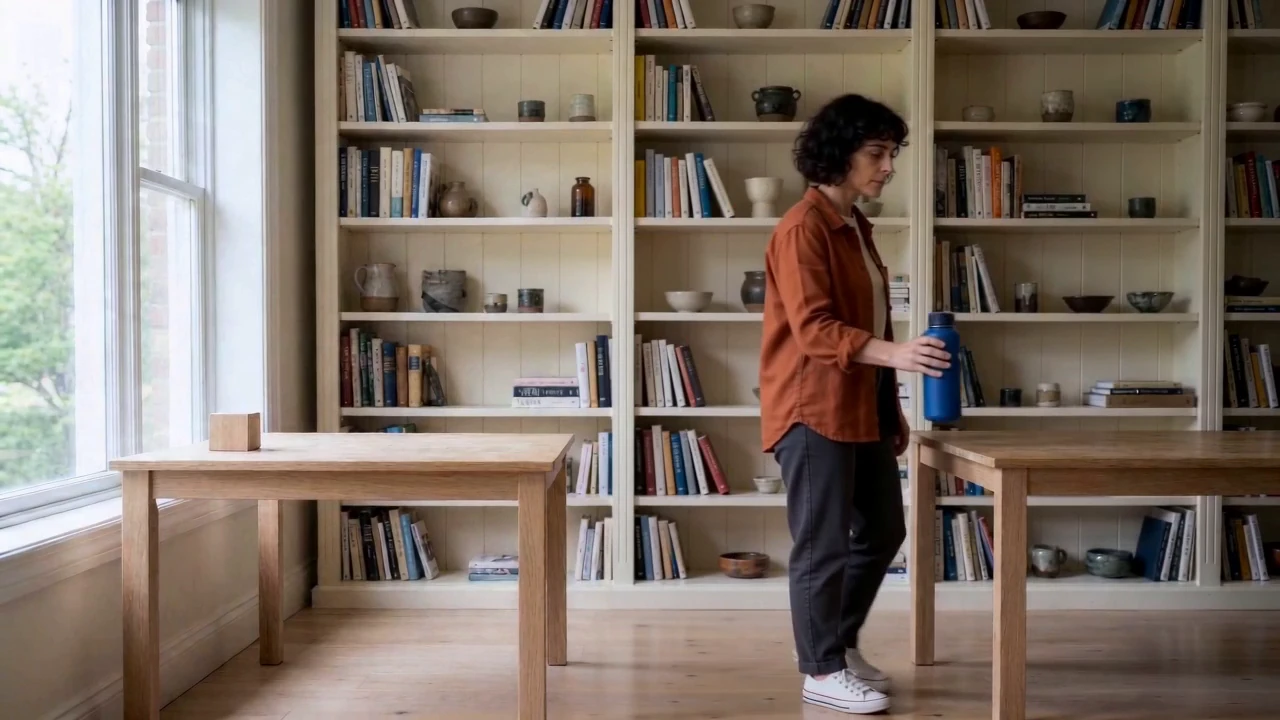
A matching face is only one part of continuity. If a character picks up a bottle, walks across the room and sets it down, the carrying hand, body direction and moment of contact must also make sense. Our separately generated pose images failed those requirements. The useful sequence came from passing an actual frame forward into the next video and cutting the walking shot before an early placement.
For current plans, prices and every Maitz article on AI video tools, see our AI video tools hub.
The final demonstration is a silent, 14.25-second sequence with a fictional adult woman and a fictional bottle. It shows a practical continuation method, with some remaining face, framing and grip-height variation. The test was run on October 3, 2026, through the connected Higgsfield tool, not through a recorded website-button walkthrough.
Step 1 Establish the character and the object
R01.png is the product reference: a cobalt bottle with a dark ribbed cap and a small cream circle. R02.png establishes Yael, a fictional 30-year-old adult with short dark curly hair, a burnt-orange overshirt, a cream shirt, dark trousers and white shoes. The sequence is not a real person's endorsement.
Practice with the supplied files, or establish a clear reference for your own character’s face, clothing and prop. Only process real people or product images with the necessary permission.
The original R02 character prompt
Create an original fictional adult woman named Yael, age 30, with a short dark curly chin-length bob. She wears a burnt-orange overshirt over a cream T-shirt, charcoal trousers and white low-top canvas shoes, with no jewelry. She is not based on any real person. Full-body three-quarter view, face clearly visible. In a cream-walled workspace, two pale oak tables sit on opposite sides of the frame with bookshelves behind. Soft daylight from frame left. Yael stands beside the left table; her right hand is just above the closed bottle from the supplied product reference, ready to grasp it. Preserve that bottle exactly. Her body faces screen right. Horizontal 16:9, realistic editorial photography, no text, no extra people.
R02 used Nano Banana 2 at 1k, requested 16:9 and count=1, with R01 as its image reference. The connector mapped the image role to image_references; the returned model name was nano_banana_flash. The saved image measured 1376×768. Yael faced the camera more than requested, but the identity, outfit and bottle were useful as a starting point.
Why the independent pose images were rejected
We first attempted R03 for the start of the walk and R04 for the moment before placement, using R02 and R01 as references. In the first R03, the bottle remained on the table and the character faced left. In R04, the bottle appeared to be held in the anatomical left hand. One correction for each image still failed: the walking pose faced the wrong direction, and the placement pose reverted to the left table with a cap grip.
All four attempts remain in the cost record and practice pack. None was animated. They are useful failure examples because a recognizable face and costume can hide a pose that is unsuitable for the next action.
Step 2 Generate the pickup
All three character videos used Seedance 2.0 Fast: seedance_2_0 with mode=fast, 720p, 16:9, a requested five seconds, count=1 and generate_audio=false. Returned parameters included seedance_2_0_fast. Each clip cost 12.5 credits in this test. Attach R02 as the start_image for K01.
Paste this common paragraph and append the shot's action. The same common paragraph was used for K02 and K03.
Use the supplied image as the first frame and preserve the exact fictional adult Yael, her face, short dark curly bob, burnt-orange overshirt, cream T-shirt, charcoal trousers and white shoes. Preserve the exact closed cobalt bottle, ribbed dark cap and cream circle, and the same workspace and soft daylight. One continuous realistic five-second shot, fixed tripod camera, no cuts, text, new people or appearance changes. Respect anatomical right and left. ACTION:
K01 Pick up the bottle
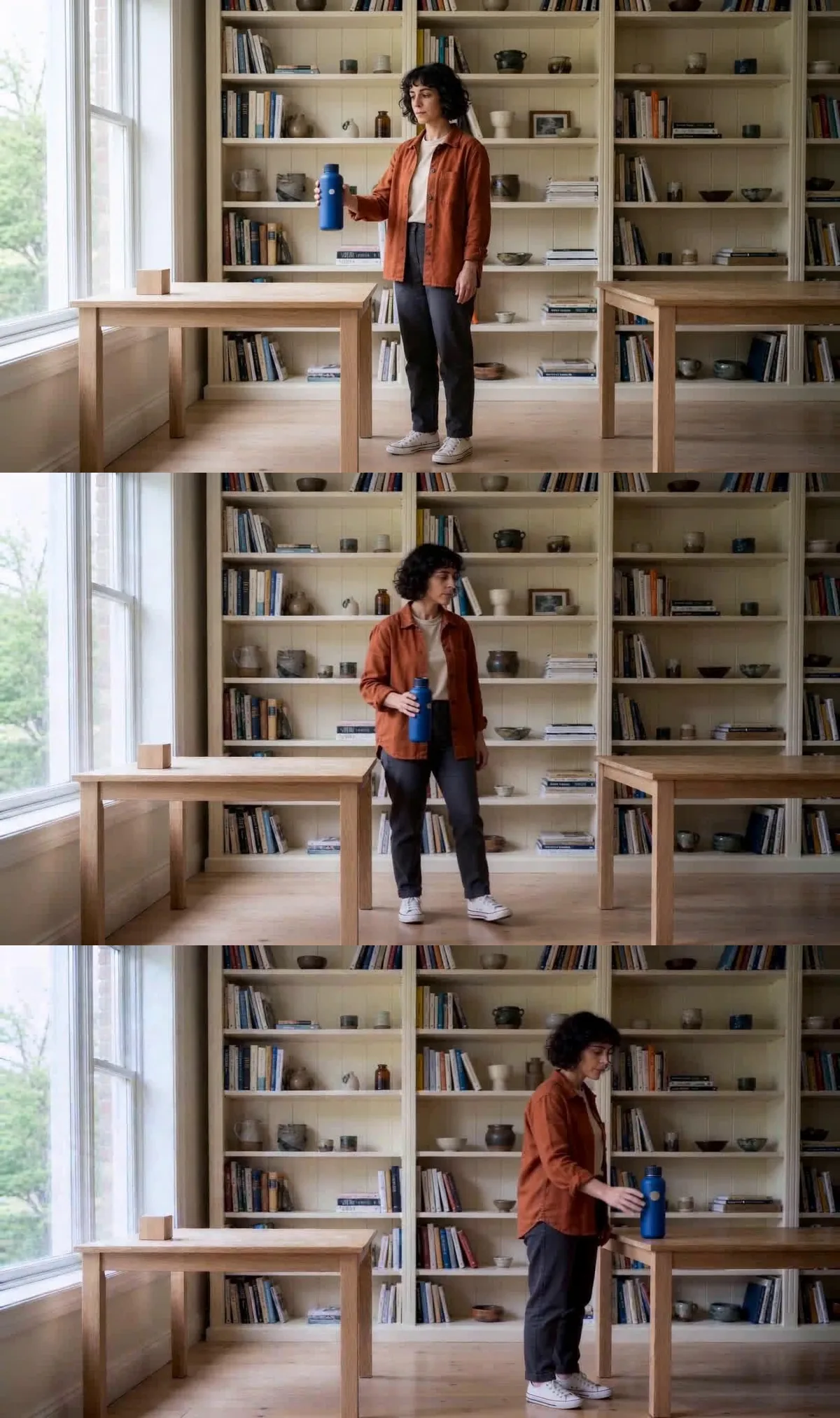
Yael grasps the bottle with her anatomical right hand, lifts it slowly from the left table to waist level and pauses. Her left hand stays empty. The bottle remains upright, closed and rigid, without penetrating her fingers. She ends ready to move screen right.
The pickup used Yael’s own right hand, not the right side of the screen. She lifted the bottle to chest height instead of waist height, and the framing changed despite the tripod instruction. We continued from that actual result, with both limitations disclosed.
Step 3 Pass forward a frame from the result
Export the frame at 4.958333 seconds from K01 as a PNG without changing its size or crop. It is supplied as K01-final-frame.png. At 24fps this is frame 119 when counting from zero: the end of the five-second selection used in the edit, rather than the very last frame of the 121-frame raw file.
Attach that extracted image as the start_image for K02. The next clip now receives the grip and pose that actually exist. For a different generated clip, choose a suitable frame from that clip rather than assuming this timestamp will always work.
K02 Walk from the actual ending pose
Starting exactly from this supplied final frame, Yael lowers the upright closed bottle gently from chest height to waist level without changing her anatomical RIGHT hand. She turns her body toward SCREEN RIGHT and takes two natural steps to SCREEN RIGHT, toward the empty right table. She carries the bottle upright with her SAME RIGHT HAND; left hand stays empty. She stops just beside the right table holding the bottle slightly above its tabletop, ready to set it down. Do not put the bottle down yet. Keep face, hands, bottle and room coherent. The tripod camera never moves.
Yael turned and walked screen right with the bottle in the same hand. Near the end, however, she began setting it down too early. We inspected the join and selected 4.25 seconds, where the bottle was still visibly above the tabletop. That became both the end of the K02 edit and the input image K02-4.25.png for the next shot.
The handoff frame and what to inspect
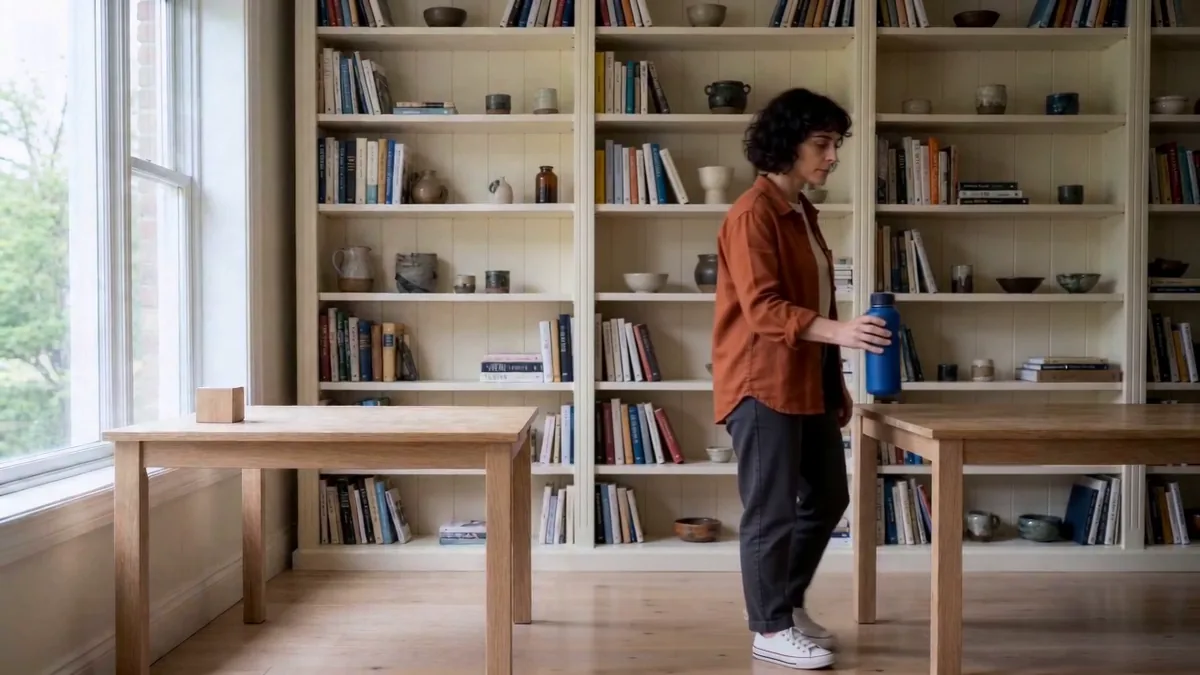
Open the image before attaching it to the next shot. The bottle should still be in the character’s anatomical right hand, above the table, with enough of the cap and base visible to inspect. If contact and release have already happened, choose an earlier frame. Do not ask the next shot to repair a broken grip retrospectively.
This timestamp belongs to K02 only. The K01 handoff used 4.958333 seconds. The selected K02 edit duration is 4.25 seconds; keep the raw file, handoff image and cut decision separately.
Step 4 Generate the placement and inspect contact
Use K02-4.25.png as start_image, retain the model and settings, and append this action to the shared paragraph.
K03 Set the bottle down
Continue exactly from the supplied frame. Yael is beside the right table and holds the closed bottle in her anatomical RIGHT hand just above the tabletop. She slowly lowers it the final few centimeters, lets its base touch the tabletop, then releases her fingers only AFTER contact. She withdraws her SAME RIGHT hand and pauses naturally. Her left hand remains empty by her side. Keep the bottle upright, rigid and stable on the table, with the same closed cap and cream circular mark. No sliding, sinking, hand switching, extra steps or camera movement.
The inspected result lowered the bottle with the right hand, released it after visible tabletop contact and left it standing upright. Minor rendering and face variation remained. Examine contact moments slowly or frame by frame: a start-and-end comparison alone can miss an early release or a hand passing through the prop.
Step 5 Assemble the sequence without hiding the fix
The Higgsedit timeline uses straight cuts, no retiming and no newly generated transition: five seconds from K01, 4.25 seconds from K02 and five seconds from K03. That is 14.25 seconds, or 342 frames at 24fps. Stretching the walk to reach a round 15 seconds would undo the reason for the cut.
Inspect each join for the bottle, carrying hand, body direction, table position and sudden scale changes. Passing a frame forward can reduce the opening mismatch. It does not lock the face, room or action for the rest of the generated clip.
Count the failed references too
Five character-reference attempts, including R02 and the four rejected pose images, cost 7.5 credits. Three video clips cost 37.5 credits. The direct total was 45 credits, or 15 credits per selected clip including preparation and failures. R01 was shared across the series; generating it specifically for this exercise would bring the total to 46.5 credits.
No additional generation charge was observed for frame extraction, editing or the English adaptation. That does not guarantee free editing in other workflows. Per-run quotes reconciled with the aggregate credit change; no refund was observed for rejected images. Active work time was not separately measured.
Try one action before expanding the story
Download the full practice pack with source images and prompts (about 22 MB). For text files only, download the lite pack with prompts, settings and logs (about 17 KB, no images or videos).
Start with R02 and one prop. The pack includes the full prompts, rejected pose images, selected handoff frames, edit decisions and a blank test log. Score the face, outfit, prop shape, carrying hand and contact moment for every clip. When an important feature clearly fails, stop before generating the next shot.
For the results, limitations and credit costs across all three tests, read our hands-on Higgsfield review.

