
Pick Cursor if you want an AI-first code editor where you watch, review and steer changes inside the files, with a free tier and a choice of models. Pick Claude Code if you prefer delegating whole tasks from the terminal, desktop app or browser and already pay for Claude. You can also combine them: Claude Code installs inside Cursor.
For current plans, prices and every Maitz article on Claude, see our Claude hub.
Compared on October 8, 2026, using Cursor’s and Anthropic’s official docs, pricing pages and privacy policies. We haven’t run the same coding task in both tools, so this is a decision guide, not a benchmark, and we don’t name a winner for speed or code quality.
At a glance
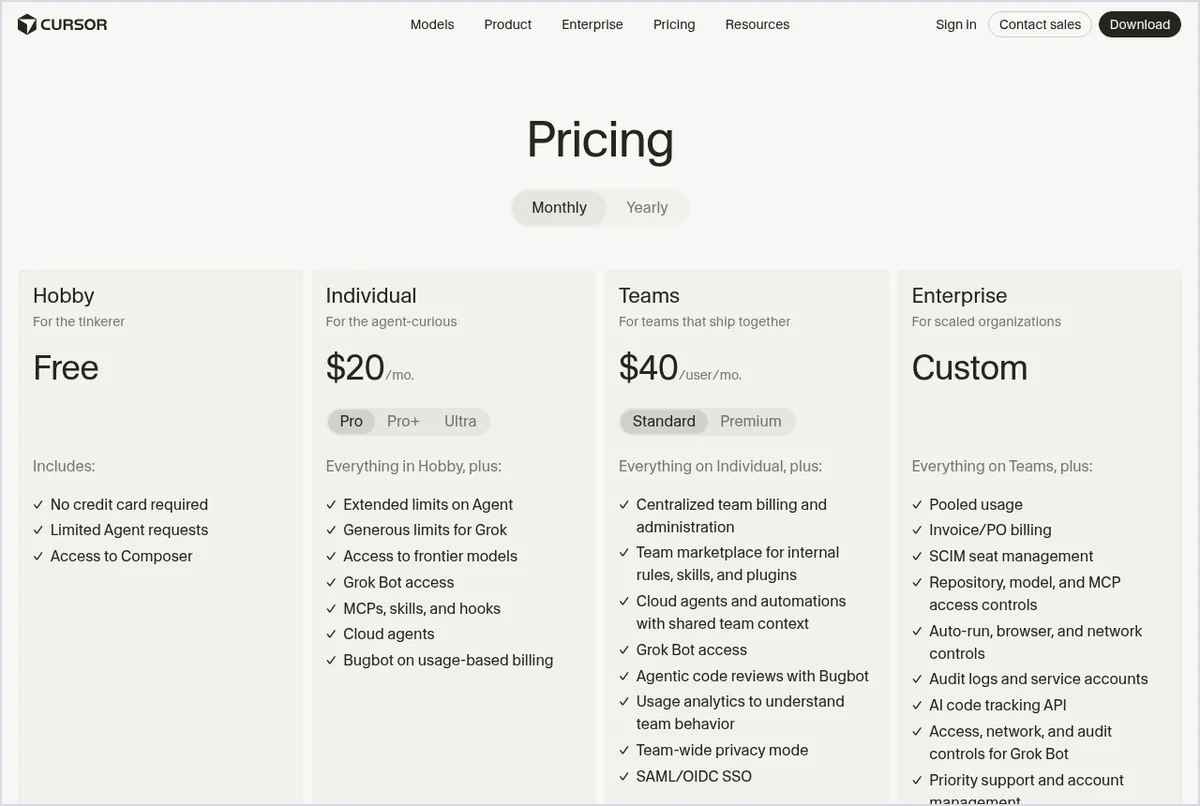
- Cursor is an editor first: a fork of VS Code with an agent, inline suggestions and model choice. Free Hobby tier; Pro is $20 a month.
- Claude Code is an agent first: it reads your codebase, edits files and runs commands from the terminal, an IDE extension, a desktop app or the web. It needs Claude Pro ($20 a month, or $17 billed annually) or higher, or a pay-as-you-go API account.
- Not either-or: Anthropic documents a Claude Code extension for Cursor, and Cursor offers Claude models through its own usage pools.
Cursor vs Claude Code: side by side
| Cursor | Claude Code | |
|---|---|---|
| What it is | AI code editor based on the VS Code codebase, with Agent, Plan and Ask modes | Agentic coding tool that reads your codebase, edits files and runs commands |
| Where you use it | Desktop editor, a CLI, JetBrains IDEs through the Agent Client Protocol (paid plans), and Cloud Agents you can check on the web or mobile | Terminal, VS Code and JetBrains extensions (also in Cursor), desktop app, browser, Claude mobile app |
| Free option | Hobby: free, no credit card, limited Agent requests | Not on the Claude Free plan; API usage is pay as you go |
| Entry paid plan | Pro, $20/month | Claude Pro, $20/month or $17/month billed annually ($200 up front) |
| Higher tiers | Pro+ $60 (3x Pro limits on Agent), Ultra $200 | Max 5x $100, Max 20x $200 |
| Teams | $40 per user per month | Team standard seat $25/month, or $20 billed annually |
| Models | Several providers, including Anthropic, OpenAI, Google and SpaceXAI, in two usage pools | Claude models only (Opus, Sonnet, Haiku on paid plans) |
| How usage is counted | Cursor Models pool plus Other Models pool at each model’s API price; on-demand usage optional | Limits shared with your Claude chat usage; session limits plus a weekly limit on Max; optional usage credits |
| Training on your code | Not with Privacy Mode on (available on free and paid plans) | Free, Pro and Max: your choice in settings. Team, Enterprise and API: no training by default |
| Extras bundled | Grok Bot access on paid plans; Bugbot code review on usage-based billing | The Claude apps (chat, Projects, research, file creation) on the same subscription |
Prices come from cursor.com/pricing and claude.com/pricing as shown in the US on October 8, 2026. Anthropic says its prices don’t include applicable tax; check the checkout page for your country.
The real difference: editor-first or agent-first
Both tools can now plan a change, edit several files and run terminal commands. The difference is where you sit while that happens.
Cursor puts you inside the editor. Agent opens in a side pane, and Cursor’s docs list the tools it can use: file search, web search, file edits, shell commands, a browser for checking visual changes, and checkpoints that let you roll files back if the agent takes a wrong turn. Ask mode is read-only and Plan mode asks clarifying questions before coding. Because Cursor is based on the VS Code codebase, you can import your VS Code extensions, themes, settings and keybindings in one click. Our Cursor AI review covers its modes, limits and permission settings in detail.
Claude Code starts from the task. You describe the outcome and Claude Code plans, edits across files and runs commands, then shows you the result. It reads a CLAUDE.md file in your project for standing instructions (or an existing AGENTS.md), connects to tools through MCP, runs hooks before or after its actions, and can schedule recurring routines that run in the cloud. The same engine sits behind every surface, so a session can move from the terminal to the desktop app or a phone. Our Claude Code beginner’s guide shows a safe first task.
Price: what each $20 actually buys
At the entry level both cost $20 a month, but the bundles differ:
- Cursor Pro buys the editor with extended Agent limits, access to frontier models, MCPs, skills and hooks, Cloud Agents and access to Grok Bot, Cursor’s AI teammate app. Usage sits in two pools: a Cursor Models pool with more included usage for Cursor’s own models (Grok 4.7, Grok 4.6, Grok 4.5 and Composer 2.5 on October 8), and an Other Models pool billed at each model’s API price. Using Claude models inside Cursor draws from that second pool.
- Claude Pro buys Claude Code plus the full Claude app: chat, Projects, research, file creation and scheduled tasks. Coding and chatting share one set of limits, so a heavy coding day leaves less for everything else. Claude Code isn’t included on the Free plan.
Two billing traps are worth knowing. In Claude Code, an ANTHROPIC_API_KEY environment variable on your machine makes it bill the API instead of your subscription, according to Anthropic’s help center. In Cursor, on-demand usage can keep you working after the included amount runs out, and the subscription price alone isn’t your spending ceiling. For pay-as-you-go API use, Anthropic reports that across enterprise deployments the average is around $13 per developer per active day and $150 to $250 per developer per month. Treat that as Anthropic’s average, not a quote.
Availability, privacy and GDPR
- Where you can buy it. Anthropic publishes a supported-countries list that includes the US, the UK and EU countries such as Germany, France and Ireland; Claude Pro is available in those supported locations. Cursor’s pricing page shows USD prices, and its models documentation mentions a separate Start plan for developers in India. We didn’t find a Cursor country list.
- Training. Cursor says that with Privacy Mode on, your data isn’t used for training and its model providers have zero data retention agreements, with exceptions for abuse investigations; Privacy Mode is available on free and paid plans. With it off, Cursor may use code data to improve its features. Anthropic lets Free, Pro and Max users choose whether their data, including Claude Code sessions, trains future models. Team, Enterprise and API usage isn’t used for training by default.
- Who controls your data in Europe. For users in the EEA, the UK and Switzerland, Anthropic Ireland, Limited is the data controller, and Anthropic commits to answer GDPR requests within one calendar month. Cursor is operated by Anysphere, Inc.; its privacy policy says EEA data may be transferred to US servers under legally valid transfer mechanisms and lists rights such as access, deletion, objection and withdrawing consent. Neither company’s documents make a blanket “GDPR compliant” claim that we rely on here.
- Certifications. Cursor states SOC 2 Type II, ISO/IEC 27001:2022 and ISO/IEC 42001:2023.
For the chat side of Claude, our guide to stopping AI tools from training on your chats shows the exact setting.
Who should pick which
| You are… | Start with | Why |
|---|---|---|
| A VS Code user who wants AI help without changing habits | Cursor | Same editor base, one-click import, inline review of every change |
| Learning to code on a zero budget | Cursor Hobby | Free tier with limited Agent requests; Claude Code needs a paid plan or API credit |
| Comfortable in the terminal, delegating whole tasks | Claude Code | Built around describing an outcome; scripts, CI and routines |
| Already paying for Claude Pro for writing or research | Claude Code | Included in the subscription you have |
| Wanting to switch models per task | Cursor | Models from several providers in one editor |
| A JetBrains user who wants to stay in IntelliJ or PyCharm | Either | Claude Code has a JetBrains plugin; Cursor’s agent runs in JetBrains IDEs through ACP on a paid plan |
| On a team with strict data rules | Either, on a business plan | Check Privacy Mode and admin controls in Cursor Teams or Enterprise, or Claude Team or Enterprise terms |
Using both together
You don’t have to choose forever. Anthropic’s docs offer an “Install for Cursor” option for the Claude Code extension, and a Claude Pro or Max plan covers Claude Code in VS Code forks such as Cursor, with that usage counting toward your Claude limits. The reverse also works: Cursor can run Claude models through its Other Models pool at API prices. A practical split is Cursor for everyday editing and small fixes, and Claude Code for longer tasks you want to hand off. Just remember you’d be paying two subscriptions.
A fair way to try both
Before you subscribe to anything, run the same small task in each tool:
- Make a practice repository with no secrets or client code.
- Write one bounded task with a check you can verify yourself, such as a failing test that should pass.
- Ask each tool to explain the code first without changing files (Ask mode in Cursor; a plain question in Claude Code).
- Then ask for one narrow fix, review every changed file, and run the test yourself.
- Note how much usage the task took on each usage screen, and how many corrections you made.
Cursor’s free Hobby tier covers a small trial. For Claude Code you’ll need a paid Claude plan or API credit, so start on the monthly Pro plan if you’re unsure.
Cursor vs Claude Code FAQ
Is Claude Code better than Cursor?
Neither is better for everyone. Cursor suits developers who want to work inside an AI-first editor and review changes as they happen. Claude Code suits developers who want to hand off whole tasks from the terminal, desktop app or browser. We haven't benchmarked them against each other.
Can I use Claude Code inside Cursor?
Yes. Anthropic's documentation offers an Install for Cursor option for the Claude Code extension, and a Claude Pro or Max plan covers Claude Code in VS Code forks such as Cursor. That usage counts toward your Claude limits, not Cursor's.
Is Claude Code free?
Not on the Claude Free plan. You need Claude Pro, Max, Team or Enterprise, or an Anthropic Console account that pays for API usage. Cursor, by contrast, has a free Hobby tier with limited Agent requests.
Can I use Claude models in Cursor?
Yes. Cursor's docs list Claude models among the supported models. They draw from the Other Models pool, which is charged at each model's API price, while Cursor's own models use a separate pool with more included usage.
Which is cheaper for a solo developer?
Both start at $20 a month. Cursor has a free tier to try first, and Claude Pro drops to $17 a month if you pay $200 for a year. What you'll actually spend depends on how much agent work you do, so compare the usage screens after a week.
Do Cursor or Claude Code train on my code?
Cursor says it doesn't train on your data when Privacy Mode is on, which is available on free and paid plans. On Claude Free, Pro and Max you choose in your privacy settings whether your data, including Claude Code sessions, is used for training; Team, Enterprise and API usage isn't used for training by default.
Bottom line
If you want AI inside an editor you already know, start with Cursor’s free tier. If you’d rather describe a task and review the result, and you already pay for Claude, Claude Code is the natural pick. If you can’t decide, the two work together. Next step: read our Cursor review for the editor’s limits, or set up Claude Code with a first task.
Sources
- Cursor: Pricing page (Hobby, Pro, Pro+, Ultra, Teams, Enterprise), checked October 8, 2026
- Cursor Docs: “Models & Pricing” (usage pools, supported models), “Agent” overview, “Cursor CLI,” “VS Code Migration,” checked October 8, 2026
- Cursor: Data Use policy, Security page and Privacy Policy (Anysphere, Inc.), checked October 8, 2026
- Claude Code Docs: “Overview,” “Advanced setup” (system requirements), “Manage costs effectively,” “Data usage,” checked October 8, 2026
- Claude Help Center: “Use Claude Code with your Pro or Max plan” and “What is the Max plan?”, checked October 8, 2026
- Anthropic: claude.com/pricing (Free, Pro, Max, Team), checked October 8, 2026
- Anthropic: Supported countries and regions, and Privacy Policy, checked October 8, 2026

