Each of the three assistants has one account setting that keeps your new chats out of model training. In ChatGPT, turn off Improve the model for everyone under Settings, then Data controls. In Claude, turn off Help improve our AI models under Settings, then Privacy. In Gemini, turn off Keep Activity on the Activity page. None of these deletes your history or removes data from models that are already trained, and a thumbs up or thumbs down still sends that conversation to the company.
Updated October 6, 2026. This guide is based on the official help and privacy pages from OpenAI, Anthropic, and Google as they read on that date. We didn’t create accounts for this article, so there are no screenshots of the apps themselves; button names are quoted from each company’s help center in English. If your app is set to another language, the labels will be translated.
At a glance
- What to do: turn off one setting per tool. It takes under a minute on desktop or mobile.
- What it doesn’t do: it doesn’t delete chats, doesn’t reach models already trained, and doesn’t stop safety review.
- For one sensitive conversation: Temporary chat (ChatGPT), Incognito chat (Claude), or Temporary chat (Gemini). All three companies say these aren’t used for training, but each keeps them for a short period.
- Work accounts: ChatGPT Business, Claude for Work, and Google Workspace don’t train on your content by default.
Turning off training on your chats: each tool side by side
| ChatGPT | Claude | Gemini | |
|---|---|---|---|
| Setting name | Improve the model for everyone | Help improve our AI models | Keep Activity |
| Where (desktop) | Account menu › Settings › Data controls | Your name › Settings › Privacy | Settings & help › Activity |
| Starting point on a personal account | OpenAI may train on your content unless you opt out | You choose at signup (existing users chose in a 2025 pop-up) | On by default if you’re 18 or over |
| Temporary option | Temporary chat: not used for training; a copy may be kept up to 30 days for safety | Incognito chat: not used for training; kept 30 days | Temporary chat: not used for training; kept up to 72 hours |
| After you delete a chat | Permanently deleted within 30 days, with exceptions | Deleted from back-end storage within 30 days; not used in future training | Deleted, but chats already read by human reviewers are kept up to 3 years |
| If training is on | Chats stay saved until you delete them | Up to 5 years in a de-identified format | Auto-delete after 18 months by default (3 or 36 months, or off) |
| Work accounts | Business, Enterprise, Edu: no training by default | Claude for Work and API: no training by default | Workspace: no training or human review without permission |
Every cell comes from the companies’ official pages as of October 6, 2026. These pages change often, so check again before you make a business decision based on them.
ChatGPT: turn off Improve the model for everyone
OpenAI says that for its services for individuals, such as ChatGPT and Codex, it may use your content to train its models, and that you opt out with this setting. That covers personal plans: Free, Go, Plus, and Pro.
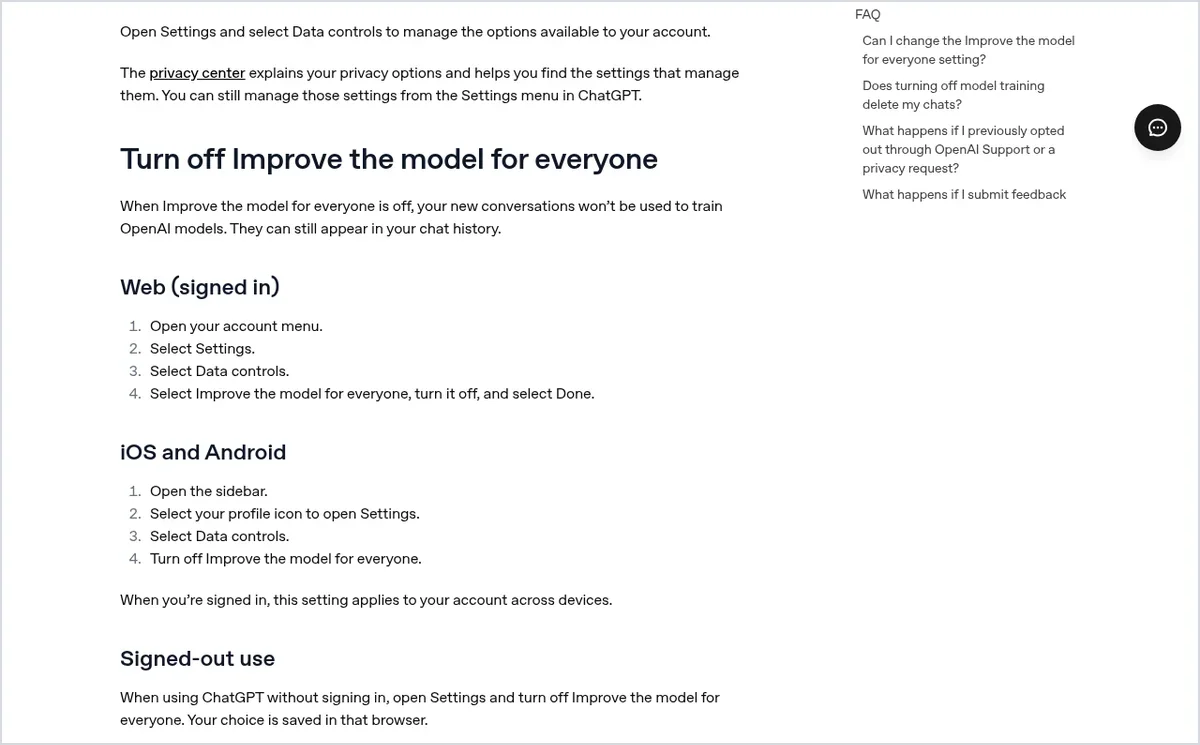
On the web
- Open your account menu.
- Select Settings, then Data controls.
- Select Improve the model for everyone, turn it off, and select Done.
On iPhone and Android
Open the sidebar, tap your profile icon to open Settings, choose Data controls, and turn off Improve the model for everyone. When you’re signed in, the setting follows your account across devices, so you only need to do it once.
Signed out, or through the Privacy Portal
- Signed out: you can turn off the same setting, but the choice is saved only in that browser.
- Alternative: in OpenAI’s Privacy Portal, choose Do not train on my content. OpenAI says either route is enough; you don’t need both.
- Codex: on a personal plan, the same setting covers Codex tasks. A separate Include environments setting in Codex settings controls whether extra context from your Codex environments can be used for training.
Temporary chat: what it does and doesn’t do
Open a new chat, select Temporary, and pick Personalized or Unpersonalized before your first message. While the chat stays temporary, it doesn’t appear in your history, doesn’t create or update memories, and isn’t used to improve OpenAI’s models. OpenAI may keep a copy for up to 30 days for safety purposes.
Two catches. If you save a temporary chat, it becomes a regular chat and follows your normal training setting. And if you use a temporary chat with a GPT that calls actions on an outside service, the data sent to that service falls under its own privacy policy, and it may keep that data longer than 30 days.
What the ChatGPT setting doesn’t do
- It doesn’t delete or hide chats. Archiving a chat doesn’t change whether it can be used for training either.
- Memory and model training are separate settings. Turning one off leaves the other as it was.
- A deleted chat leaves your account right away and is scheduled for permanent deletion within 30 days, unless OpenAI must keep it longer for security or legal reasons. A file saved to Library isn’t deleted with the chat, as we covered in our guide to cleaning an Excel file with ChatGPT.
Claude: turn off Help improve our AI models
Where the setting is
On desktop or the web, select your name in the settings menu, choose Settings, then Privacy, and switch off the toggle under Help improve our AI models. The mobile path is the same: your name, Settings, Privacy. Anthropic’s help page spells it “Help Improve our AI models,” and some outside guides use a different name, so look for the words “improve our AI models.”
What’s the default? There isn’t a single answer. Anthropic asks new users to choose during signup, and existing users were asked to choose in a pop-up in 2025. If you don’t remember what you picked, open Privacy and check. These rules apply to Free, Pro, and Max, and to Claude Code when you use it with one of those accounts.
What happens to older chats
This is where Claude differs. Anthropic says that once you turn the setting off, it won’t use your new chats, and it will also stop using chats it already stored, in future training runs. Anything already in a training run that has started, or in a model that’s already trained, stays there. A chat you delete from your history won’t be used to train future models.
Incognito chat
When you start a new chat outside a project, a ghost icon appears in the corner. Click it to start an Incognito chat. Anthropic says these chats aren’t saved to your history or memory and aren’t used for training, even if the training setting is on. They are kept for 30 days, or longer on Enterprise plans with a custom retention policy. Incognito isn’t available inside Projects, and you can’t convert an Incognito chat into a regular one later, so copy anything you need before you close it.
How long Anthropic keeps what
- Training on: up to 5 years, in a de-identified format.
- Deleted chat: removed from your history immediately and from back-end storage within 30 days.
- Chat flagged for a policy violation: inputs and outputs up to 2 years, safety classification scores up to 7 years.
- Thumbs up or down: the whole conversation is stored up to 5 years, de-linked from your user ID.
- Connector content: raw content from connected sources such as Google Drive isn’t included in training data unless you paste it into the chat.
Gemini: turn off Keep Activity
Google says Keep Activity is on by default for users 18 and over. While it’s on, Google uses your activity to improve its services, including training generative AI models, with help from human reviewers. Our Gemini review covers what each plan includes and how Google handles your chats.
How to turn it off
- On a computer: go to gemini.google.com, click Settings & help, then Activity. Near the top, click On, then Turn off, or Turn off and delete activity if you also want to clear what’s stored.
- In the Android or iPhone app: tap Menu, your profile picture, then Gemini Apps Activity, and tap On, then Turn off.
- Shortcut: myactivity.google.com/product/gemini opens the same page.
The same page controls auto-delete. The default is 18 months; you can switch to 3 or 36 months, or turn auto-delete off.
What you lose when it’s off
Most guides skip this part. With Keep Activity off, only a short list of connected apps stays available: Device assistance, Gemini Notebook, Messages, Phone, and WhatsApp. That means the connection to Google Workspace apps such as Gmail and Drive isn’t available. Chats with Gems aren’t saved (the Gems themselves are). And Google says you need Keep Activity on to create and to use skills, which matters if you followed our guide to moving Gems to Skills.
So it’s a trade-off: turn it off and give up those features, or leave it on and use a temporary chat for anything sensitive.
Temporary chat in Gemini
Next to New chat, click Temporary chat. Google says temporary chats aren’t used to train its AI models, don’t appear in your activity, and are kept for up to 72 hours. On a personal Google Account they work on the web and in the mobile app, but not in Gemini in Chrome or Google Messages; on a work account it depends on your admin (more below). In a temporary chat you can’t use Gems or connected apps, get personalized responses, or give feedback.
What still happens with everything off
- Even with Keep Activity off, chats are kept with your account for up to 72 hours so Google can respond, process feedback, and protect users, including with help from human reviewers.
- Chats that human reviewers have read are disconnected from your account and kept for up to 3 years, even if you delete your activity.
- Google’s Gemini privacy hub states that your Gemini settings don’t control processing of your chats to create anonymized data to improve Google services.
- If you send feedback with Keep Activity off, Google also collects the last 24 hours of your chats as context.
- Audio, video, and screen shares from Gemini Live have a separate setting, and it’s off by default.
Five things the setting doesn’t do, in any of the three
- Feedback overrides the setting. A thumbs up or down sends the conversation, and sometimes more, to the company. In ChatGPT, the whole conversation may be used for training even after you opt out. In Claude, it’s stored up to 5 years and may be used for training. In Gemini, feedback with Keep Activity off includes 24 hours of chats.
- What’s trained stays trained. Opting out works going forward, not backward.
- Safety and legal uses continue. In Claude, chats flagged by safety classifiers can still be used to improve safety systems. In Gemini, chats are still used to protect users when Keep Activity is off. In ChatGPT, OpenAI can keep a deleted chat longer than 30 days when security or legal obligations require it.
- Opting out isn’t deleting. Deletion and retention are separate settings. See the table above.
- Memory and personalization are a separate matter. Turning off memory doesn’t turn off training, and vice versa.
Work accounts: Business, Team, Enterprise, and Workspace
- OpenAI: OpenAI says it doesn’t use content from ChatGPT Business, Enterprise, Edu, or ChatGPT for Healthcare, or from its API, to train its models by default. The organization can set its own retention.
- Anthropic: for commercial products such as Claude for Work (Team and Enterprise) and the API, the default is no training. Thumbs up or down feedback can still be used, and owners can turn it off with the Rate chats setting under Organization settings › Data and Privacy.
- Google: the Workspace privacy hub says your content isn’t reviewed by humans or used to train generative AI models outside your domain without permission. Feedback isn’t used to train the models behind Workspace’s AI services and is kept for up to 18 months. Whether temporary chats are available is an admin setting, and if your organization uses Google Vault, chats may be retained under its rules.
On a work account, the protection comes from the contract, not the toggle. The one thing to check is that you’re actually signed in to the work account and not your personal one in the same browser.
In the EU and UK: your GDPR rights on top of the toggle
If you live in Europe, the toggle isn’t your only lever. Here’s what each company’s own privacy documents say:
- Who’s responsible: OpenAI Ireland Limited is the controller for users in the EEA and Switzerland. Anthropic Ireland, Limited is the controller in the EEA, UK, and Switzerland. Gemini Apps are provided by Google Ireland Limited in the EEA and Switzerland.
- Legal basis: OpenAI’s European privacy policy lists legitimate interests as the basis for training and improving its models. Google lists legitimate interests for improving and developing its products and machine learning technologies. Anthropic’s policy lists consent and legitimate interests for its research and model training purposes.
- Your right to object: where processing relies on legitimate interests, GDPR gives you the right to object. OpenAI points to its Privacy Portal for privacy requests, Google lets you file a request from its Help Center or with Report legal issue under a Gemini response, and Anthropic takes requests at its privacy contact.
- Complaints: OpenAI names the Irish Data Protection Commission as its lead supervisory authority in the EEA. UK users can go to the Information Commissioner’s Office.
This isn’t legal advice. If you handle customer data in these tools for a business, run it past whoever handles data protection for you.
What not to paste, even with training off
Opting out reduces exposure; it doesn’t remove it. Chats are still kept for days at least, and in some cases human reviewers can read them. Google itself asks you not to enter confidential information you wouldn’t want a reviewer to see. Before you paste, run through this list:
- Social Security or national ID numbers, card details, and customers’ health information.
- Passwords, verification codes, and API keys.
- Documents your contract with a client or vendor says you can’t share.
- A full customer list, when a few anonymized sample rows would do. That’s the approach we took in our guide to building a Claude agent for WhatsApp Business.
What about other AI tools?
Our DeepSeek review and Kimi review both have sections on privacy and training data. If you use Grok Bot, see our Grok Bot privacy and security guide, and for a broader comparison, Grok Bot vs ChatGPT. And for every guide, plan and price we cover for each tool in one place, see our ChatGPT, Claude and Gemini hub pages.
Still choosing which of the three to pay for? Our ChatGPT vs Claude vs Gemini buying guide compares plans, availability and privacy side by side.
FAQ
Does turning off training delete my chats?
No. In all three tools your chats stay in your history until you delete them. In Gemini you can pick Turn off and delete activity to do both at once. In Claude, a chat you delete also won’t be used for future training.
Is a temporary chat really deleted?
Not right away. The companies say these chats aren’t used for training, but OpenAI may keep a copy for up to 30 days, Anthropic keeps Incognito chats for 30 days, and Google keeps temporary chats for up to 72 hours. In ChatGPT, saving a temporary chat turns it into a regular one.
What happens if I give a thumbs up or thumbs down?
In all three tools the feedback goes to the company along with the conversation. In ChatGPT, the whole conversation may be used for training even after you opt out. In Claude, it’s stored for up to 5 years. In Gemini, the last 24 hours of your chats are sent too.
Does a paid plan protect my chats better than the free one?
No. In ChatGPT the same setting covers Free, Go, Plus, and Pro, and in Claude the same rules cover Free, Pro, and Max. No training by default is a feature of the business plans.
If I turn off Keep Activity in Gemini, will my skills keep working?
Google says you need Keep Activity on to create and to use skills. If skills matter to you, leave it on and use a temporary chat for sensitive conversations.
Do I need to do anything on a work account?
Usually not. ChatGPT Business and Enterprise, Claude for Work, and Google Workspace don’t train on your content by default. Do make sure you’re signed in to the work account, and remember that in ChatGPT and Claude, thumbs up or down feedback can still be used by the company.
Bottom line
Give it three minutes: turn off Improve the model for everyone in ChatGPT, check what you chose under Privacy in Claude, and decide whether to turn off Keep Activity in Gemini or keep it for skills. For the most sensitive conversations, use a temporary chat, skip the thumbs, and don’t paste customer data you wouldn’t hand to a stranger. Next step: compare plans in our Gemini review.
Sources
- OpenAI Help Center: “Data controls in ChatGPT” (checked October 6, 2026)
- OpenAI Help Center: “Temporary chat in ChatGPT” (checked October 6, 2026)
- OpenAI Help Center: “How your data is used to improve model performance” (checked October 6, 2026)
- OpenAI Help Center: “Chat and file retention in ChatGPT” (checked October 6, 2026)
- OpenAI: “Enterprise privacy at OpenAI,” updated January 8, 2026
- OpenAI: Europe privacy policy, updated August 24, 2026
- Anthropic Privacy Center: “Is my data used for model training?” (consumer, March 16, 2026; commercial, August 18, 2026)
- Anthropic Privacy Center: “How do I change my model improvement privacy settings?”, August 3, 2026
- Anthropic Privacy Center: “How long do you store my data?”, July 1, 2026
- Claude Help Center: “Use incognito chats” (checked October 6, 2026)
- Anthropic: “Updates to Consumer Terms and Privacy Policy,” August 28, 2025
- Anthropic: Privacy Policy, effective September 10, 2026
- Google: Gemini Apps Privacy Hub, updated September 24, 2026
- Google: Gemini Apps Help, “Manage & delete your activity in Gemini Apps,” “Use Gemini Apps,” and “Create & manage skills for Gemini Apps” (checked October 6, 2026)
- Google Workspace: “Generative AI in Google Workspace Privacy Hub,” updated August 14, 2026, and “Control temporary chats and chat deletion in the Gemini App”

