Kimi AI, from Moonshot AI, combines reading, research and the creation of documents, spreadsheets and presentations. Based on its official documentation, it suits people who regularly turn a lot of material into a structured file, and is less compelling for occasional questions. Plan names and pricing were inconsistent on October 4, 2026, so check your account first.
Updated October 4, 2026. This review is based on Kimi’s official documentation. We did not test the service in a logged-in account, so it includes no performance scores or claims of quality verified through hands-on use. The cover image is an editorial illustration, not a product screenshot or a test result.
What is Kimi AI, and who could it help?
Kimi AI, from Moonshot AI, is particularly interesting for work that starts with several documents and ends with a file you need to hand over. Its offering brings together reading, research, and the creation of documents, spreadsheets, and presentations. Before replacing an existing tool or adding a subscription, though, three practical questions matter: what you get at the end, how much correction the writing needs in your language, and what the service costs in your account.
Based on the documentation, Kimi looks most relevant to people who regularly work with information and need to turn it into a structured deliverable. The case is less compelling for someone who only wants an occasional answer. Its potential value lies in connecting several stages of work; the quality and time savings still need to be tested with your own material and output format.
What the Kimi name covers
Moonshot AI’s Kimi is an online assistant that combines conversation with task execution. Separate products sit alongside it: Kimi Work is intended for working with files and applications on a computer, while Kimi Code serves developers through a desktop app, the command line, and a VS Code extension. Access to local applications is not a permission automatically granted through ordinary chat.
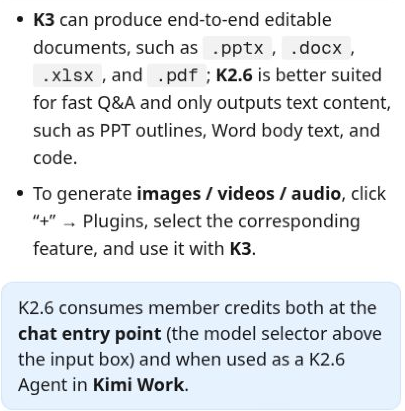
There are also differences within the online service. The current documentation presents K2.6 for conversation and text responses, and K3 for complex tasks and editable file creation. That distinction matters: text arranged as slides still leaves you with the job of building a presentation. If you need a file to deliver, the relevant file-generation option must be available in your account.
Most of the capability descriptions below come from the kimi.com Help Center. There is also a service and a set of policy pages at kimi.ai, and information about plans, allowances, or privacy does not necessarily apply in the same way to both. Check the options and terms for the account you actually use.
The interesting strength: working with existing material
The Help Center describes support for PDF, Word, and Excel files, presentations, images, and other file types. Dedicated document and spreadsheet tools are also intended for editing and creating files, rather than only answering questions about their contents. These capabilities are relevant to office workers, independent professionals, and anyone gathering sources before writing.
Consider a business owner who has received three supplier quotes. A useful comparison needs to separate the base price from the total, identify payment terms, and highlight what each quote leaves out. Organizing that information in a table could save manual work, provided the details are preserved. This illustrates the kind of task worth using to assess Kimi; it is not an output produced and tested for this review.
The finished output should remain easy to correct, with clear headings, traceable data, and a file you can continue editing. In a spreadsheet, formulas, units, and currencies matter too. Attractive formatting cannot make up for an incorrect total, and the time spent checking against the source is part of the real cost of the work.
For a systematic way to check a summary against the original document, see our guide to summarizing a PDF with ChatGPT. The verification process can be adapted to other tools.
Deep Research still needs source checking
Deep Research is described as a process that searches the web, processes sources, and prepares a report with references. It may suit learning about a field or gathering material before a decision. This is a different use case from a short chat question. According to the company, the process typically takes 10 to 25 minutes. That is the estimate in the documentation, not a timing measurement we made.
A report with references gives you a better starting point for verification, but each reference needs to support the statement attached to it. For research aimed at a specific market, the local context and the source’s date are especially important. A price or a rule from another country can lead to an unsuitable conclusion. We consider a report useful when readers can trace a claim back to its source and understand what remains unknown.
Kimi in other languages: writing, documents, and long inputs
Kimi claims multilingual capabilities, but check whether your language appears among the interface languages listed on its capabilities page. A missing language does not establish that the tool cannot answer in it, and a listed one does not guarantee natural wording or correct right-to-left formatting. We did not test either here.
If you create documents in a language other than English, check paragraphs that mix two languages, as well as numbers, punctuation, and headings. Wording that looks good in chat may behave differently after export to Word or PDF. A test with a short, familiar piece of public material provides a better basis for a decision than a marketing example.
Support for long inputs also depends on the product, model, and plan. The chat help pages describe around 128,000 tokens for K2.6 and up to one million tokens for K3, but eligibility conditions are not consistent across the documentation and should be checked in your account. Tokens are units used to process text, not a fixed number of words. A large context window does not guarantee that every detail will be identified or included in the response.
If most of your work involves writing in a language other than English, compare the correction time on the same task before choosing a tool. For a related approach to organizing ongoing work and reference material, see our guide to Claude Projects.
What does Kimi cost, and what should you check?
When checked on October 4, 2026, Kimi’s official plan information was inconsistent. The Help Center pricing page still listed Andante, Moderato, Allegretto, and Allegro, while the Kimi Code documentation already distinguished new plans from legacy plans. This review therefore does not provide a verified purchase price. Before subscribing, check the plan name, billing currency, final price, and included capabilities in your account.
The documentation describes a shared credit pool for subscription features, with consumption linked to token usage. According to the model-selection page, K2.6 chat also consumes credits. Allowances and benefits can vary by plan and product, and the task counts shown are estimates. It would therefore be inaccurate to describe all Kimi capabilities as free or unlimited.
Occasional users have no reason to default to the most expensive plan. Workload is what matters: an occasional research report, weekly presentations, and ongoing document processing are different needs. If you already pay for another assistant, ask whether Kimi shortens a particular stage of your work enough to justify an additional subscription.
Privacy before uploading files
Check which policy applies to the service and account you use. The kimi.com Help Center describes storage in mainland China and possible use of content for training after processing and de-identification. The kimi.ai policy, updated in August 2026, identifies NOVASCENT PRIVATE LIMITED as the provider and describes use of content for improvement and training, with possible transfers to servers outside your country of residence. We did not verify where data from a given account is stored.
The kimi.com Help Center describes requesting a training opt-out through support, with a processing time of 5–7 business days after identity verification. We did not test this process. Before uploading sensitive material, establish which policy applies to your account and obtain confirmation of the opt-out rather than assuming the information will not be used for training.
The privacy policy also distinguishes third-party services, where processing is governed by those services’ own policies. Connecting a plugin or granting file access requires a separate check of the data involved and the permissions granted. For an initial trial, use public material or information with identifying details removed. Client documents, medical information, and business secrets require compliance with your organization’s policies and the appropriate permissions.
If your task involves a spreadsheet, our guide to cleaning Excel data with ChatGPT while preserving the originals explains how to keep the source intact. Save a copy before making changes, and check formulas and data against it.
Who might Kimi suit?
Kimi may suit people who need to read, organize, and write from substantial amounts of material and are willing to check the results. It is a less obvious fit for someone who only wants a few short answers, needs proven writing quality in a language other than English in working files, or is subject to organizational restrictions on transferring information.
Overall, the documentation presents an interesting option for working with information and documents, particularly when you need to move from reading material to preparing a file. Our recommendation is to assess an actual output before committing: are the details correct, do the language and layout meet your needs, and is the cost clear? Without those hands-on checks, there is no basis for declaring Kimi a better replacement for an assistant that already works for you.
How to assess Kimi with a small task
Start with two public or fictional supplier quotes that contain no client details. Ask for a comparison that separates what the documents say from what they leave unspecified:
Compare the two documents. For each supplier, list the price, what is included, payment terms, and missing information. Do not fill in missing data. For each detail, identify the source document and page. If this account supports it, create an editable file; otherwise, say so explicitly.
This is a suggested exercise, not one performed for the review. Check three things before deciding on a subscription: whether every number matches the source, whether the text remains readable in the exported file, and whether credit consumption is clear in your account.
Frequently asked questions about Kimi
Does Kimi work well in languages other than English?
Multilingual capabilities do not guarantee a localized interface or Word and PDF files with correct text direction. We did not test output quality or exports in other languages for this review, so check a short output before using the service routinely.
Can Kimi create a presentation or a Word file?
The Kimi.com Help Center describes editable file creation in K3. Verify that the model and feature are available in your plan and version of the service. This review does not include a file generated during an account test.
Is Kimi free?
This review does not include a verified checkout price. The documentation describes credits and differences between plans, and the service’s pages differed in their naming and pricing information. Check the offer shown in your account before committing.