Scenario review, short version: it’s the platform game studios like Epic Games and Supercell use to generate images, video, 3D and audio in a consistent style, and its main strength is training a model on your own character. For a solo creator, it’s worth it mostly if you need the same character across a lot of assets and are willing to pay for Pro at $45 a month to train a model. If you just want short social videos, simpler tools will do.
Note: this is a first look based on Scenario’s official information, not a hands-on test. We didn’t sign up or pay for a plan. We checked every detail on October 13, 2026 on the official website, pricing page and developer docs.
Quick answer
- Who it’s for: teams and creators who need a consistent character or style across many images and videos.
- Price: 50 free credits a day for personal use, and paid plans from $15 a month.
- Custom model training: only on Pro ($45 a month) and above.
- Not tested: output quality and how many credits each generation costs.
What is Scenario, and why do game studios use it?
Scenario describes itself as an AI platform for creative production. Instead of one model, it gathers hundreds of models from different companies in one place: the homepage says 650+ models from 40+ providers, while the models page says 500+. They include GPT Image 2.5, Seedance 2.5, Kling V3 and ElevenLabs audio models. The developer docs also list Google’s Veo 3.1 and lip-sync models from Sync Labs.
According to its About page, the company has worked in this space since 2022, starting with early Stable Diffusion experiments. It says it powers studios such as Scopely, Epic Games, Supercell and Tripledot Studios. Its focus is control and consistency rather than trends: a character that looks the same in every asset, and assets that go straight into a game.
How does Scenario keep a character consistent?
There are two ways. The first is reference images: you upload a picture of the character and ask the model to stick to it. The second, which Scenario emphasizes, is training a custom model. Per the pricing page, you upload 5 to 15 images of a character or object, or 10 to 30 images of a style, and 1024×1024 works best. Training typically takes 30 minutes to a few hours. You can also combine several trained models in one generation, for example a character and a style.
If you’d rather try without a dedicated tool first, see our guide on how to keep the same AI character across five scenes.
What else does the platform do?
- Images: generate, edit, upscale and split into layers.
- Video: turn an image into a clip, control the first and last frame, and extend a take.
- 3D: turn one image into a textured 3D model and prepare it for a game engine.
- Audio: sound effects, music and voice from a prompt.
- Workflows and agents: chain several models into one workflow the whole team can run in one click, plus an assistant called Genie that picks models and fills in the form.
- API and MCP: Scenario says you can connect Claude Code, Codex or Cursor through MCP, or call the REST API with TypeScript and Python SDKs. There’s also an experimental Blender plugin.
How much does Scenario cost?
| Plan | Price per month | Credits per month | Model training | Best for |
|---|---|---|---|---|
| Free | $0 | 50 per day | No | Trying it out, personal use only, no credit card |
| Starter | $15 | 1,500 | Not listed | Casual creators, single user |
| Pro | $45 | 5,000 | Yes | Creators who need a custom model, priority queue |
| Max | $75 | 10,000 | Yes | Teams of up to 25 users |
| Enterprise | Custom | Consumption-based | Yes | Organizations, 12-month contract |
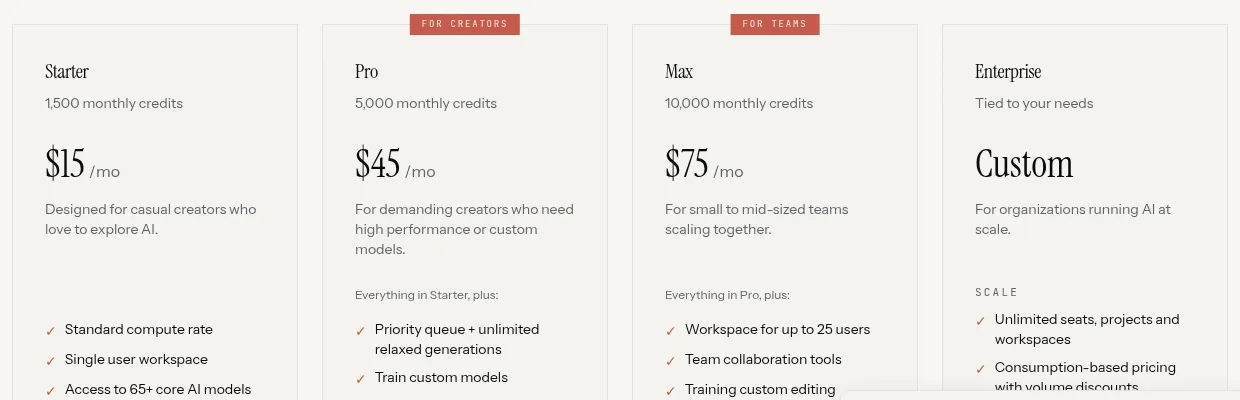
Every generation uses credits, and the amount depends on the model and resolution. Scenario doesn’t publish a single per-generation price list; you see the cost in the generator before you run. Credits don’t roll over, and annual billing is 33% cheaper.
Licensing and privacy: the fine print
Per the pricing page, all paid plans include a full commercial license, so you can sell your outputs or deliver them to clients. Free plan outputs are for personal and evaluation use only.
On privacy, we found a gap worth knowing about. The pricing page FAQ says your data is never used to train Scenario’s models. But the summary of the terms says that on self-serve plans the company may use your content and anonymized insights to improve its services and AI. An explicit no-training commitment is listed under Enterprise. If you’re working on a client’s character, read the terms before you upload.
Scenario vs. Higgsfield: which suits creators?
We tested Higgsfield ourselves in our hands-on Higgsfield review. The main difference is the audience:
- Scenario is built for production teams: model training, workflows, 3D and game-engine assets, an API and MCP.
- Higgsfield leans toward content creators and short videos. According to Higgsfield’s official site, it offers Soul ID, which trains a character identity on 20+ images, and Lipsync Studio, which turns a character image into a talking video.
- Lip sync: both offer it. In Higgsfield it’s a dedicated tool in the app; in Scenario, Sync Labs models are listed in the developer docs. We haven’t tested lip sync in either.
If your goal is a product clip or a social video, start with our Higgsfield image-to-video guide. If you’re building a character that will appear in dozens of assets, or you work with a team, Scenario is worth a look.
Who is Scenario for, and who should skip it?
- Yes: game developers, illustrators and marketing teams who need the same character or style across many assets, and anyone who wants to connect generation to code or an agent through the API or MCP.
- Maybe: a solo creator with a recurring character, such as a brand mascot. Try the free plan first, and pay for Pro only if plain reference images aren’t enough.
- No: people who need a few images or videos a month. Simpler, cheaper tools cover that.
What we still don’t know
- What the results actually look like, and whether characters really stay consistent. We haven’t tested it.
- How many credits each type of generation costs, since the cost is shown only inside the app.
- The exact founding year. The About page only says the company has been in this space since 2022.
New to a term? Look it up in our AI glossary.
Scenario FAQ
What is Scenario?
A platform for generating images, video, 3D and audio with AI models from many providers in one place. You can train a custom model on your character or style, and work through the app, an API or MCP.
Does Scenario have a free plan?
Yes. The pricing page lists 50 free credits a day with no credit card required. Free plan outputs are for personal and evaluation use only, not commercial use.
How much does Scenario cost?
Billed monthly: Starter is $15, Pro is $45 and Max is $75 a month, and Enterprise is custom. Annual billing is 33% cheaper.
Which Scenario plan lets you train a custom model?
Pro and above. Custom model training is listed on Pro, and Max includes everything in Pro. It isn’t listed on Starter.
How many images do you need to train a character?
According to Scenario, 5 to 15 images for a character or object, and 10 to 30 for a style. Training typically takes 30 minutes to a few hours.
How is Scenario different from Higgsfield?
Scenario is built for production teams and game studios, with model training, workflows, an API and MCP. Higgsfield leans toward content creators and short videos, with Soul ID for a recurring character and Lipsync Studio for talking characters.
Scenario review: the bottom line
Scenario is a serious tool for consistent characters and styles, with model training, many models in one place and a way to plug into code. For a solo creator, it’s worth it if your character is the core of your work and you’re willing to pay for Pro. Everyone else should start with the 50 free daily credits and see whether it gives you something your current tools don’t.
Sources
- Scenario: pricing page and its FAQ, checked October 13, 2026
- Scenario: homepage, checked October 13, 2026
- Scenario: About page, checked October 13, 2026
- Scenario: models page, checked October 13, 2026
- Scenario: terms and conditions, checked October 13, 2026
- Scenario developer docs: Google and Sync Labs video models, checked October 13, 2026
- Higgsfield help center: “How to Use Lipsync, Voiceover, and Aspect Ratios,” checked October 13, 2026
- Higgsfield blog: “How to Take a Character From Still Image to Talking Video Without Losing Their Identity,” checked October 13, 2026