To turn published articles into a Canva carousel, pick one message, give each page a clear job, prepare an editable PPTX, import it into Canva, and check language and layout before exporting PNG and PDF files. In our test, three published Maitz guides became a six-page carousel at 1080 by 1350 pixels.
For current plans, prices and every Maitz article on Canva and Gamma, see our Canva and Gamma hub.
Tested on October 4, 2026: we imported a prepared PPTX into Canva, inspected its native structure and exported PNG and PDF files. A separate copy received a temporary text, size and color edit. This English guide describes that same test, which used a right-to-left carousel; a separate English carousel was not produced.
When useful articles already exist, a carousel begins with editing. Pick the message, divide it into pages and leave room for readers to scan. For this test, we used three published Maitz guides about Higgsfield and built a real carousel from their findings in a right-to-left language.
The result contained six pages at 1080 by 1350 pixels, with short headings, images from the tests and links to the full guides. These were our project dimensions. Check your destination’s current requirements and publishing preview before uploading your own carousel.
Keep the findings and their limits
The source articles covered camera moves, continuity of a character and object, and a 15-second product video. The qualifications mattered: the lateral camera move failed the test, small facial and framing differences remained, and the product video needed a correction to its opening. Shortening the text had to preserve those facts.
We reused Maitz’s existing text and owned assets. The bottle, product and adult character in the examples are fictional; the described tests were performed. We added no sales results, campaign claims or promise that every attempt would behave the same way.
Give each page a clear job
- Opening: three real Higgsfield tasks, showing what worked, what was corrected and what remained limited.
- Camera moves: one image and three instructions. The push-in and arc produced useful results; the lateral move failed the test even after a correction.
- Continuity: continue from the previous frame. A frame from the preceding clip helped preserve the same hand and action. A shorter walk prevented premature placement, while small facial and framing differences remained.
- Product video: three shots in 15 seconds. The cropped opening was corrected and titles were added in editing. The final vertical video was exactly 15.000 seconds long and had no audio.
- Checks: does the motion match the instruction, do the hand and object remain consistent, and are the titles and duration correct in the export? Keep rejected attempts too.
- Further reading: the three full Maitz guides, including videos, prompts, corrections and costs.
These descriptions explain the actual tested pages in English. Read just the headings in order before styling your own version. If the sequence skips a necessary explanation, fix the copy first. When shortening a page, retain any condition that changes the meaning.
Prepare editable elements and import the file
We prepared the initial design as a PPTX with separate text boxes and images. Maitz colors, consistent numbering and a fixed website position connected the pages. The Latin name Higgsfield sat separately from the right-to-left lines, while short explanations stayed above or beside the images.
Our test imported the file through the connected Canva app. For a manual desktop-browser workflow, Canva’s documentation describes dragging a PPTX onto the homepage or using Upload, then opening the imported design in the editor. That manual upload route is documented guidance; it was not the route used in this test.
After import, we verified six pages at the intended dimensions. Native inspection found 69 text boxes and four image elements marked editable. In a separate one-page copy, the connected app replaced one text box with a short right-to-left test line ending in 2026, set the font size to 36 and tested a color change.
The first dark color lacked contrast. A white correction made the text readable, with correct right-to-left order in Canva’s preview. The text appeared toward the left of the box, so right alignment remains unverified. The changes were checked in a preview only and were not saved. We did not change font family, edit text manually in the browser, test save and reopen or export the edited copy.
Inspect language and layout
A local preview of the source file showed a right-to-left word-order problem. We added explicit right-to-left paragraph metadata to the source before importing it. We then inspected all six Canva previews and found correct reading order without clipped text. This result applies to the tested file; it does not establish reliable conversion for every right-to-left presentation.
In a right-to-left language such as Arabic or Hebrew, inspect headings, English names, numbers and punctuation separately. Check image crops and contrast too. In our import, links changed from the source blue to a readable muted teal. That color remained in the exported files, so visual review still mattered even when the content survived.
Export actual PNG and PDF files
- Open Share, then Download. We selected PNG, size 1, all six pages and transparent background off. The native download produced a ZIP containing exactly six images, each 1080 by 1350 pixels.
- For a copy with links, return to Download and select PDF. The tested interface offered Digital and Print presets; we chose Digital and all six pages.
- Open the downloaded files. We inspected every PNG at full size and at approximately 360 pixels wide, then reviewed all six PDF pages. This visual check found no clipped lines, incorrect reading order or problematic image crops.
Headings and main copy remained legible in the smaller view. Image captions and the website footer are smaller; enlarge them before publishing if readers need to read those details without zooming.
The final PDF page contained four unique verified URI destinations: the three articles and the Maitz website. Their destinations had been checked against the public pages. A PNG remains a static image; displaying a URL in it does not make the text clickable.
Use the result within its tested scope
This workflow turned existing content into a real Canva design and two checked export formats. Both downloads completed without a purchase or Pro upgrade. We used no AI generation or paid assets, so this test says nothing about their quality or usage limits.
The design remained accessible only to its owner. Blank-canvas creation, font-family changes, print export and social publishing were not tested. Before publishing your own carousel, check page order, cropping and readability again in the destination’s actual preview.
Download the tested carousel
These files were exported from Canva during the test. The carousel is in a right-to-left language; both guide versions describe the same case.
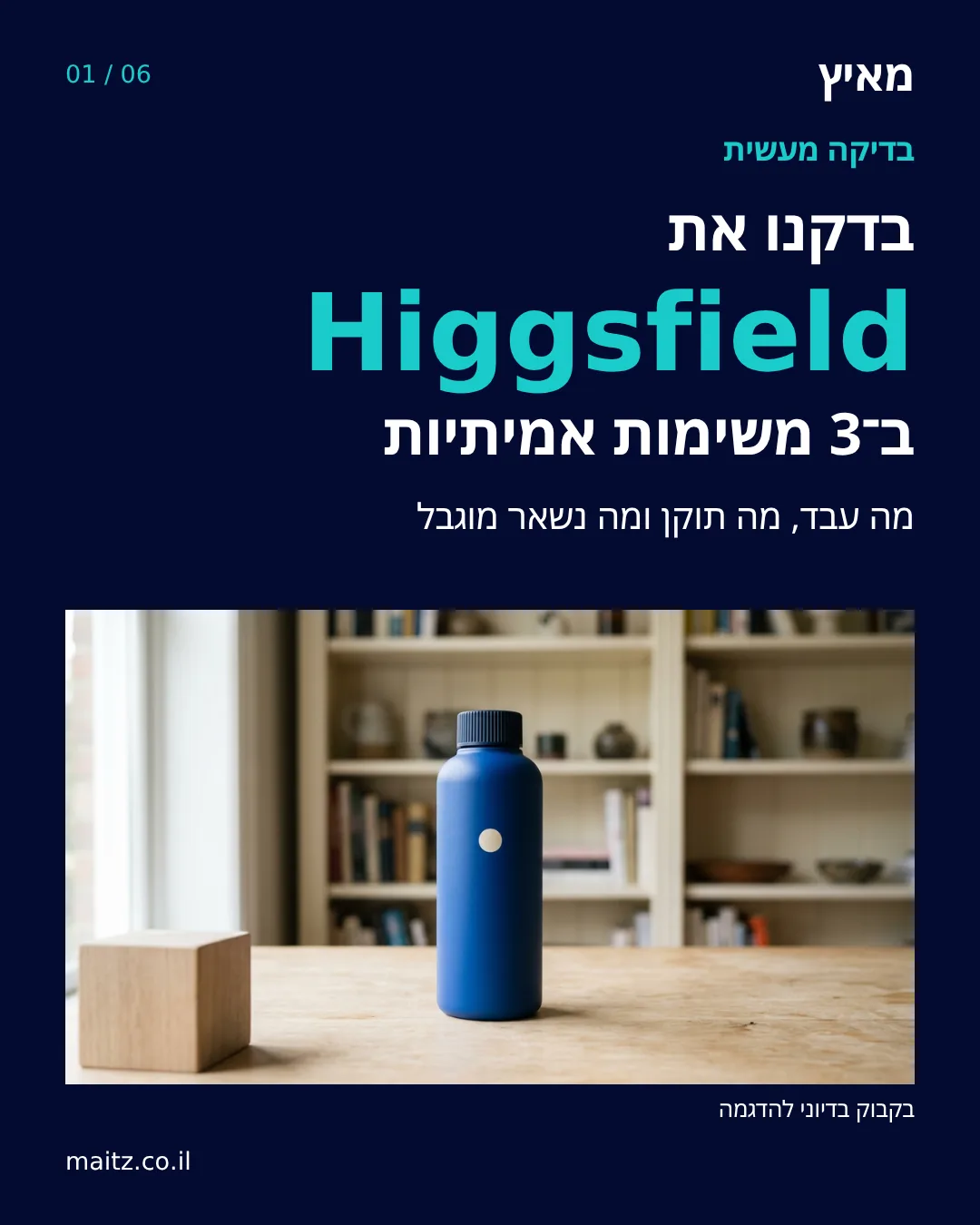
Download all six PNG pages as a ZIP
Download the PDF with article links
Related reading on Maitz: Maitz camera movement test
Related reading on Maitz: Maitz character and object continuity test
Related reading on Maitz: Maitz 15 second product video guide

