To create flashcards and quizzes in Gemini Notebook (formerly NotebookLM), open a notebook you can edit, add only your practice sources, and choose Flashcards or Quizzes in Studio; the pencil icon opens customization for difficulty and quantity. Before you practice, check every question, answer and explanation against the source itself, because a citation alone does not prove an answer is correct.
Transparency: This guide is based on Google documentation checked on October 4, 2026. The fictional materials and reference answers were written for the guide. They are not results from a product test. We have not tested an account’s interface, language quality, quota or exported file.
A practical guide for adult learners and instructors turning reading material into a checkable practice set.
A useful flashcard tests one idea and preserves the condition that makes its answer true. Start with a short set, check it against the source, and then practice. A polished question can still teach the wrong deadline if it overlooks an updated procedure.
The current name is Gemini Notebook. Google announced the change from NotebookLM in July 2026. We retain the familiar search term in the title and use current documentation for the workflow. [1]
For what the free Gemini plan covers and what paid plans add, see our Gemini review; the rest of our coverage of Google’s AI tools is collected in our Gemini guide.
Download the practice sources and checking templates (ZIP). Keep the answer key outside the product notebook for independent checking.
Choose material you can verify
Pick a short chapter or two documents you are allowed to upload. Before generating anything, list the facts the material should teach and the information it does not provide. For a first exercise, use invented material rather than student records, client documents or confidential training manuals.
Google lists browser availability in specific countries, including the United States and Canada, subject to account and age requirements. Managed accounts may need an administrator to enable access. English is listed as an output language, but support can vary by feature. Select the intended output language and inspect the actual wording. [5, 8]
Use a dedicated notebook containing only the exercise sources. Chat source selection is documented separately from Studio customization. Check generation-source controls too if they appear; do not assume that selecting sources for chat automatically controls every Studio output. A small, isolated notebook makes the intended scope easier to audit. [2, 3]
A two document exercise with one changed rule
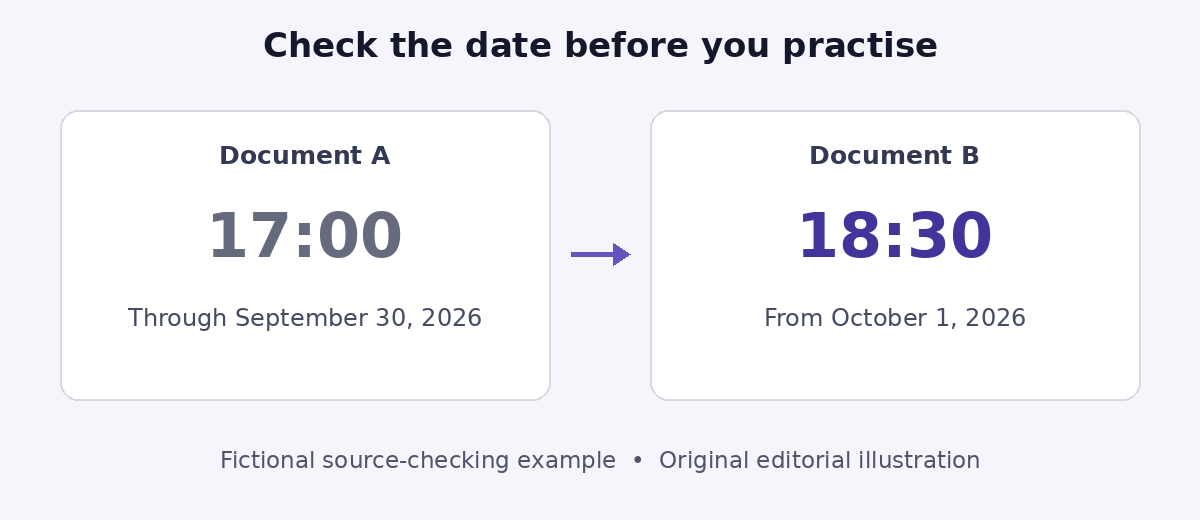
The Atlas Adult Training Center is fictional. Its two procedures contain 12 distinct fact identifiers, F01 to F12. F07 appears twice because a return cutoff changes. Weekend opening hours are deliberately absent. The downloadable kit contains the same two documents as plain text files, so you can check answers against the exact wording.
Document A Kit procedure
Published September 1, 2026. Each kit has 8 route cards (F01) and one blue instruction card (F02). Kits are stored on shelf C (F03). Reserve at least 24 hours before collection (F04). Each borrower may take at most two kits (F05), for three calendar days (F06). The latest return time on the return date is 17:00 (F07). Record the kit identifier at handover (F08).
Document B Procedure update
Published September 20, 2026. From October 1, 2026, the return cutoff is 18:30, replacing 17:00; the old rule applies through September 30 inclusive (F07). Return at desk B (F09). Report a missing card before reshelving (F10), to Dana, the kit coordinator (F11). Inventory takes place on the first Monday of each month (F12). The other instructions in A remain in force.
Keep A and B as separate sources with their titles and dates. For real documents, inspect what the product actually imported. A successful upload does not prove every relevant passage is readable. Google supports text and PDF files, with source-type and size limits documented separately. [9]
Generate a small set with a clear learning goal
With edit access, choose Flashcards or Quizzes in Studio. The pencil opens customization, including difficulty. Quantity controls offer fewer, standard or more. [2]
Begin with fewer items at medium difficulty. An exact number in a prompt is a request, not a guaranteed output count. Suggested flashcard prompt:
Create a small set of English flashcards for adult learners using only Documents A and B. Test one fact per card. Include the change to F07 and distinguish publication date from effective date. Do not fill gaps with outside information. Rewrite any question that permits two reasonable interpretations.
Use the same sources for a quiz, but ask for application as well as recall:
Create a short English quiz from A and B. Mix direct recall with brief scenarios. Each question should have one answer supported by the sources. Ask separately about the return cutoff on September 28 and October 4, 2026. Do not invent weekend opening hours.
Audit the question and the explanation
Keep the source open beside the set. For each item, check whether its wording is unambiguous, whether the answer applies on the stated date, and whether the explanation points to the right passage. Explain can expand an answer. In chat, selecting a citation opens its context. A citation is a route to evidence, not proof of correctness. [2, 3]
| Check question | Our edited reference answer | Evidence |
|---|---|---|
| What is the return cutoff on October 4, 2026 | 18:30; the update took effect on October 1 | B, F07 |
| What was the cutoff on September 28, 2026 | 17:00; the published update was not yet effective | A and B, F07 |
| How many route cards are in two complete kits | 16, calculated as 2 × 8; exclude instruction cards | A, F01; calculation |
| What are Saturday opening hours | Not specified in the two sources | Absent |
“When must a kit be returned?” is an ambiguous card. It could ask about the loan period or the daily cutoff. Replace it with “What is the latest return time on October 4, 2026?” If an explanation cites only A to answer 17:00 for that date, pause practice and correct the item.
Check the claim “Kits must be returned by 17:00 on October 4” against A and B only. Identify the relevant sections, effective date and corrected wording. Give a short supporting quotation I can open or find. Say when the claim lacks support. Do not search for new information for this check.
This is a scope instruction, not a technical guarantee that the product never uses outside information. Current chat documentation also describes broader experimental capabilities. For this learning exercise, evaluate the evidence actually supplied and keep the task limited to the chosen material. [3]
Correct the set before you practice again
Keep a simple issue log: unclear question, wrong answer, wrong date, weak citation or missing information. If the interface does not offer the edit you need, keep a corrected version in your own practice document. Regenerating the whole set to fix one deadline makes the comparison harder.
Answer before revealing the back of a card, then explain why the rule applies. Flashcards can track missed items for another pass. Google documents CSV download for cards; Play Books publisher restrictions may prevent it. That does not establish a quiz-export feature. [2]
If you download a CSV, open it and check row counts, line breaks, question–answer pairing and non-English text where relevant. Do not assume explanations, citations or learning progress survived the export. Keep the sources and corrected wording alongside it.
Check account limits and privacy before scaling up
Check Usage in your account before a large generation. The general quota page describes compute-based usage; the work/school page still lists daily per-feature quotas by license. These pages do not justify one universal daily quiz allowance. The useful limit is the one that applies to your account and current workflow. [4, 7]
For personal access, submitted feedback may include source material and outputs for human review. Workspace protections depend on the license and service access; a work email address alone does not establish enterprise-grade handling. Check permission to upload and your organization’s requirements before using sensitive material. [6, 7]
If you also use Gemini chat, check its training settings separately. Our guide to stopping ChatGPT, Claude, and Gemini from training on your chats shows the exact setting.
Finish with a short set whose answers you can defend from the evidence. If you need to understand the document first, our guide to summarizing a PDF and checking accuracy covers that earlier step. Return to flashcards when you are ready to test recall and understanding.
NotebookLM flashcards and quizzes FAQ
Are NotebookLM and Gemini Notebook the same tool?
Yes. Google announced in July 2026 that NotebookLM is now called Gemini Notebook. This guide follows the current documentation, which uses the new name.
Can I export flashcards to CSV?
Yes. Google documents CSV download for flashcards, though Play Books publisher restrictions may prevent it when an ebook is a source. That does not establish a quiz export feature. After downloading, check row counts, line breaks and question–answer pairing.
How do I check a quiz answer against the source?
Keep the source open beside the set and check that the question is unambiguous, the answer applies on the stated date, and the explanation points to the right passage. Explain can expand an answer, and in chat, selecting a citation opens its context. A citation is a route to evidence, not proof of correctness.
Are there usage limits for flashcards and quizzes?
There are limits, but no single universal daily allowance. Google’s general quota page describes compute-based usage, and the work/school page lists daily per-feature quotas by license. Check Usage in your account before a large generation.
Sources
Official Google documentation, checked October 4, 2026. Interface labels and eligibility can change.
- Google Blog: “NotebookLM is now Gemini Notebook” (the rename)
- Google Help: “Generate Flashcards or Quizzes in Gemini Notebook”
- Google Help: “Use chat in Gemini Notebook” (chat and source citations)
- Google Help: “Manage your Gemini Notebook usage limits”
- Google Help: “Change output language in Gemini Notebook”
- Google Help: “Privacy and Terms of Use in Gemini Notebook”
- Google Help: “Use Gemini Notebook with a work or school Google account”
- Google Help: “Learn about Gemini Notebook” (availability and account requirements)
- Google Help: “Add or discover new sources for your notebook” (importing sources and limits)

