The X Subscription is SpaceXAI’s new single plan for Grok, Grok Bot, Cursor and X Premium. It has five tiers, from Free at $0 to Ultra at $200 a month, and Grok Bot is included only from Premium ($30 a month) up. If you already pay for Cursor, SuperGrok or X Premium, you don’t have to switch: your current plan stays exactly as it is.
The plan was announced on October 12, 2026. We checked the details on October 13, 2026 against the official x.ai announcement and pricing page and Cursor’s official forum post. We didn’t buy a plan for this article, so there are no usage measurements here. Every number below comes from those official pages.
Quick answer
- What it is: one subscription for Grok, Grok Bot, Cursor and X, with a shared usage pool that refreshes weekly.
- Grok Bot: included on Premium and above, not on Free or Plus.
- Existing subscribers: no need to switch. The option to switch is rolling out in your billing settings.
- Prices: USD per month, before taxes.
What is The X Subscription, and what does it replace?
Until now, each product was sold on its own: Cursor had its plans, SuperGrok covered the Grok chatbot, and X Premium covered the social network. Grok Bot came with those subscriptions. According to the announcement, The X Subscription folds them into one plan: Grok for chat, voice, images and video; Grok Bot for AI teammates that get work done; Cursor for local and cloud coding agents; and X for the checkmark, creator tools and fewer ads.
The big change is the usage pool. Paid plans include one pool of Grok model usage shared across Grok, Grok Bot and Cursor. The pricing page says it refreshes weekly and that usage costs vary by product. In practice, long chats or image generation draw from the same pool your bots run on.
The announcement also says the previous plans are no longer available for new sign-ups. Anyone signing up from now on gets The X Subscription.
How much does each X Subscription plan cost, and what’s included?
| Plan | Price per month | Included usage | Grok Bot | What else to know |
|---|---|---|---|---|
| Free | $0 | Limited | No | Daily Grok access, a starter allowance for Cursor’s coding agents, and standard X |
| Plus | $8 | Base | No | Grok Chat, Voice, Imagine and Build, the Grok API, Cursor (Grok models only), and an X checkmark |
| Premium | $30 | 4x Plus | Yes | Latest Grok models, video generation, cloud agents and automations, code hosting and AI code reviews. Per the announcement, the benefits of SuperGrok, Cursor Pro and X Premium+, previously $90 a month combined |
| Super | $100 | 15x Plus | Yes | Priority model access at peak times |
| Ultra | $200 | 50x Plus | Yes | Earliest access to all products and models |
| Teams | From $30 per user | 4x to 50x Plus, by seat tier | Yes | Same per-seat price as Premium, Super or Ultra, plus SSO, admin controls and consolidated billing |
| Enterprise | Custom | Pooled across the organization | Yes | Through sales |
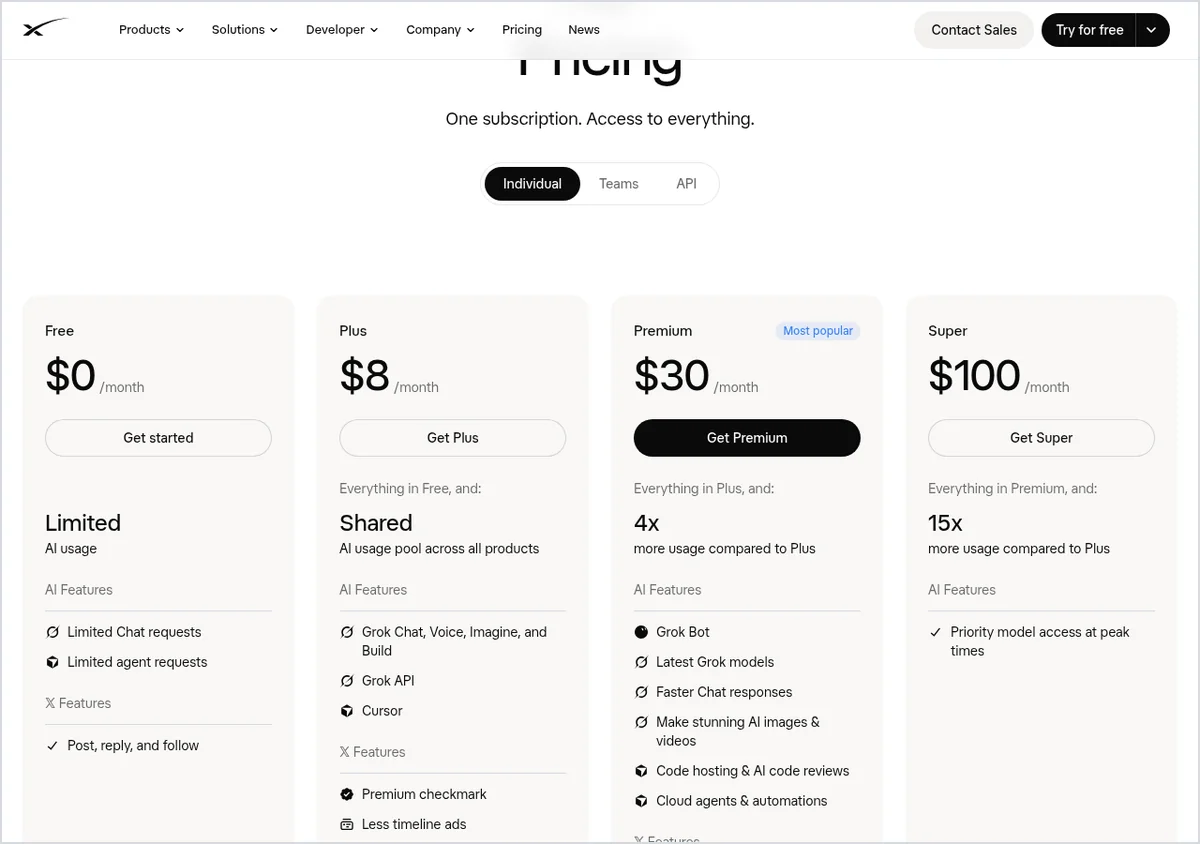
Third-party models in Cursor are available on Premium and above, but they aren’t included in the monthly price. You pay API list prices through top-ups, and you can set spending caps. On Plus, Cursor works with Grok models only.
What changes for Grok Bot users?
- Entry price for new customers: Grok Bot now starts at Premium, $30 a month. Our Grok Bot pricing guide found the cheapest way in on October 3 was Cursor Pro at $20. The announcement says the previous plans are closed to new sign-ups.
- One pool for everything: your bots share usage with your chats, images and Cursor work. Heavy Grok use in a week leaves less for your bots that week.
- More usage per dollar, according to the company: SpaceXAI says each new tier delivers more usage per dollar than the comparable plan it replaces, and at least twice as much coding usage with Grok models as the comparable Cursor plan. That’s the company’s claim; we haven’t tested it.
- Free trial: neither the announcement nor the pricing page mentions the Grok Bot free trial. It isn’t clear whether it still works the same way, so check your account before you sign up.
Which plan should you pick?
The official x.ai recommendation: Premium for new AI users, Super for daily agent users, Ultra for power users, and Plus for social creators with limited AI usage. Here’s our take by use case:
- You only want Grok and an X checkmark: Plus at $8. Note that it doesn’t include Grok Bot.
- You want Grok Bot for everyday work: Premium at $30 is the cheapest plan that includes it. Start there and watch how much of your weekly allowance is left in settings.
- You run bots and routines daily, or code a lot in Cursor: Super at $100, with 15x the usage of Plus. Upgrade only if you keep running out on Premium before the week ends.
- A team or business: Teams costs the same per seat as the individual plan and adds admin controls, SSO and one bill.
Already a subscriber? Here’s what to do
- Nothing, if you don’t want to. Per the announcement, your plan, price and features continue as they are.
- Check your billing settings. The option to switch is rolling out over the next few days and shows up in your account billing settings when it’s available to you. Switching comes with limited-time offers, which you can only see there.
- Pay for more than one today? The upgrade flow links your X, Grok and Cursor accounts and recommends a plan based on what you have. If you switch, your current plans end with a prorated refund for unused time.
- On an annual plan? You keep every day you paid for. Your term runs to its end date unless you choose to upgrade.
- Use third-party models in Cursor? On a current Cursor plan, your included third-party usage continues until you switch. After that it’s billed separately, so check how much you use before you move. If you’re weighing coding tools, see our Cursor vs Claude Code comparison.
Two more things: the pricing page says subscriptions are sold only through the official website, not resellers, and you can cancel anytime, at least 24 hours before renewal.
What we still don’t know
- Exact usage amounts per plan. Only the ratios between plans are published.
- How much of the shared pool a typical Grok Bot task uses. x.ai says costs vary by product but publishes no table.
- What the limited-time switching offers include.
- When the switch option will reach every account.
For all our coverage of the product, see our Grok Bot guide. New to it? Start with Grok Bot explained.
The X Subscription FAQ
What is The X Subscription?
It’s one SpaceXAI subscription that bundles Grok, Grok Bot, Cursor and X Premium. It has five individual plans (Free, Plus, Premium, Super and Ultra), plus Teams and Enterprise for organizations.
Which X Subscription plan includes Grok Bot?
Premium and above: Premium, Super, Ultra, Teams and Enterprise. According to the comparison table on the pricing page, Free and Plus don’t include Grok Bot.
I already pay for Cursor, SuperGrok or X Premium. Do I have to switch?
No. The official announcement says your current plan, price and features stay as they are, and you can switch anytime from your billing settings. The company says it will eventually move remaining customers, but there’s no timeline yet and it promises advance notice.
How much usage does each plan include?
The company doesn’t publish exact amounts, only ratios: Premium gives 4x the usage of Plus, Super 15x and Ultra 50x. The pool is shared across Grok and Cursor and refreshes weekly.
What happens if I run out of usage mid-week?
You can keep going with top-ups or wait for your allowance to refresh. Your remaining usage is shown in your account settings.
Are the prices before tax?
Yes. The pricing page says prices don’t include applicable taxes or fees such as VAT, so the amount at checkout can be higher.
Bottom line
If you want Grok Bot, the cheapest plan that includes it is Premium at $30 a month, and that’s the place to start. Existing subscribers can wait: there’s no requirement to switch, and it’s worth checking which switching offer your billing settings show before you decide.
Sources
- x.ai: “Introducing The X Subscription,” announcement dated October 12, 2026, checked October 13, 2026
- x.ai: pricing page (Free, Plus, Premium, Super, Ultra, Teams, Enterprise) and plan comparison table, checked October 13, 2026
- Cursor forum: “Introducing The X Subscription,” official post by the Cursor team, checked October 13, 2026
- Cursor: pricing page, checked October 13, 2026
- @SpaceXSI on X: launch post, October 12, 2026

