You can make a 15-second product video in Higgsfield by generating three 5-second clips from product images with Seedance 2.0 Fast at 720p, trimming each to exactly 120 frames at 24 fps, and adding all titles in the editor. Our tested run on October 3, 2026 cost 54.5 credits, including one rejected opener.
For current plans, prices and every Maitz article on AI video tools, see our AI video tools hub.
A short product video needs a clear introduction, a detail worth looking at and an ending that is easy to read. For this test, we generated three shots of a fictional bottle, replaced an opener that cropped the base and added all typography in the edit. The result is a silent vertical video lasting exactly 15.000 seconds, supplied in two language versions and a clean version without text.
This is a direct-generation-plus-editing workflow using Higgsfield and Higgsedit. It was tested on October 3, 2026, through Higgsfield’s connection to an AI assistant (MCP), not the website. Plan and price details were rechecked against Higgsfield’s official pages on October 8, 2026. We did not test the website interface, Marketing Studio or Ads Studio, and we did not measure performance in an advertising campaign.
Download the English video · Download the title-free export. Both files are silent; the product is fictional and made for demonstration.
Step 1 Give each shot one job
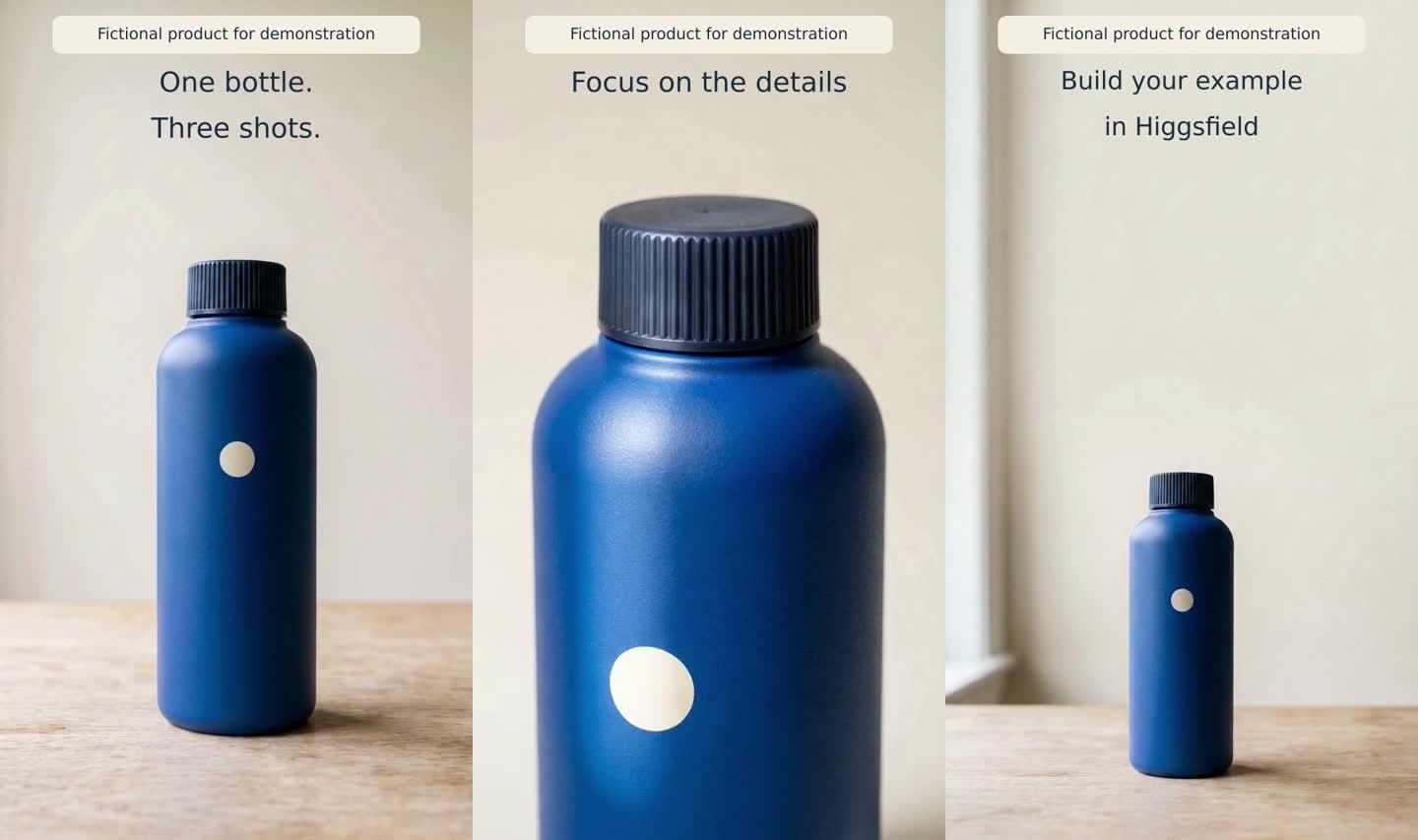
Our fictional cobalt bottle has a ribbed cap and a cream circle. It is not for sale. The copy describes the exercise without inventing capacity, insulation, material-performance or price claims.
- Seconds 0 to 5: introduce the full bottle with a forward move. Title: One bottle. Three shots.
- Seconds 5 to 10: show the cap and shoulders with a moving highlight. Title: Focus on the details.
- Seconds 10 to 15: hold a steady end shot with negative space. Title: Build your example in Higgsfield.
The text versions display Fictional product for demonstration throughout. Keep that disclosure clear if you use the clean export publicly.
Step 2 Prepare three starting images
Use R01 from the practice pack as the consistent product reference. Generate R05, R06 and R07 with Nano Banana 2 at 1k, requested 9:16 and count=1. The actual images measured 768×1376, and each cost 1.5 credits. The connector mapped the image input role to image_references; the returned model name was nano_banana_flash.
R05 Full-product opening frame
Reframe the exact bottle from the supplied product reference as a vertical 9:16 product photograph. Preserve its silhouette, cobalt color, ribbed cap and cream circular mark. Place it upright on pale oak with a clean cream background, soft daylight from frame left, full bottle visible and empty upper quarter for later editorial text. No people, no new label, no letters.
R06 A closer look at the product
Create a vertical 9:16 close-up photograph of the exact supplied bottle. Frame the complete dark ribbed cap, rounded shoulders and upper cobalt body. Preserve every visible proportion and material; no added parts. Soft daylight from frame left, cream background, no text, no hands.
R07 Negative space for the ending
Create a vertical 9:16 end-card photograph using the exact supplied bottle, full bottle upright on pale oak, positioned in the lower center with generous empty cream space above. Keep the original silhouette, cobalt color, dark ribbed cap and cream circle. Soft daylight from frame left. No printed text, people or invented logo.
Compare the cap, shoulders, circle and color before paying for video generation. Leave room below the base as well as above the cap. Starting composition and camera motion both affect the risk of cropping.
Step 3 Generate the video shots
All clips used Seedance 2.0 Fast: seedance_2_0 with mode=fast, 720p, 9:16, a requested five seconds, count=1 and generate_audio=false. Returned parameters included seedance_2_0_fast. Each clip cost 12.5 credits. Attach each reference as start_image.
Paste the shared paragraph followed by the shot instruction. Do not ask the image or video model to draw the final titles, in any language.
Use the supplied image as the first frame. Preserve the exact fictional cobalt bottle, silhouette, material, dark ribbed cap and cream circular mark. Vertical 9:16, one continuous five-second product shot, no cuts, people, hands, invented labels, new parts, text, particles or liquid. The bottle remains closed, rigid, upright and stationary. SHOT:
A01 Opening from R05
Very slow straight camera dolly forward toward the full bottle, constant focal length, no rotation or zoom. Keep the entire bottle visible and the upper quarter clear for text added later. Stable soft daylight and cream background.
The first attempt cropped the bottle's base late in the shot, so we rejected it as a complete five-second opener. We then used the same image and settings for this correction:
Almost imperceptible forward dolly, less than 5 percent increase in product size over the entire shot. Keep the FULL bottle including its entire base and cap visible in EVERY frame, with a wide empty margin below its base and above its cap. Never crop the bottom or top. Keep the upper quarter clear for later text. Constant focal length, no rotation, no zoom; stable soft daylight and cream background.
The retry kept the cap and base inside the sampled frames, although the product grew more than the requested limit of five percent. We accepted it as a practical opener with a documented motion-amplitude limitation. A01-retry replaced the original A01 in the final edit.
A02 Detail shot from R06
Locked camera on the cap and shoulders. One broad soft highlight moves gently across the bottle from screen left to screen right, revealing its matte surface and ribbed cap. The product does not move or deform. Keep the exposure stable.
The highlight moved across the product and the identifying details remained recognizable. It also made the surface look glossier than the matte reference. Do not treat this as evidence of a real product's finish. If exact material appearance is a commercial requirement, correct that shot or use another source of footage.
A03 Ending from R07
Locked-off tripod end shot. Hold the full bottle and background completely steady with no zoom or camera move. Keep the empty space above the bottle clear throughout for a title added later.
The ending remained nearly static and preserved the space for a title. That gave the viewer time to read without adding movement for its own sake.
Step 4 Make the duration exactly 15 seconds
Each raw clip contained 121 frames at 24fps, approximately 5.0417 seconds. Joining all three without trimming would produce 15.125 seconds. We set the edit to 720×1280 at 24fps and took exactly 120 frames, or five seconds, from each selected source.
The timeline order is A01-retry, A02 and A03, starting at zero, five and ten seconds. Use straight cuts and no speed change. The final export contains 360 frames and lasts 15.000 seconds. It is silent, with no audio stream.
Step 5 Keep typography separate and editable
Add editable Higgsedit titles using DejaVu Sans and short lines. In our second version, written in a right-to-left script (Hebrew), putting the Latin word Higgsfield on its own left-to-right line corrected a mixed-script shaping problem. Check this whenever a title mixes scripts.
In our 720×1280 export, titles sit above the product with 48-pixel side margins. Main type is 42 pixels; the ending uses 38. We moved the disclosure to the top after a low label obscured the bottle base. Check safe areas again for your destination platform.
Save a clean master and each language version. On a phone, check clipping, word order, product obstruction and contrast, especially if you change the pale background.
The actual cost includes a rejected opener
Three starting images cost 4.5 credits, three original clips cost 37.5 and the opener correction cost 12.5. Direct total: 54.5 credits. Generating R01 specifically for this exercise adds 1.5, making 56 credits. Across the series, R01 is counted once.
Including reference preparation and the rejected attempt, the direct cost was approximately 18.17 credits per selected shot. No further generation charge was observed for the two language versions or their text overlays. This is not a cash conversion, future price guarantee or timed productivity benchmark. Editing used Higgsedit; a verified numeric editing-tool release was not available.
What the same shots cost at today’s listed rates
Our numbers are recorded costs for one route on one date. Here they are next to the approximate rates on Higgsfield’s pricing page on October 8, 2026:
| Item | Recorded in our test (October 3) | Listed on the pricing page (October 8) |
|---|---|---|
| Nano Banana 2 image | 1.5 credits (1k, via the assistant connection) | 2 credits per image |
| Seedance 2.0 Fast clip, 720p, 5 seconds | 12.5 credits | About 12 credits |
| Seedance 2.0 clip, 720p, 5 seconds | Not used | About 22 credits |
| Seedance 2.0 clip, 1080p, 5 seconds | Not used | About 45 credits |
The listed image rate may assume different settings from ours, so trust the number on the Generate button. On paper, the Starter plan ($19 a month before tax, 270 credits a month) covers this 56-credit exercise about four times, and it includes Seedance 2.0 Fast, the video model used here. Two caveats: generations made outside the higgsfield.ai website, including through MCP, always deduct credits, and Unlimited or free generations apply only on the website.
Direct generation or Ads Studio?
Higgsfield also has dedicated ad tools. We didn’t test them; this comparison uses Higgsfield’s changelog descriptions:
| Route | What you put in | What you get | Tested by us |
|---|---|---|---|
| Direct generation and editing (this guide) | Product images and shot prompts | Shots you design, edited with your own titles | Yes, October 3, 2026 |
| Ads Studio (September 30, 2026) | A link to your website, brand settings and products | Static ad creatives, up to 20 ads per product per batch | No |
| Ad Multiplier (visual interface added October 6, 2026) | One reference video ad of 4 to 30 seconds and up to 20 images | Variants with your own product, cast, location, script, hook or call to action, at 480p, 720p or 1080p | No |
Direct generation gives you the most control over each shot and works with any editor. Ads Studio is for static creatives, and Ad Multiplier starts from an existing video ad, so it suits teams that already have one that works.
Inspect the export before using it
- Check that there is one bottle, the cap stays closed and no new parts or invented labels appear.
- Compare product scale and material across shots. Attractive lighting can still misrepresent the surface finish.
- Verify the final file's duration and frame rate, not only the editing timeline.
- Read every title in each language and check the fictional-product disclosure.
- Add voice, music or product claims only when they fit the brief, you have the rights and the claims are supported. Those additions were outside this test.
Download the full practice pack with source images and prompts (about 22 MB). For text files only, download the lite pack with prompts, settings and logs (about 17 KB, no images or videos).
The pack includes sources, all submitted prompts, edit decisions, bilingual copy and a test log. Reviewing files requires no generation. Check current prices before rerunning; results can differ.
New to image-to-video? Start with our Higgsfield beginner’s guide to creating a video from an image.
Frequently asked questions
How many credits does a 15-second product video cost in Higgsfield?
In our test on October 3, 2026, the direct cost was 54.5 credits: three images, three clips and one replacement opener. Generating the product reference as well adds 1.5 credits, for 56. That’s a recorded cost for our settings and route, not a price guarantee.
Which Higgsfield plan works for this product video?
The video shots use Seedance 2.0 Fast, which Higgsfield’s pricing page listed for every paid plan on October 8, 2026, starting with Starter at $19 a month before tax with 270 credits. Check your plan’s comparison table for the image model you want before buying.
Can Higgsfield add titles to the video?
We didn’t ask the image or video model to draw any text. All titles were added as editable text in Higgsedit, which let us make two language versions from the same clips without generating more video.
Why trim each clip to 120 frames?
Each raw clip had 121 frames at 24 fps, about 5.0417 seconds. Trimming each to 120 frames makes exactly 5 seconds per shot, so three shots give a final video of exactly 15.000 seconds.
Does Higgsfield refund clips you reject?
We observed no refund for clips we rejected on creative grounds. According to Higgsfield’s credits guide, failed generations are usually refunded automatically, although some models may not refund failed generations.
Sources
- Higgsfield, Pricing page: individual plans and feature comparison table (checked October 8, 2026)
- Higgsfield Help Center, “How do credits work?” (updated September 22, 2026)
- Higgsfield Help Center, “How do I use Seedance?” (August 2, 2026)
- Higgsfield Changelog: Ads Studio (September 30, 2026) and Ad Multiplier (October 6, 2026)
- Maitz test log, October 3, 2026 (included in the practice pack)
For the results, limitations and credit costs across all three tests, read our hands-on Higgsfield review.

