The Grok Bot free trial is a usage credit, not a set number of days, although a 7-day window also applies. The credit drains by agent steps and tokens, not by messages, so one long task can use most of it. Start with a short, tightly scoped task, check the plan screen, then scale up.
Checked October 8, 2026, against Cursor’s Grok Bot help center and docs and the Grok Bot page on x.ai. We didn’t start a trial for this article, and Cursor doesn’t publish how big the credit is, so you won’t find usage measurements here. Everything below is either Cursor’s own wording or a clearly marked suggestion from us.
At a glance
- What you get: a one-time usage credit, plus a 7-day window to use it.
- What spends it: the work your Bots do (steps and tokens). The number of messages doesn’t matter.
- Money: the trial never turns into a paid plan, and canceling it is free. An App Store intro offer on iPhone is a different thing.
- Biggest risk: one open-ended or long task can burn most of the credit, and used credit isn’t restored.
How the Grok Bot trial works
If you’ve never used Grok Bot, start with our beginner’s guide to Grok Bot. In short, it’s an app where AI teammates called Bots work on their own cloud computer. The trial lets you try that without a paid plan. Here is what Cursor’s Plans and billing page says about it:
| Question | Official answer |
|---|---|
| What is the trial? | A usage credit rather than a set number of days |
| Is there a time limit? | Yes, a 7-day window also applies |
| What uses up the credit? | How much work your agents do, measured by agent steps and tokens, not messages |
| How big is the credit? | Not published |
| Can it be topped up or restored? | No. Credit used by a long run isn’t restored, even if you didn’t like the result |
| Will I be charged when it ends? | No. The trial never becomes a paid plan |
| Can I cancel it? | On a free-plan account, Cancel Trial on the plan screen ends it at once, removes the rest of the credit, and you can’t claim it again. On a paid plan or Teams seat it simply ends on its own |
| Mac and iPhone | One usage bucket per Cursor account, shown the same on both |
| iPhone App Store trial | A separate intro offer run by Apple. It becomes a paid Apple subscription unless you cancel in time |
| Android | No in-app trial |
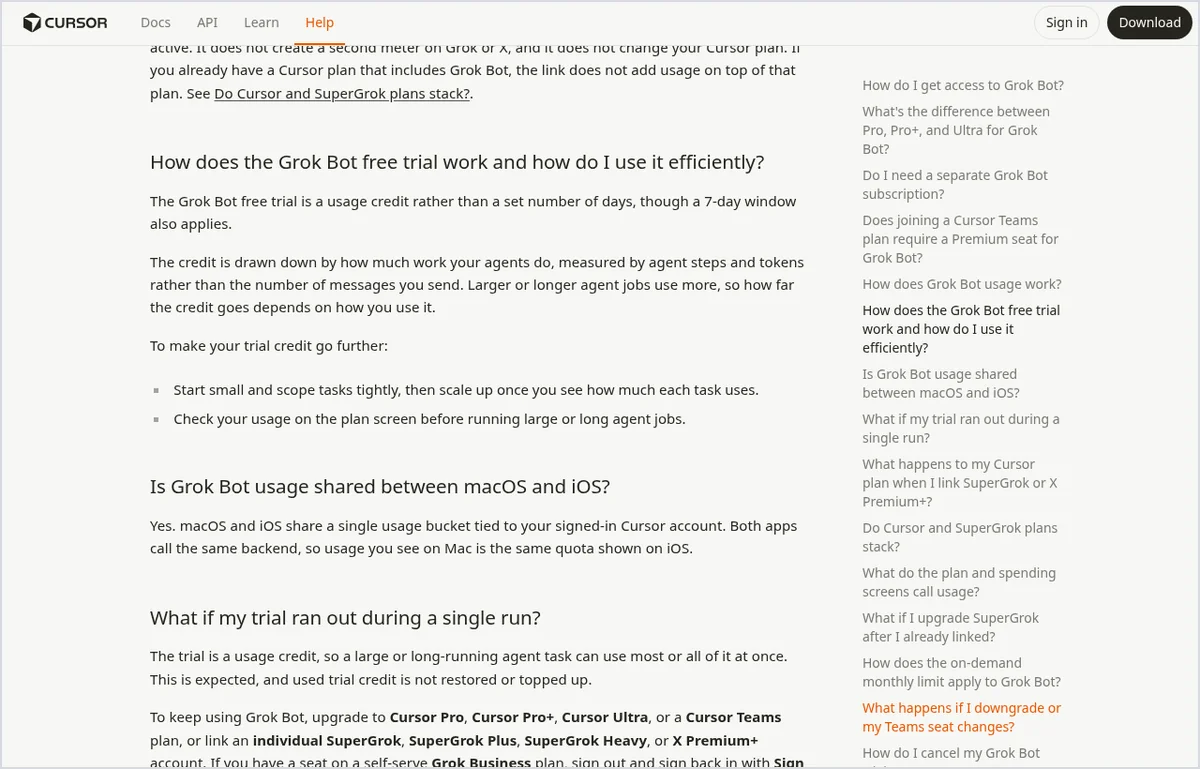
Two details matter most. First, the credit is shared: usage is metered on your Cursor account, so every Bot you run draws from the same pool. Second, there’s no published conversion such as “the trial equals X tasks”. Cursor’s own advice is to start small, see how much each task uses, and only then scale up.
What uses up the credit fastest
Cursor doesn’t publish a cost per action, but its documentation is clear about which kinds of work cost more. Larger or longer agent jobs use more credit. That includes:
- Open-ended requests. “Research everything about our market” has no finish line, so the Bot keeps taking steps.
- Routines. Each scheduled run spends usage, and Cursor warns that an hourly schedule or a Slack trigger on a busy channel can use a week of usage in a day. Pressing Test on a routine spends usage too, because it does the real work.
- Several Bots on one job. Bots can pass work between themselves in a thread. That’s useful, but all of them draw from your one credit.
- Retries after a vague first try. A second full run costs as much as the first. A precise request saves you the redo.
Plan your first task: 6 steps
- Pick one task with a clear finish line. Cursor’s onboarding advice is a short task with a clear result that doesn’t change an external service. Summarizing a document fits. Sending emails doesn’t.
- Give the Bot one job. Open Bot settings and fill in a short Name, a Label for its main job, and a Description that says which sources to use and when to ask you first. Our first Bot guide walks through those fields.
- Start with Cursor’s own first task. Attach a document and send the starter prompt from the official onboarding page: “Summarize this document in five bullets. List every date, decision, and open question in a separate section. Cite the section for each item. Do not change the source file.”
- Add limits that keep the run short. Our suggestion: add “Use only the attached file. Don’t search the web or open websites. If something is unclear, ask me before you continue.” Fewer steps means less credit used.
- Check the meter. Cursor recommends checking your usage on the plan screen before large or long jobs. In the app, usage lives under Settings, then Usage & Billing. Compare it before and after your first task to see what a small job costs.
- Scale one step at a time. If the first task used little, try something slightly bigger, such as comparing two files, before you hand over a multi-tool job.
Prefer copy-ready wording? Our 20 Grok Bot prompts include short tasks that suit a trial.
A 7-day trial plan
This plan is our suggestion, not Cursor’s. It spreads the credit across the week so you learn before you spend.
| Day | What to do | Why |
|---|---|---|
| 1 | Install, sign in, run the one-document summary | Shows what a small, bounded task costs on your account |
| 2 | A second small task on your own material, with the same limits | Checks whether the result is useful for your real work |
| 3 | One task that uses a website or a connected tool, with a clear stopping point | Tests sign-in and approvals before you rely on them |
| 4 to 5 | The job you’d actually pay for, split into two parts | Lets you stop after part one if the meter drops fast |
| 6 | Only if you plan to keep it: one routine on a wide schedule | Each run, including Test, spends usage |
| 7 | Decide: which plan, or none | The trial ends without a charge either way |
Tasks to skip during the trial
- “Monitor the news every hour” or any frequent routine. Read our routines guide first, then schedule once you’re on a plan.
- Large research projects across many sites with no limit on sources.
- Anything that sends, deletes or buys on your behalf. Learn how approval cards work on a low-stakes task first.
- Rerunning the same long task to “see if it does better”. Change the instructions first.
If a run failed with an error rather than a weak result, Cursor asks you to report it as a bug. Our Grok Bot troubleshooting guide covers the common errors.
When the trial ends: what to pay for
When the credit or the 7-day window runs out, access stops unless you have an eligible plan. Grok Bot has no standalone price; it comes with these subscriptions (USD per month, billed monthly, as listed on cursor.com and x.ai on October 8, 2026):
| Plan | Price | Grok Bot usage (official wording) |
|---|---|---|
| Cursor Pro | $20 | Weekly usage, below Pro+ |
| SuperGrok | $30 | Linked usage, below SuperGrok Plus |
| Cursor Teams (Standard) | $40 per seat | Follows the Teams plan allowance |
| Cursor Pro+ | $60 | Generous weekly usage, below Ultra |
| SuperGrok Plus | $100 | Generous linked usage, below Heavy |
| Cursor Ultra | $200 | Highest weekly usage |
Paid usage resets weekly, and a Cursor plan and a linked SuperGrok subscription don’t stack. SuperGrok Lite doesn’t include Grok Bot. For the full breakdown, including on-demand usage and monthly caps, see our Grok Bot pricing guide.
Not sure Grok Bot is the right tool for you at all? Our Grok Bot vs Claude comparison can help you decide.
Before you upload anything
Grok Bot needs cloud data storage, so accounts on Cursor’s Legacy Privacy Mode are asked to switch to Privacy Mode before starting. All your Bots share one cloud computer, including its files and browser sessions, so treat anything you put there as available to every Bot. Keep passwords and API keys out of chat and use the secure prompt when a Bot asks for a credential. If you’re in the EU or UK, Cursor’s privacy policy says data may be transferred to US servers under legally valid transfer mechanisms, and lists rights such as access, deletion and objection. For a practice run, use a document you’re allowed to share. More in our Grok Bot privacy guide.
Grok Bot free trial FAQ
How long is the Grok Bot free trial?
It isn't measured in days. It's a usage credit, and Cursor says a 7-day window also applies. Depending on how you use it, the credit can run out well before the seven days are up.
How much usage does the trial include?
Cursor doesn't publish the size of the credit. It's spent by agent steps and tokens, so the best way to find out is to run one small task and compare the meter on the plan screen before and after.
My trial ran out in one task. Can I get it back?
No. Cursor says a large or long task can use most or all of the credit at once, and used trial credit isn't restored or topped up. If the run ended with an error, report it as a bug.
Will I be charged when the trial ends?
Not for the Grok Bot trial. It never becomes a paid plan, and canceling it costs nothing. The exception is an intro offer started in the iPhone App Store, which Apple runs and which becomes a paid subscription unless you cancel it in your Apple ID subscriptions.
Can I cancel the trial and start again later?
You can cancel it, but not restart it. Cancel Trial on the plan screen ends the trial immediately, removes any remaining credit, and you can't claim the trial again.
Does the trial include routines and connected tools?
Cursor's trial page doesn't list feature exclusions. What it does say is that routines spend usage on every run, including when you press Test, so a frequent routine can drain a trial quickly.
Bottom line
Treat the Grok Bot trial like a fuel tank, not a calendar. Spend the first run on a one-document summary with tight limits, read the meter, and grow the tasks only when you know what they cost. If the results are worth it, the cheapest way to keep going is Cursor Pro at $20 a month. Next step: set up your first Bot in 15 minutes.
Sources
- Cursor Help Center: “Plans and billing” for Grok Bot (free trial, usage, cancellation, refunds), checked October 8, 2026
- Cursor Help Center: “Grok Bot FAQs,” checked October 8, 2026
- Cursor Help Center: “Onboarding” for Grok Bot (first Bot and first task), checked October 8, 2026
- Cursor Help Center: “Routines” for Grok Bot (usage per run, Test, Slack triggers), checked October 8, 2026
- Cursor Docs: “Get started with Grok Bot,” checked October 8, 2026
- Cursor: Pricing page (Hobby, Pro, Pro+, Ultra, Teams), checked October 8, 2026
- x.ai: Grok Bot page and x.ai pricing page (SuperGrok, SuperGrok Plus), checked October 8, 2026
- Anysphere (Cursor): Privacy Policy, checked October 8, 2026

