
Grok Bot works best when each bot has one permanent role. This guide gives 15 bot ideas for work, home and study, each with a name, a role and a first task to copy. Thirteen of the 15 can start without connecting any account, using files, pasted text or public websites, and we ran three of the tasks ourselves.
For current plans, prices and every Maitz article on Grok Bot, see our Grok Bot hub.
In short
- A good bot gets one permanent role. Each of the 15 ideas here has a name, a role and a first task you can copy.
- Most of them, 13 out of 15, can be started without connecting any account: with files, pasted text or public websites. Two need email and calendar connected.
- Some ideas are based on roles from the official documentation and on packages listed in the Grok Bot Marketplace. We ran three of the tasks ourselves.
Just installed Grok Bot, the agent app from SpaceXAI, and not sure which bot to create? Here’s a ready-made list. The documentation’s advice is clear: start with one bot for work that repeats in your life, and add a bot only when there’s a permanent role that justifies it. Pick one idea, and use the first bot guide to set it up in fifteen minutes.
Which bot is right for you?
| # | Example name | Role | Needs a connection? |
|---|---|---|---|
| 1 | Scout | Finds potential customers | No, public web |
| 2 | Librarian | Summarizes meetings | No, pasted notes |
| 3 | Treasurer | Organizes expenses and receipts | No, export file |
| 4 | Chief of Staff | Morning briefing | Yes, email and calendar |
| 5 | Coordinator | Schedules job interviews | Yes, calendar |
| 6 | Tester | Reproduces website bugs | No, test site |
| 7 | Watcher | Tracks competitors | No, public web |
| 8 | Auditor | Checks subscriptions and recurring charges | No, export file |
| 9 | Gardener | Plant care log | No |
| 10 | Navigator | Plans trips | No, public web |
| 11 | Office Manager | Deliveries, issues and birthdays | No, list or spreadsheet |
| 12 | Tutor | Study flashcards | No |
| 13 | Editor | Editing and rewriting | No |
| 14 | Planner | Website content | No, or Search Console |
| 15 | Researcher | Research with sources | No, public web |
In the table, “No” marks a bot you can start without connecting any account.
How do you choose a name and role?
The names in the table are just examples. Give the bot a short name that’s easy to remember and type after @, and a description of a sentence or two: what its role is, what it returns, and what it must not do without approval. Things that change from time to time, like the file or the date, go in the chat, not the description.
Which bots work well for work?
1. Scout: potential customers
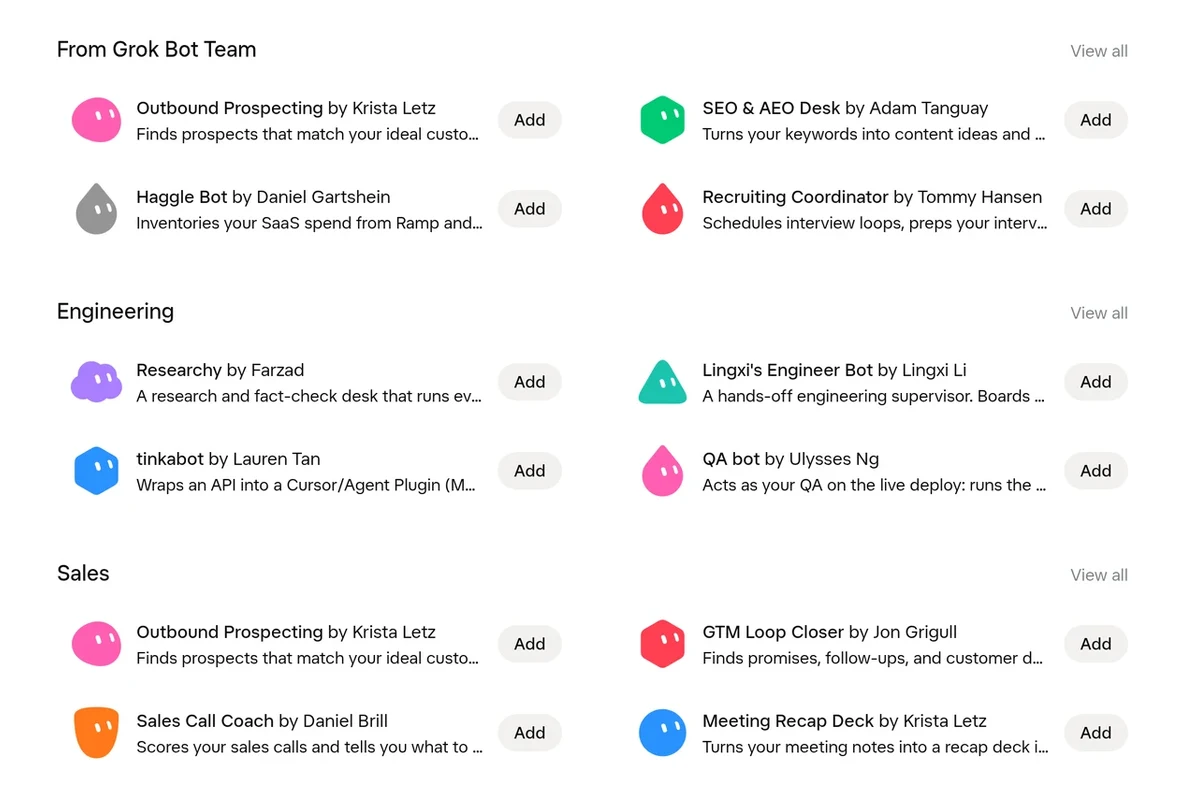
Role: find businesses that match your ideal customer. The Marketplace has a package called Outbound Prospecting that does similar work, and doesn’t send without approval.
First task: “Find 10 accounting firms in [your area] with an active website. For each one: name, city, website, and one sentence on what they offer. Don’t contact anyone.”
2. Librarian: meeting summaries
Role: turn notes into an organized summary. The Marketplace has Meeting Recap Deck, which prepares a summary presentation and, according to its description, doesn’t invent quotes.
First task: “From the attached notes, prepare a summary: decisions, tasks with owner and date, and open questions. Don’t add anything that isn’t written.”
3. Treasurer: expenses and receipts
Role: the Expense Manager role from the documentation, in a smaller version.
First task: “Attached is the expenses export. Calculate totals by category, and list rows without a receipt or without a category. Don’t guess.”
4. Chief of Staff: morning briefing
Role: the Chief of Staff role from the documentation. Requires connecting Gmail and Google Calendar, as explained in our connection guide.
First task: “Prepare a briefing for today: meetings, emails waiting for a reply from me, and what I should prepare. Don’t send or change anything.”
5. Coordinator: job interviews
Role: schedule interviews and follow up on what’s stuck. The Marketplace has Recruiting Coordinator, which, according to its description, doesn’t write to candidates without approval.
First task: “From the attached list of candidates and interviewers, suggest an interview schedule for next week. Don’t send invitations.”
6. Tester: reproducing bugs
Role: the Bug Reproduction role from the documentation. The bot opens the site on its computer and documents it step by step.
First task: “Reproduce the issue in the attached description in the test environment, with a test user. Return the steps, expected versus actual result, and screenshots. Don’t use real customer data.”
7. Watcher: tracking competitors
Role: check what changed on competitors’ websites: prices, new products, promotions.
First task: “Check the pricing pages of the three sites on the list, and record the prices and the date in a table. Don’t sign up for anything.”
Which bots help at home?
8. Auditor: subscriptions and recurring charges
Role: spot charges that repeat every month and suggest what to drop. Upload an export of your card statement, and don’t let the bot into your bank account.
First task: “In the attached file, find charges that repeat every month. For each one: name, amount and date. Mark duplicates. Don’t cancel any subscription.”
9. Gardener: plant log
Role: keep a care log and reminders. The Marketplace has a package called Flora that does exactly that.
First task: “These are my plants and where they stand. Prepare a weekly watering table, and write what to check on each one.”
10. Navigator: trip planning
Role: prepare a draft itinerary, without booking.
First task: “Plan three days in [region] for a couple with two children, with no more than an hour of driving a day. For each attraction: opening hours and price from the official website, with the date you checked. Don’t book.”
11. Office Manager
Role: deliveries, issues and team birthdays. The Marketplace has Office Ops Desk, which works from a list or spreadsheet and doesn’t send without approval.
First task: “From the attached spreadsheet, prepare a weekly summary: deliveries on the way, open issues and birthdays next week.”
Which bots suit studying and content?
12. Tutor: study flashcards
Role: turn study material into questions.
First task: “From the attached text, make 5 question-and-answer flashcards. Use only information from the text.”
13. Editor: editing and rewriting
Role: shorten and simplify text without changing its meaning. The Marketplace has Copy Humanizer, which, according to its description, shows every change and doesn’t invent facts.
First task: “Edit the attached paragraph into short, plain language. Don’t change facts, numbers or conditions, and list everything you changed.”
14. Planner: website content
Role: article ideas, briefs for writers and alt text for images. The Marketplace has SEO & AEO Desk for briefs, and Imogen for alt text.
First task: “Write one sentence of alt text for the attached image. Include the important numbers.”
15. Researcher: research with sources
Role: gather up-to-date information with a source and date for every claim. The Marketplace has Researchy, which is built for this.
First task: “Find what changed in income tax rules for self-employed people in [your country] over the past year. For each claim: an official source and a date. Separate facts from estimates.”
For more ready-made wording, see 20 Grok Bot prompts.
What do you do after the first task?
- Check the result against the source, and fix whatever isn’t accurate.
- Tell the bot what to remember for next time: format, length, what’s off limits.
- Save the process as a skill, and only then schedule it, as explained in our routines guide.
Note: all your bots work on the same cloud computer, and connections are available to all of them. So a separate bot for each role helps keep things organized, but it doesn’t provide security separation. We cover this in Grok Bot privacy and security.
How did we test?
We ran three first tasks in Grok Bot, in a right-to-left language, on sample material. The Tutor made five flashcards from a paragraph on the water cycle, and all the answers came from the text. The Editor shortened a message to customers, but in the first version it deleted the words “business days” and so changed the promise. That’s why we added “don’t change facts, numbers or conditions.” The Planner wrote alt text for a photo of a cost table, and all the numbers in it were correct. We checked the other tasks only as text. We didn’t create bots in the account or install packages from the Marketplace. We took the package descriptions from the official Marketplace page and didn’t test them in practice. The English task wording here is adapted from the versions we ran and wasn’t re-run in English.
FAQ
How many bots should I create?
The documentation recommends starting with the smallest team that gets the job done. One bot, and another only when there’s an additional permanent role.
Do the Marketplace packages work in other languages?
We didn’t test that. Their descriptions are in English. We wrote the original tasks in a language other than English; see our language support guide.
Can a bot buy or book things for me?
With the right access, the bot can act on websites. The documentation recommends requiring approval before every purchase, which is why every task here says “don’t book” or “don’t send” explicitly.
How much does it cost?
Grok Bot is included in certain subscriptions, and every task uses allowance. Details in How much does Grok Bot cost.
Sources
- Grok Bot Docs: Use cases
- Grok Bot Docs: Bots
- Grok Bot Docs: Computer and apps
- Grok Bot Marketplace
- Cursor Help: Connect plugins
The capabilities mentioned here were checked against the official documentation on October 3, 2026.

