Grok Bot and OpenAI Dots are both AI assistants with their own cloud computer that keep working while you are away and come back for approvals. Grok Bot is a team of bots with different roles and routines you define, from $20 a month. Dots is one personal assistant inside ChatGPT, included for individuals only in ChatGPT Pro.
For current plans, prices and every Maitz article on ChatGPT and Grok Bot, see our ChatGPT hub and Grok Bot hub.
In short
- Both tools do something similar: an AI assistant with its own cloud computer that keeps working when you’re away from the screen and comes back to you for approvals.
- Grok Bot is a team: several bots with different roles, on one shared computer, with routines you define. The cheapest way in is $20 a month.
- Dots is a single personal assistant inside ChatGPT that decides on its own when to get back to work, and talks to you in Slack, Teams and voice calls too. For individual users, it’s included only in ChatGPT Pro.
OpenAI recently started rolling out Dots, and since then people keep asking how it differs from Grok Bot, the agent app from SpaceXAI. This comparison is based only on the official documentation from both sides, as it appeared on October 3, 2026. We didn’t test the two tools against each other on the same task. New to Grok Bot? Start with What is Grok Bot.
What do they have in common?
- A cloud computer. Both Grok Bot’s bots and the dot work on a cloud computer with a browser, and the work continues when your own computer is off.
- Takeover for sensitive steps. When a password or verification is needed, you take control of the computer and type it yourself. In both cases the documentation asks you not to type passwords into the conversation.
- Automatic review of actions. Both use a mechanism called Auto-review, which checks actions before they happen and stops some of them for your approval.
- Connecting to your own computer, if you want. Both tools can also work with files on your computer, but only after you’ve approved it.
How are they different?
| Topic | Grok Bot | Dots |
|---|---|---|
| Number of assistants | Several bots, each with its own name, role and memory | Your dot. We didn’t find an option in the documentation to create several dots with different roles |
| The cloud computer | One computer shared by all the bots in the account | The dot has its own computer and browser |
| When it works | According to routines you set, or after an event | Decides on its own when to return to a task. You can also ask for a check at a fixed time |
| Where you talk to it | Desktop and phone app. A Team Bot also in Slack | ChatGPT on desktop, web and phone, plus Slack, Teams and voice calls |
| Model | Cursor chooses; no model picker | GPT-6 Astra |
| Memory | Each bot has its own memory | Also uses ChatGPT’s memory |
| Entry price | $20 a month (Cursor Pro) | ChatGPT Pro (price varies by country; check the official pricing page) |
How much does each cost, and who can get it?
Grok Bot is included in every paid individual Cursor plan, starting at $20 a month on Cursor Pro, and also in SuperGrok at $30. Usage is measured as a weekly allowance. Details in How much does Grok Bot cost.
Dots, according to the ChatGPT pricing page, is included only in the Pro plan among the individual plans. Pro comes in three usage tiers, and its price varies by country, so check the official pricing page. According to the documentation, on Pro, access is open to users over 18 outside the European Economic Area, the UK and Switzerland. The rollout is gradual, so you may not see Dots right away. For businesses, it’s also available on Business Premium and Enterprise, where an admin needs to turn it on.
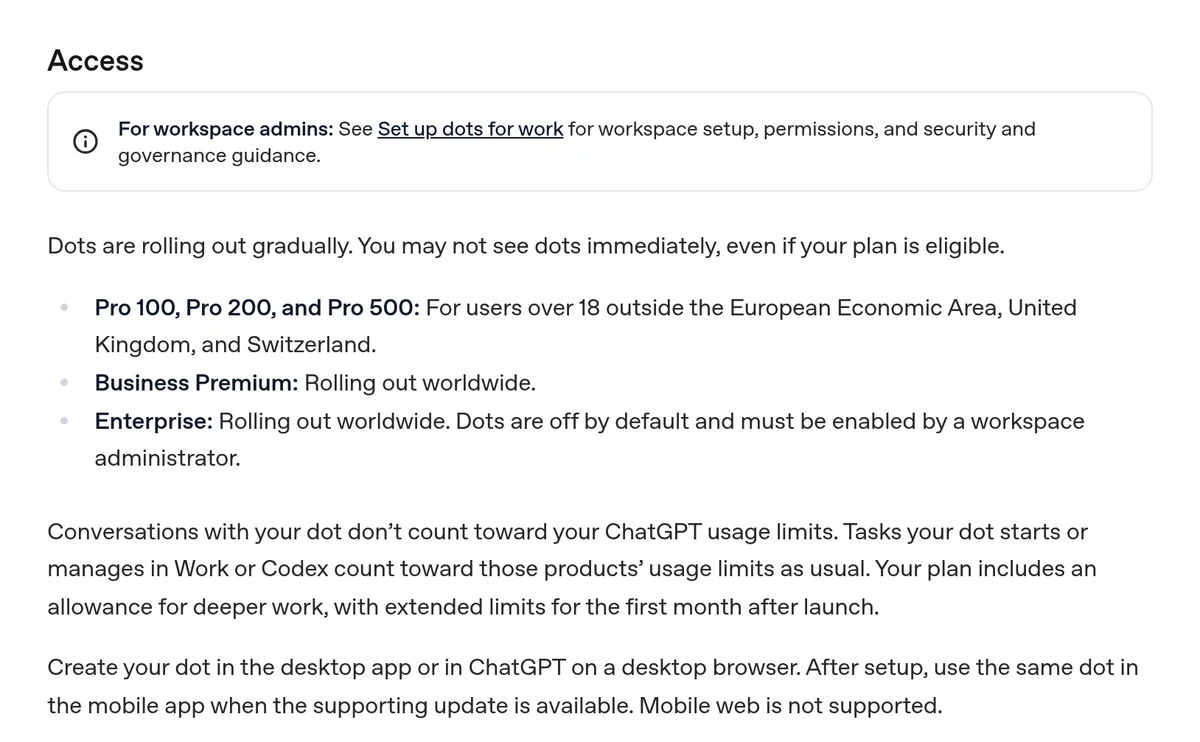
Another difference in how usage is counted: according to the documentation, conversations with the dot don’t count toward ChatGPT’s usage limits, but tasks it starts in Work or Codex count there as usual. In Grok Bot, all the work of all the bots comes out of the same weekly allowance.
How does each one decide when to work?
This is where the most interesting difference lies.
In Grok Bot, you’re the boss of the schedule. You define a routine in plain language, for example “every Sunday at 8 a.m.,” and the bot saves it with a time, a time zone and instructions. There’s a Test button for a trial run, a history of recent runs, and you can pause it. The documentation limits each bot to 50 routines. How to do it step by step is explained in our routines guide.
In Dots, the approach is the opposite. You explain what to track and what matters to you, and it decides on its own when to come back and check. It can also look for useful information in connected sources on its own, read-only. If you want an update at a fixed time, the documentation recommends writing a time zone and an end date, and asking it to confirm the schedule.
In other words: Grok Bot suits people who want a predictable process they can check. Dots suits people who prefer to hand over responsibility and let the assistant decide.
What about approvals and privacy?
Both tools let you add your own rules on top of the automatic action review: in Grok Bot these are Ask first and Allow automatically rules, and in Dots they’re Custom Rules. In both, your rules don’t override the built-in safety mechanisms. In Dots, actions like changing a password or transferring money require you to do them yourself.
On privacy, there’s one difference worth knowing. In Grok Bot, all the bots share a computer, files and logins, so a separate bot is not a security barrier. In Dots, according to OpenAI’s help center, you can’t view or delete individual memories. You delete all the context by deleting the dot. On personal accounts, the “Improve the model for everyone” setting determines whether its work can be used for training. More on the Grok Bot side in our privacy and security guide.
How do you stop each one?
Worth knowing before you give an assistant a long task, not in the middle of it.
- In Grok Bot, you send the bot a direct message, “Stop now,” and the work stops. A message from you always takes priority over work running in the background. You pause a routine separately, in the bot’s list of routines.
- In Dots, there are several separate switches. Pause stops the main task, tasks the dot handed off are stopped in the Activity view, and recurring tasks are canceled in Scheduled. According to the documentation, ending a voice call doesn’t necessarily stop work it was given either.
In both tools, stopping doesn’t undo actions already taken. An email that was sent stays sent, so the key rule is to ask for a draft before any action that goes out.
So who is each one for?
Grok Bot is for you if:
- You have several kinds of recurring work and want a separate bot for each
- It matters to you to set exactly when something runs, and to check the history
- You already have Cursor Pro or SuperGrok, or a budget of $20 to $30 a month works for you
Dots is for you if:
- You already work inside ChatGPT, and its memory is useful to you
- You want to talk to the assistant in Slack, Teams or on a call too
- You’re a Pro subscriber, or are considering the plan anyway
Not sure? Our Grok Bot vs ChatGPT comparison takes a broader view, including cheaper ChatGPT plans without Dots.
How did we compare them?
On October 3, 2026, we read the official Dots guide, the ChatGPT features page and pricing page, and the privacy FAQ in OpenAI’s help center. Against these, we went through the Grok Bot documentation and Cursor’s plans page. We didn’t run an identical task in both tools, so this is not a comparison of output quality or speed.
FAQ
Is Dots available in my country?
According to the documentation, on the Pro plan it’s open to users over 18 outside the European Economic Area, the UK and Switzerland. The rollout is gradual, so not every subscriber sees it right away.
Can I use both?
Yes, they’re separate products with separate subscriptions. Just remember to disconnect connections you no longer need in either one.
Which handles languages other than English better?
We haven’t tested Dots in other languages. For Grok Bot, see our language support guide, based on hands-on tests in a language other than English.
What gets deleted when you delete the assistant?
In Grok Bot, deleting a bot removes its profile, conversation and routines, but files and logins on the shared computer may remain. In Dots, deleting the dot deletes its context, but files and conversations it created are kept separately.
Where do I start with Grok Bot?
With one bot and one task you can check. The full guide is Your first Grok Bot.
Sources
- Grok Bot Docs: Overview, Bots, Computer and apps, Messages and collaboration, Skills and routines, Approvals and privacy, Team Bots
- Cursor Help: Plans and billing
- ChatGPT Learn: Meet dots; Connect computers and apps to your dot
- ChatGPT: Dots page; pricing page
- OpenAI Help Center: Dots privacy, security, and safety FAQs
Prices and features were checked against the official pages on October 3, 2026, and may change.

